Download Any Video in High Quality, Anytime
Download videos from YouTube, Facebook, Twitter, and more - no buffering, no ads, no subscriptions.
Affiliate
Earn commissions when you drive sales through your affiliate links.
Resellers
Sell EaseUS products as a distributor.

Creators & Influencers
Partner with us on YouTube, TikTok, Twitch to earn commissions.
OEM & Outsourcing Service
Put your brand on EaseUS software, or get custom solutions.

Refer & Earn
Earn rewards when you refer others to EaseUS solutions.

Education
Verified students and teachers get exclusive discounts.
Page Table of Contents
Updated on Oct 23, 2026
Quick Answer:
YouTube videos may not download due to expired Premium, an unstable internet connection, an outdated app, or video restrictions. Check your internet connection, update your app & Premium account, and ensure you have enough storage space on your device so you can download the videos you want successfully.
First, let's learn "why can't I download videos on YouTube anymore?" We have divided this issue into two perspectives: for Premium users and third-party downloader users.
For YouTube Premium Users:
For Third-party Downloader Users:
If the tool you use is not downloading YouTube videos, EaseUS Video Downloader supports various streaming sites. Download this tool and give it a try (you can download a few items for free).
Download Any Video in High Quality, Anytime
Download videos from YouTube, Facebook, Twitter, and more - no buffering, no ads, no subscriptions.
If you can't download YouTube videos, several common fixes can help you solve the issue. Whether the problem stems from app glitches, network issues, subscription status, or device limitations, understanding these causes can help you quickly identify the right fix. Before getting frustrated, it's worth trying the following fixes.
We do not support or encourage you to download copyrighted videos in violation of YouTube's terms and conditions. Before downloading a YouTube video, you are advised to seek permission from the video owner to download videos legally.
Check Your Internet Connection: Ensure you have a stable and fast internet connection. Switch between Wi-Fi and mobile data to see if that helps. Restart your router if needed to refresh the connection.
Sign in to an Active YouTube Premium Account: If the download button disappears or is not working, open the YouTube app, tap your profile, go to Purchases and memberships, and confirm your Premium subscription is active. If it has expired, renew it via youtube.com/premium.
Restart Your Device: Power off your phone or tablet completely, wait a few seconds, then turn it back on to clear temporary glitches affecting downloads.
Update the YouTube App: On your device's app store (Google Play or Apple App Store), search for YouTube and tap Update if available. Using the latest version fixes bugs that may block downloads.
Clear App Cache and Data:
Check Your Location: If YouTube Premium is not available in your location, you cannot save videos from YouTube directly. Check the YouTube Premium memberships available locations.
Check Device Storage: Open your device's Settings > Storage to see available space. Delete unused apps or files if storage is low, or enable 'Use SD card' in YouTube settings if your device supports it.
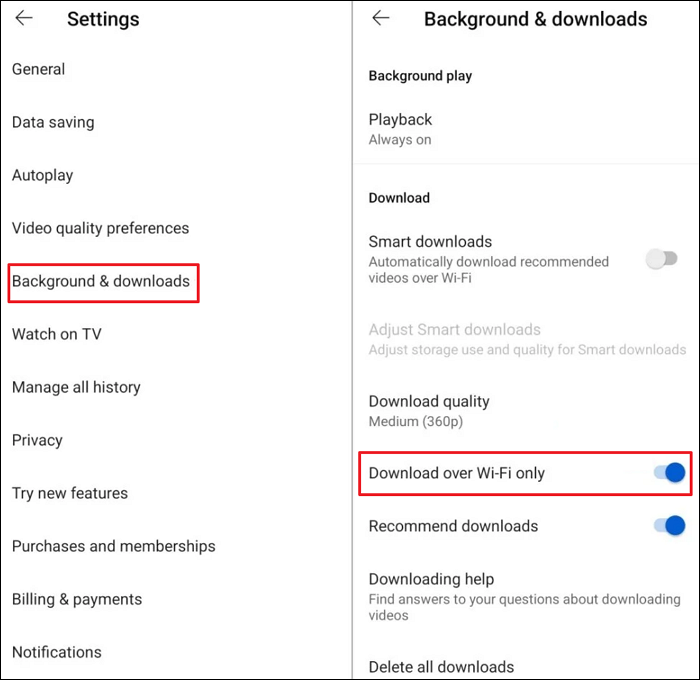
Adjust Download Settings: Go to Settings> Background & downloads. Switch off the Download over Wi-Fi only.
Try Another Video: Sometimes, specific videos have restrictions. Attempt to download another video to see if the problem is video-specific.
Reinstall the YouTube App: Uninstall the app from your device, then download and install it again from the app store. This resets the app and fixes corrupted files, causing download failures.
After exploring the common fixes for YouTube video downloading issues, if you still cannot download YouTube videos, it's helpful to consider alternative methods for saving YouTube content. There are several effective tools beyond the official YouTube app that can help you download videos directly to your device.
From a legal standpoint, downloading copyrighted content without permission violates YouTube's terms of service and copyright laws. Before downloading videos from YouTube, ensure you get permission first and use the downloaded content for personal use.
EaseUS Video Downloader, the video downloader for PC and Mac, works well for downloading videos and audio from YouTube, Twitter, Facebook, Instagram, and more. As a video downloader, it can:
Secure Download
Secure Download
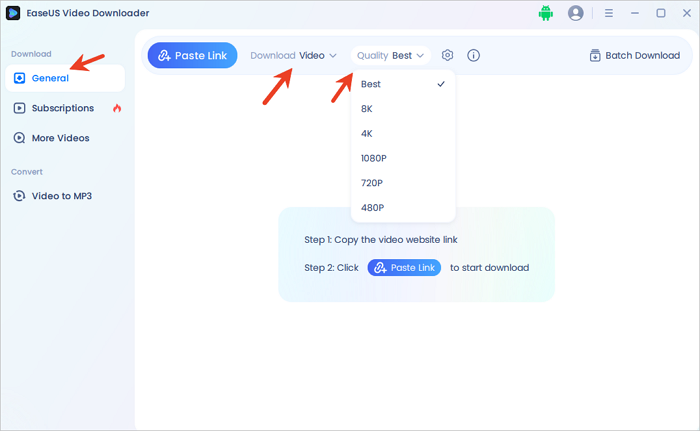
Step 1. Launch EaseUS Video Downloader on your PC. Go to "General" > "Download" to select the output format and press "Quality" for the resolution.
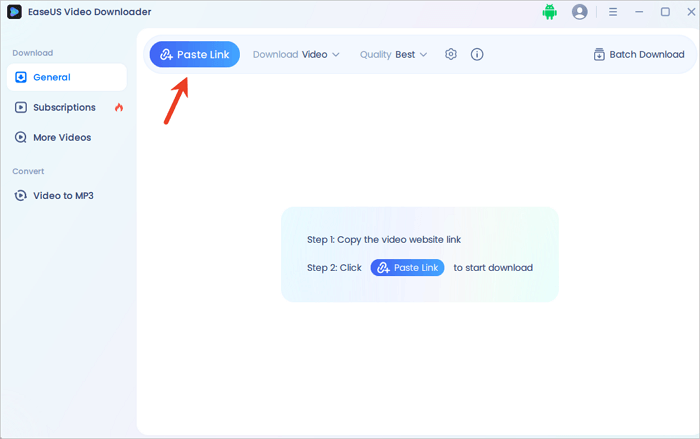
Step 2. Copy and paste the URL of the video you want to download and click "Paste Link" to proceed.
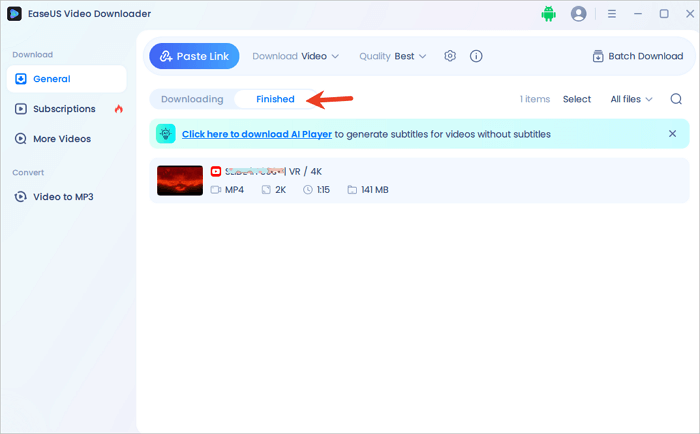
Step 3. After the downloading process finishes, you can check the downloaded video in the option "Finished."
Disclaimer: The information provided in this guide is for personal use. EaseUS is in no way collaborated or affiliated with the video-sharing site and will never approve any copyright infringement action. The end-user should be solely responsible for their behavior.
Here are some popular online video downloaders:
| Sites | KeekVid, Y2mate, Free YouTube Video Downloader, etc. |
| Ads | Yes, online video downloaders often display ads, pop-ups, and redirects. |
| Pirate Sites | Yes, there are so many pirate sites with similar names or domains. |
| Recommended | No, these sites are often unofficial and unauthorized, and they carry risks such as malware and scams. |
When using online video downloaders to save YouTube videos, it's crucial to protect your device and privacy. Many free YouTube video downloaders may contain hidden malware, viruses, or spyware that can damage your system or steal personal information. To stay safe, always choose reputable downloaders, such as EaseUS Video Downloader, which has no ads or pop-ups, ensuring a safe downloading environment.
Download Any Video in High Quality, Anytime
Download videos from YouTube, Facebook, Twitter, and more - no buffering, no ads, no subscriptions.
Here are some popular and reliable browser extensions that make downloading YouTube videos easy and convenient.
The authorized and legal way to download YouTube videos is through YouTube Premium's offline feature or when YouTube explicitly provides a download button for certain videos (P.S.: Creators can download their own videos via YouTube Studio). Apart from these methods, YouTube's Terms of Service prohibit video downloading by any other means. YouTube Premium subscribers can download videos for personal use. Sharing or redistributing these downloaded videos outside the app is not allowed. Once you download videos with YouTube Premium, these downloads are stored temporarily within the app itself and cannot be accessed as separate files on your device's storage. Additionally, these downloaded videos expire after up to 29 days. After expiration, they are automatically removed from your device.
Downloading videos using third-party tools without permission violates copyright law and YouTube's policies, which can lead to account suspension or legal consequences. Downloading is only allowed if you have explicit permission from the copyright holder or if your use qualifies as fair use, such as for education or commentary. To stay fully compliant, it's best to get written permission, use downloads for personal use, and respect copyright laws.
If you can't download YouTube videos, fortunately, a variety of troubleshooting fixes and alternative ways to download YouTube videos successfully. However, it's important to stay mindful of legal considerations and potential security risks when using third-party tools. By choosing reputable downloaders and following best practices, you can safely and successfully enjoy your favorite YouTube content offline anytime, anywhere.
1. Why is the YouTube downloader not working?
Maybe you have entered the wrong YouTube video URL. The video restrictions, such as copyright protection, age-restricted, or geo-blocked videos, can prevent you from downloading.
2. How do I enable YouTube to download videos?
Sign in to your premium account and follow the steps below: Go to your profile picture > Downloads > Settings > Smart Downloads. Toggle on the option of Smart Downloads.
3. Why does my YouTube downloader keep saying failed?
YouTube downloader keeps saying failed due to several common issues:
4. Can you download YouTube videos without premium?
The majority of copyrighted content on YouTube is only legally downloadable via a Premium subscription or authorized channels. For videos labeled as Creative Commons or explicitly marked as free to share or download, you can typically download them without an active Premium account.
Our Team
Joey Albert
Alin
Gorilla
Rel
Dawn Tang
Sasha
Copyright © 2004 - 2023 EaseUS. ALL RIGHTS RESERVED.