-
![]()
Joey Albert
Joey has been involved with tech ever since she joined the EaseUS editor team in March 2011 and now she is a senior website editor. She is good at solving various issues, such as video downloading and recording.…Read full bio -
![]()
Alin
Alin is a sophisticated editor for EaseUS in tech blog writing. She is proficient in writing articles related to screen recording, voice changing, and PDF file editing. She also wrote blogs about data recovery, disk partitioning, data backup, etc.…Read full bio -
Jean has been working as a professional website editor for quite a long time. Her articles focus on topics of computer backup, data security tips, data recovery, and disk partitioning. Also, she writes many guides and tutorials on PC hardware & software troubleshooting. She keeps two lovely parrots and likes making vlogs of pets. With experience in video recording and video editing, she starts writing blogs on multimedia topics now.…Read full bio
-
![]()
Gorilla
Gorilla joined EaseUS in 2022. As a smartphone lover, she stays on top of Android unlocking skills and iOS troubleshooting tips. In addition, she also devotes herself to data recovery and transfer issues.…Read full bio -
![]()
Rel
Rel has always maintained a strong curiosity about the computer field and is committed to the research of the most efficient and practical computer problem solutions.…Read full bio -
![]()
Dawn Tang
Dawn Tang is a seasoned professional with a year-long record of crafting informative Backup & Recovery articles. Currently, she's channeling her expertise into the world of video editing software, embodying adaptability and a passion for mastering new digital domains.…Read full bio -
![]()
Sasha
Sasha is a girl who enjoys researching various electronic products and is dedicated to helping readers solve a wide range of technology-related issues. On EaseUS, she excels at providing readers with concise solutions in audio and video editing.…Read full bio
Page Table of Contents

Sasha
Updated on Jan 21, 2026
0 Views |
0 min read
If you've spent time in Roblox or Forsaken communities, you've probably seen players asking the same question that often pops up on Reddit: "Is there a good bluudud or c00lkidd voice changer?" The demand is real — everyone wants that iconic robotic, distorted tone that makes the c00lkidd persona so recognizable in roleplay, trolling, or creative audio projects.
But finding a tool that truly captures the sound, works safely, and avoids copyright risks isn't easy. This guide will show you how to get the c00lkidd voice in just 5 minutes using simple tools. We'll also cover important safety, copyright, and platform rules so you can experiment freely without crossing legal lines.
Using a Real-Time Voice Changer (EaseUS VoiceWave)
💲Pricing: $0 for 5 voice effects, $14.95/mo for 100+ voices
💻Supported OS: Windows 10(64 bit OS)/Windows 11
👨💻Target Audience: Gamers, content creators, and streamers
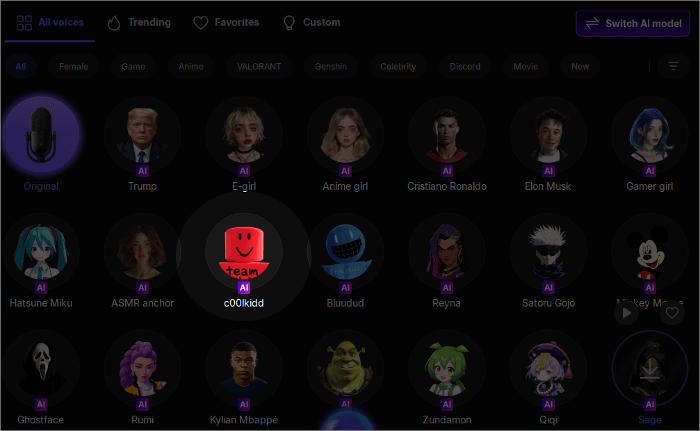
EaseUS VoiceWave is a powerful PC voice changer application that boasts a variety of Forsaken/Roblox AI voices, including c00lkidd, Bluudud, 1x1x1x1, and 007n7, and lots of other popular AI voices from anime like Demon Slayer, Dragon Ball, and cartoons like Mickey Mouse, SpongeBob SquarePants, and movies like Ghostface, Captain America. There are more than 300 AI voice filters. As a real-time voice changer, it can be used with over 1,000 instant messaging apps and online games.
Original
Modified
How to Set up EaseUS VoiceWave
VoiceWave is a beginner-friendly application; you can follow its setup instructions to complete the configuration.
Step 1. Download and Install
Download the EaseUS VoiceWave application from its website and install it on your PC.
- ✨For a better experience:
- Intel i3 or better multicore processor, 2GHz or above
RAM: 4 GB RAM (8GB required for HD)
Graphics: Intel HD Graphics 5000 or later; NVIDIA GeForce GTX 700 or later; AMD Radeon R5 or later. 2 GB vRAM (4GB required for HD)
Disk: At least 7GB free hard-disk space for installation
Step 2. Open VoiceWave and Set up
Open the application and follow the setup instructions to select your microphone as the input device and your headphone as the output device.

How to Integrate with the Communication App
To use it with any of your communication apps, you just need to open the app or a game with voice chat, go to its audio settings, and then set VoiceWave microphone as your input device. Here, we will use Discord and Roblox as examples.
╰┈➤ˎˊ˗To use it with Discord:
Step 1. Open the Discord app, and sign in to your account. Click the gear icon next to your account name in the bottom left corner.
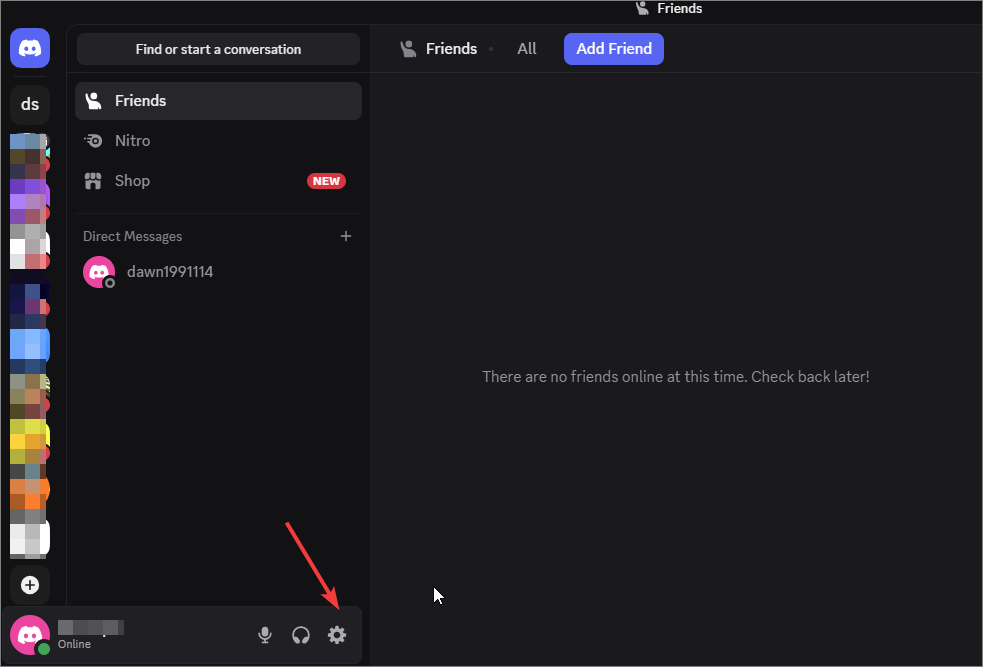
Step 2. Scroll down to locate "Voice & Video" in the left menu.
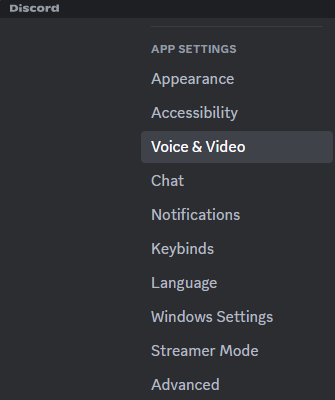
Step 3. Select the VoiceWave microphone from the "INPUT DEVICE" dropdown.
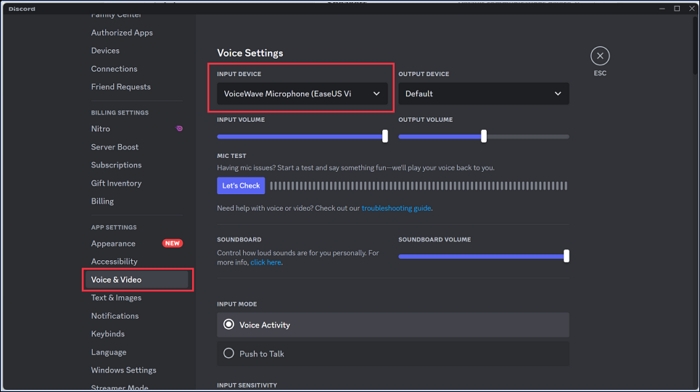
Step 4. Go back to EaseUS VoiceWave, and select "c00lkidd" AI voice as your target voice. Then, whenever you speak via a microphone, you will sound like c00lkidd.
You can also learn about this tool directly through the video.
╰┈➤ˎˊ˗To use it with Roblox:
Step 1. In Roblox, go to "Settings" > "Privacy" and turn on "Use microphone to chat with voice" under the "Microphone and Camera Input."
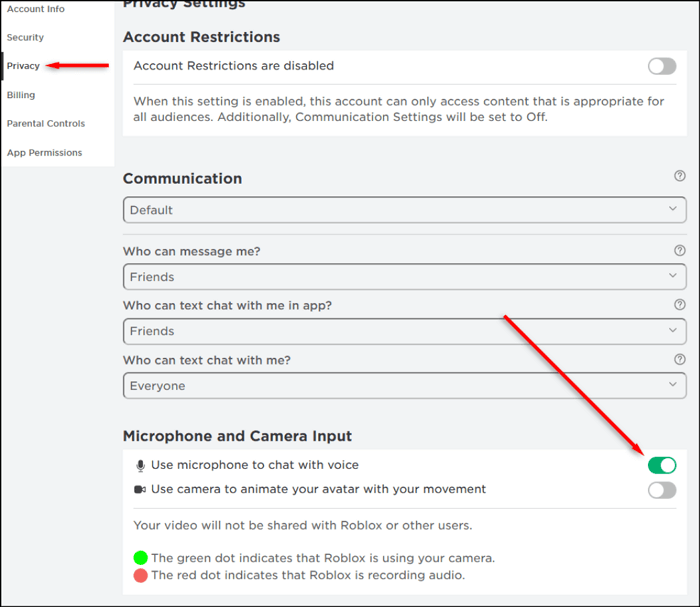
Step 2. Go to Roblox "Settings" > "Input Device," then choose "VoiceWave microphone" as your default input device. Adjust settings under "Settings" > "General" if needed.

Step 3. Open EaseUS VoiceWave while playing Roblox games. Find and click to select "c00lkidd" AI voice, then your voice will be changed in real time as you speak.
You could also watch this video to see how Voicewave works with Roblox.
Use a C00lkidd AI Voice Generator(Jammable)
💲Pricing: $1.99/mo for a full jammable voice library, and $9.99/mo for more features
💻Supported OS: Any operating system with an Internet connection
👨💻Target Audience: Content creators, musicians, and enthusiasts
Jamable is an online platform that allows the creation of AI covers using various voice models ranging from Forsaken killers like c00lkidd, John Doe, Jason, Slasher, and Pr3typriincess, to cartoon characters like Stitch and public figures like Victor Alfieri. You can use it to make c00lkidd cover or convert your text to speech. It also allows you to upload voice samples to create your custom voices.
To use Jammble to make c00lkidd cover or convert your text to speech:
Step 1. Sign up and log in to your account.
Step 2. Find the AI c00lkidd voice, and click "CREATE."
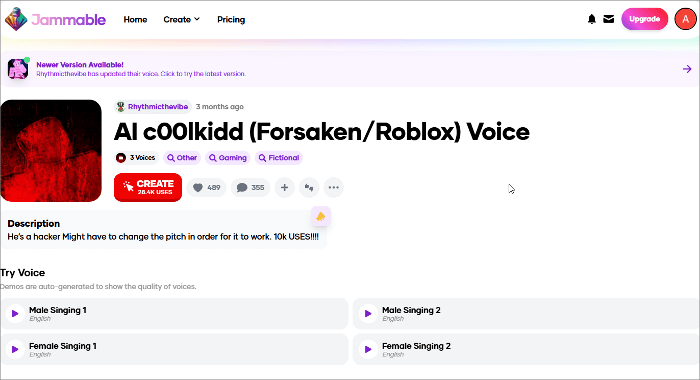
Step 3. Select "Audio to sing," then upload your song or enter your text.
Step 4. Click "START COVER" or "USE THIS TEXT" to start the generation.
Manual Simulation with DAW
💲Pricing: Free
💻Supported OS: Windows, macOS, and Linux
👨💻Target Audience: Users who want full customization
While AI voice models and real-time changers can instantly recreate the c00lkidd sound, manual voice design still has real value. First, it's legally safer since you are crafting inspired by c00lkidd rather than directly cloning his voice model, which avoids copyright or likeness concerns. Second, manual control gives you more creative freedom. You can fine-tune tone, depth, and texture for specific use cases. Here, we'll show you how to use Audacity to replicate the c00lkidd-style tone.
Watch the video below to see how to use Audacity to create a c00lkid voice.
Legal, Ethical, and Platform Guidelines
Using a synthesized or imitated celebrity or character voice carries risks related to copyright, likeness, and misuse. While non-commercial or personal entertainment use is generally tolerated, using such voices for profit, impersonation, or misleading content can lead to legal or ethical issues.
Many platforms, including YouTube, TikTok, and gaming servers, have policies or reporting systems regarding deepfake or AI-generated voices. Always review and follow their community guidelines before posting or streaming.
Safer alternatives: obtain permission or licenses when possible, clearly label your work as "AI-generated" or "voice imitation."
Final Words
Whether you're using c00lkidd AI voice for fun, content creation, or advanced sound design, there's a path for you to master the Forsaken killer voice safely and creatively.
🎧 For Beginners:
Use quick tools like EaseUS Voice Changer to get an instant c00lkidd-style effect in real time.
🎙️ For Song Lovers:
Try AI voice generators, such as Jammable, which allow you to turn your text into c00lkidd speech or make a c00lkidd cover.
🎚️ For Advanced Users:
Dive into DAWs like Audacity, using plugins to handcraft a fully customized c00lkidd-inspired voice.
Share it on:

FAQs on How to Get c00lkidd Voice Changer
1. Are voice changers illegal?
Generally no. Using a voice changer for private fun, roleplay, streaming, or creative work is legal in most places. Risks appear when you use a changed/imitated voice to impersonate, commit fraud, defame, or violate platform rules — that can be illegal or lead to account bans.
2. How to get Deadpool's voice?
You could instantly sound like Deadpool with EaseUS VoiceWave. Just download this application on your PC, and follow the instructions to set up yout input and output devices, then set it as your input device in any other third-party apps like Minecraft or WhatsApp, you could easily make yourself sound like Deadpool.
3. How to get a voice changer for free?
Options exist:
Free apps (desktop/mobile): EaseUS VoiceWave has a free tier with limited presets.
Web tools: Some online voice changers offer free demos (quality and limits vary).
4. How to get a voice changer for VRChat?
Install a real-time changer (VoiceWave, Voicemod) and a virtual audio device (VB-Audio Virtual Cable or Voicemeeter). Set the virtual cable as your system/VRChat microphone input (in VRChat settings) and route the change's output through that cable. This gives low-latency, live changes.