-
![]()
Joey Albert
Joey has been involved with tech ever since she joined the EaseUS editor team in March 2011 and now she is a senior website editor. She is good at solving various issues, such as video downloading and recording.…Read full bio -
![]()
Alin
Alin is a sophisticated editor for EaseUS in tech blog writing. She is proficient in writing articles related to screen recording, voice changing, and PDF file editing. She also wrote blogs about data recovery, disk partitioning, data backup, etc.…Read full bio -
Jean has been working as a professional website editor for quite a long time. Her articles focus on topics of computer backup, data security tips, data recovery, and disk partitioning. Also, she writes many guides and tutorials on PC hardware & software troubleshooting. She keeps two lovely parrots and likes making vlogs of pets. With experience in video recording and video editing, she starts writing blogs on multimedia topics now.…Read full bio
-
![]()
Gorilla
Gorilla joined EaseUS in 2022. As a smartphone lover, she stays on top of Android unlocking skills and iOS troubleshooting tips. In addition, she also devotes herself to data recovery and transfer issues.…Read full bio -
![]()
Rel
Rel has always maintained a strong curiosity about the computer field and is committed to the research of the most efficient and practical computer problem solutions.…Read full bio -
![]()
Dawn Tang
Dawn Tang is a seasoned professional with a year-long record of crafting informative Backup & Recovery articles. Currently, she's channeling her expertise into the world of video editing software, embodying adaptability and a passion for mastering new digital domains.…Read full bio -
![]()
Sasha
Sasha is a girl who enjoys researching various electronic products and is dedicated to helping readers solve a wide range of technology-related issues. On EaseUS, she excels at providing readers with concise solutions in audio and video editing.…Read full bio
Page Table of Contents

Dawn Tang
Updated on Dec 11, 2025
0 Views |
0 min read
Who's Slasher in the Forsaken?
Slasher is a newly added stealth/ambush killer in Roblox Forsaken, available for all players for free. He's a redesign of his predecessor, Jason, to avoid copyright issues. His head is covered by a black shroud with a crude hockey mask resemblance, reminiscent of Hannibal in The Silence of the Lambs. Slasher specializes in stealth tactics and deadly chases with his machete.

Want to troll players in Roblox Forsaken or liven up calls on Discord and other apps? You can recreate the chilling Slasher Killer voice using real-time voice changers and text-to-speech tools. Here are the best Slasher voice changers and TTS tools for PC and web to make your gameplay and chats more immersive and fun.
- EaseUS VoiceWave – Best for real-time gameplay & trolling
- Voicemod – Best for streaming & soundboard-heavy fun
- Jammable (TTS) – Best for scripted content & videos
Slasher Forsaken Voice Changer for PC in Real Time
- Pricing: 5 free voices, $14.95/Month, $29.95/Year, $39.95/Life
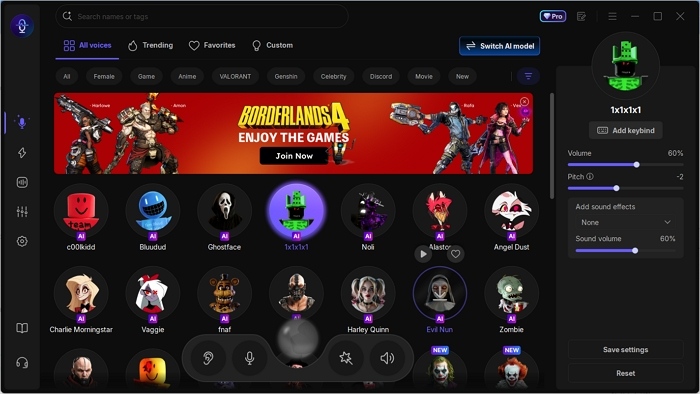
EaseUS VoiceWave is the best Slasher Forsaken voice changer with real-time voice transformation, low latency, low CPU consumption, and high-quality AI voices. Forsaken killers, including C00lkidd, Bluudud, Noli, 1X1X1X1, John Doe, and 007n7, are all available in the voice changer. Here's a voice example of C00lkidd:
Original
C00lkidd
Beyond the Forsaken characters, the voice changer boasts 400+ AI voices for celebrities, anime, movies, politicians, and funny ones, and it's growing. You can use them on Discord, Fortnite, WhatsApp, CSGO, and 2000+ online games and apps. And to keep things spicy, drop a scary soundboard like footsteps or funny noises like a fart inside the app.
| ⭕Pros | ❌Cons |
|---|---|
|
|
How to use the Slasher Forsaken voice for Discord?
Step 1. Open EaseUS VoiceWave and select the microphone.
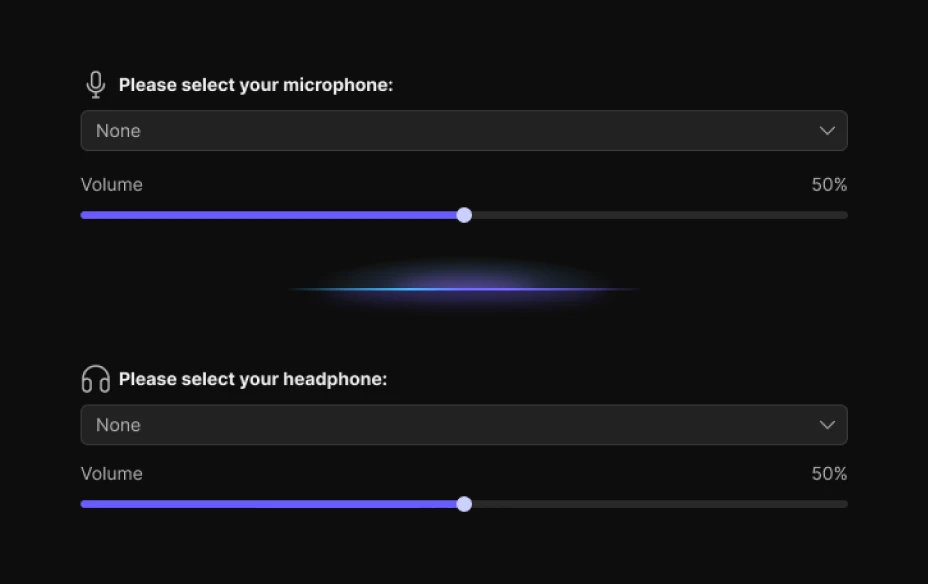
Step 2. Browse or search for Slasher AI voice and download the model.
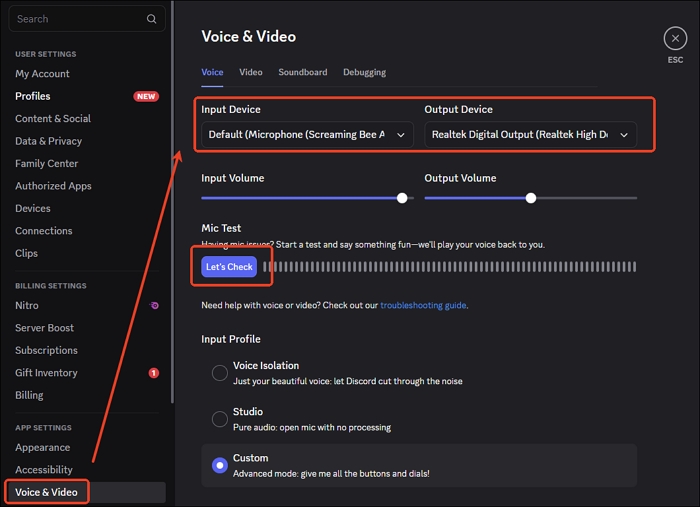
Step 3. Open Discord, go to Settings > Voice & Video > INPUT DEVICE > VoiceWave Microphone. Speak now.
See also:
Slasher Voice Changer and Soundboard on Computer
- Pricing: 4 free voices, 6 rotating daily voices, $5.99/Month, $109.99/Life
Voicemod is another real-time voice changer for Slasher Forsaken, with multiple Forsaken characters and related instant sounds contributed by the community. The Forsaken voice changer comes with 200 voices, but more are added from the community. Varying from voices, you can change the voice volume, bass, mid, and treble.
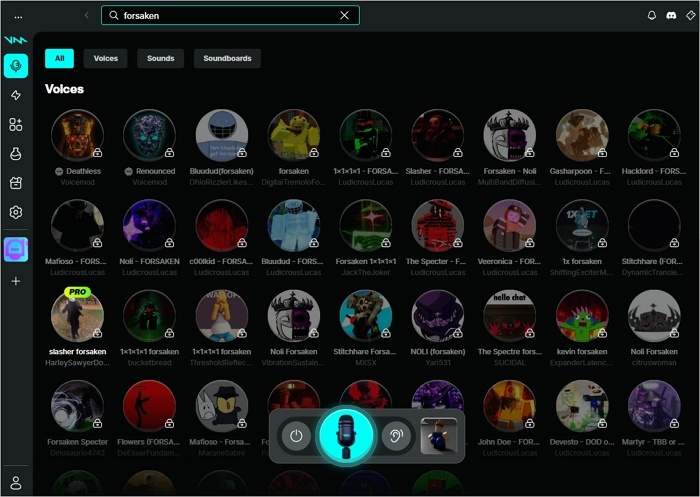
The retro Slasher voice changer provides smooth, HD voice transformations, fully compatible with mainstream games for real-time streaming and gameplay.
| ⭕Pros | ❌Cons |
|---|---|
|
|
AI Jason Forsaken/Roblox Text to Speech Online
- Pricing: $1.99 starter, $9.99 creator
Jammable is a paid online TTS tool for Forsaken characters and other trendy voices. This retro Slasher AI voice generator includes 50,000+ voice effects uploaded by community members, allowing you to convert text to speech, do a duet with the voice, or create an AI cover from the audio file.
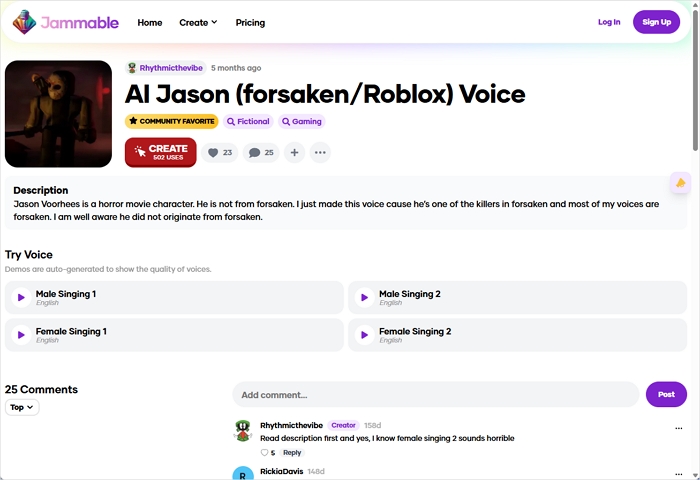
You have to create an account and log in to proceed, and pay the $1.99 to get the TTS. It doesn't provide a free trial for users.
| ⭕Pros | ❌Cons |
|---|---|
|
|
Wrapping up
Slasher is a newly added killer skin in Roblox Forsaken, so there aren't many Slasher voice changers available yet. This article lists the top three Slasher voice changers and TTS tools for Roblox fans to recreate his scary voice for gameplay, trolling, or roleplay. Free download the best Slasher Forsaken voice changer in real time.
FAQ
Is it legal to use a voice changer while gaming?
Yes, using a voice changer while gaming is generally legal. Just make sure you're not violating a game's terms of service or using it for harassment, impersonation, or scams. For fun, privacy, or role-play, it's usually fine.
Does ClownPierce use a Voice Changer?
Yes, ClownPierce uses a voice changer in his streams to make his content more humorous and engaging. Real-time voice modification adds entertainment, and tools like VoiceWave let others achieve similar effects.
Is Clownfish Voice Changer real time?
Yes, Clownfish voice changer is designed to work in real time.
How to get a Voice Changer on VRChat Oculus Quest 2?
To get a voice changer on VRChat Oculus Quest 2:
- Download EaseUS VoiceWave and select the media device.
- Press the Oculus button on your controller.
- Go to Settings > Device > Audio > VoiceWave Virtual Microphone.
- Back to the voice changer and tap your desired voice.
- Speak now.