-
![]()
Joey Albert
Joey has been involved with tech ever since she joined the EaseUS editor team in March 2011 and now she is a senior website editor. She is good at solving various issues, such as video downloading and recording.…Read full bio -
![]()
Alin
Alin is a sophisticated editor for EaseUS in tech blog writing. She is proficient in writing articles related to screen recording, voice changing, and PDF file editing. She also wrote blogs about data recovery, disk partitioning, data backup, etc.…Read full bio -
Jean has been working as a professional website editor for quite a long time. Her articles focus on topics of computer backup, data security tips, data recovery, and disk partitioning. Also, she writes many guides and tutorials on PC hardware & software troubleshooting. She keeps two lovely parrots and likes making vlogs of pets. With experience in video recording and video editing, she starts writing blogs on multimedia topics now.…Read full bio
-
![]()
Gorilla
Gorilla joined EaseUS in 2022. As a smartphone lover, she stays on top of Android unlocking skills and iOS troubleshooting tips. In addition, she also devotes herself to data recovery and transfer issues.…Read full bio -
![]()
Rel
Rel has always maintained a strong curiosity about the computer field and is committed to the research of the most efficient and practical computer problem solutions.…Read full bio -
![]()
Dawn Tang
Dawn Tang is a seasoned professional with a year-long record of crafting informative Backup & Recovery articles. Currently, she's channeling her expertise into the world of video editing software, embodying adaptability and a passion for mastering new digital domains.…Read full bio -
![]()
Sasha
Sasha is a girl who enjoys researching various electronic products and is dedicated to helping readers solve a wide range of technology-related issues. On EaseUS, she excels at providing readers with concise solutions in audio and video editing.…Read full bio
Page Table of Contents

Dawn Tang
Updated on Nov 26, 2025
0 Views |
0 min read
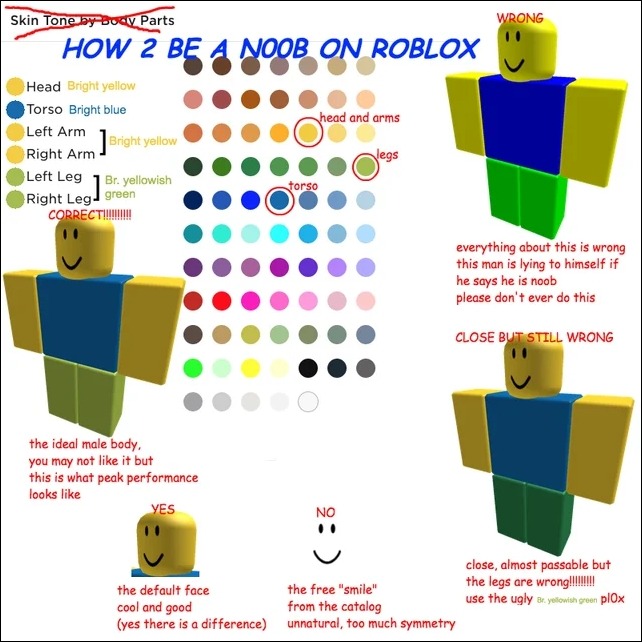
Noob is a slang term describing a new or inexperienced player on the internet, and in Roblox, it has also come to represent a classic avatar style. The iconic Roblox Noob avatar features a bright yellow head and arms, a bright blue torso, and lime green legs, often paired with a simple smile face.
At first, it is a symbol of beginners; the Noob look has since become a nostalgic icon embraced by players for its simplicity and retro charm. Over time, variations of the Noob appearance have evolved with different avatar models and clothing options, but the core color scheme remains instantly recognizable.
This article highlights the 4 best Roblox Noob AI voice changers and generators to help you create fun, classic Noob-style voices for your content or gameplay.
| Noob AI Voice | System | Voice Quality | Features | Pricing | Integration |
|---|---|---|---|---|---|
| EaseUS VoiceWave | Windows 10/11 | Realistic | Real-time voice changing |
5 free voices, $14.95/month $29.95/year, $39.95/lifetime |
Work with Roblox and 1000+ games |
| Jammable | Web | Varies from models | AI cover, duet |
$1.99/month Basic, $9.9/month Creator |
Integrating with Discord |
| FakeYou | Web |
Slightly robotic |
Voice to voice | 12s free generation, $12/Plus, $25/Pro, $40/Elite | Gaming-related content |
| 101Soundboards | Web & Mobile | Decent | Soundboard | Free | Voice messages and chat in the game |
✍🏻Editor's Choice:
- For the real-time voice conversion during Roblox games, go for EaseUS VoiceWave.
- For the Noob AI cover attempt, select FakeYou.
- For different Noob soundboards, 101Soundboards is the way.
Roblox Noob AI Voice Changer on PC Free Download
EaseUS VoiceWave is a popular Roblox Noob AI voice changer designed for real-time voice modulation during Roblox gameplay. It allows users to transform their voices into a high-pitched, cartoonish "Noob" style with ease, thanks to its extensive library of voice effects with C00lkidd, Pr3typriincess, Bluudud, and 1x1x1x1 included, and fine-tuned customization tools.
Whether you're roleplaying as a classic Roblox Noob, pranking friends, or creating meme-worthy content, the voice changer for ARC Raiders offers smooth, low-latency voice processing and seamless integration with platforms like Discord and Roblox. With intuitive controls and preset voice filters, even beginners can jump in and start sounding like a goofy Noob in seconds.
| ✅Pros | ❌Cons |
|---|---|
|
|
- 📝User Review
- Long time leaving review but fantastic product! Thanks! It works really well, I've had a good pay around with it. - By P Baker, from Stacksocial
How to use Roblox AI voice changer?
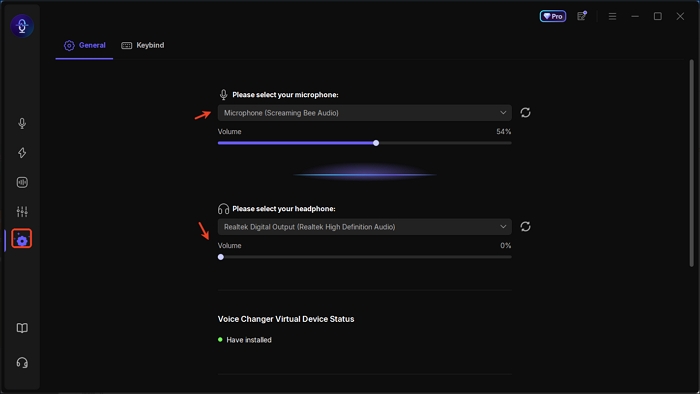
Step 1. Open EaseUS VoiceWave and set up the media devices.
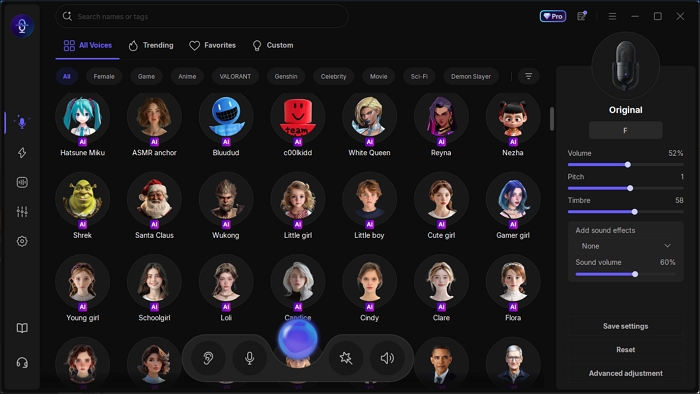
Step 2. Search for Noob in the voice effect page and download the AI model if needed.
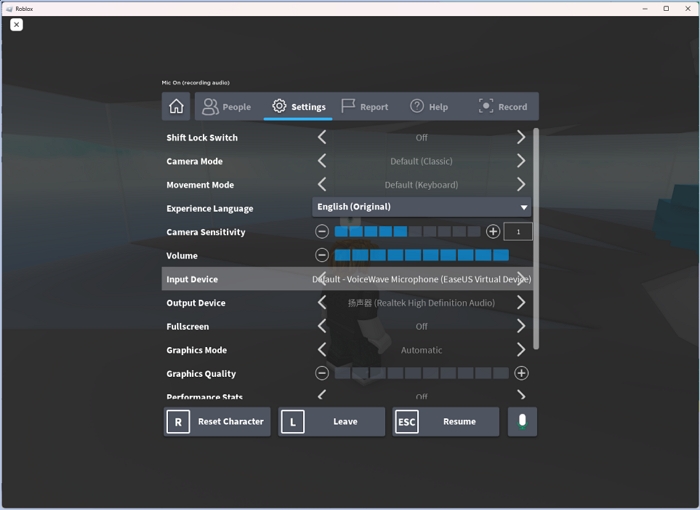
Step 3. Select VoiceWave Virtual Microphone in your Roblox settings and speak now.
See also:
Roblox Noob AI Song Cover & Generator Online
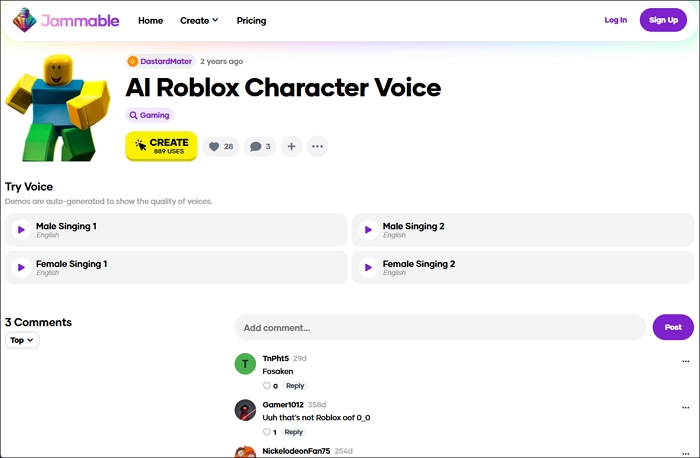
Jammable collects and holds over 50,000+ voice effects from the community members, with trending and classic voices like Hazbin Hotel, Tanjiro, Sonic, Roblox characters, and more. Features differ from voice filters; some support text-to-speech and AI song cover, while others can only do duet and song cover. Despite the variety, voice qualities really hinge on the contributors and their models. The user reviews listed below the effect may explain something.
One major drawback of Jammable is that it doesn't provide a free trial, so you can only tell the voice quality from its samples and comments, but the good news is that the basic plan is pretty affordable for a try.
| ✅Pros | ❌Cons |
|---|---|
|
|
- 📝User Review
- A game changer for any songwriters/bands that need clean vocals for a demo. I wouldn't want it as the final version of my song because I value an actual human voice but...having a proto Arianna Grande singing your demo is a one of a kind experience. - By Stefan Vogt, from Trustpilot
Roblox Noob AI Voice to Voice RVC Model
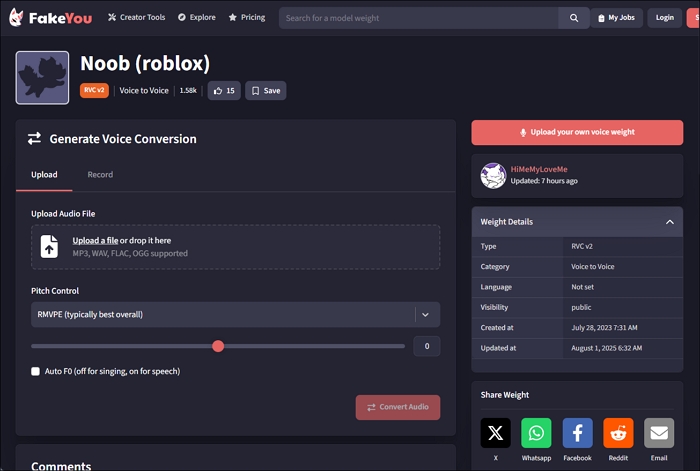
Similar to Jammable, FakeYou is also a website contributed mostly by its community members. With 8500+ voices for you to choose from, you can nearly find all voices you want from celebrities, singers, politicians, game characters, and anime. Based on RVC, SVC, TT2, LoRA, and more algorithms, the features available might be different.
In this case, the Noob voice-to-voice converter allows for pitch control and auto F0 and enables the conversion of the entire song (typically 3 minutes), but other sound cards may limit the conversion to 12 seconds and lack setup tools.
| ✅Pros | ❌Cons |
|---|---|
|
|
- 📝User Review
- No need to create an acct, just use the site. When you pay though, you'll need an acct. There are more benefits to having a paid subscription then having a free one. - By Rockin, from Trustpilot
Noob AI Text to Speech Free Online with No Sign-up
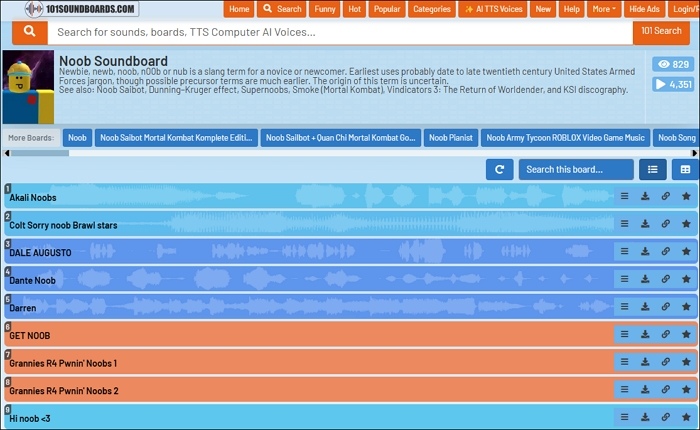
101Soundboards is the biggest TTS voice website in the world, boasting a vast collection of 87,000+ AI text-to-speech voices ranging from anime, comics, and celebrities, to games, memes, movies, nature clips, and streamers. It is a website, but you can also download the iOS and Android app versions.
Mainly composed of two parts, a text-to-speech generator and soundboards, 101Soundboards converts whatever you put into the generator (200-character limit) into the generated sound clips below the voice filter. The original sound boards have better voice quality; the TTS AI voice is not always the case. Also, you can tap the hide ads button to remove the annoying ads on the page.
| ✅Pros | ❌Cons |
|---|---|
|
|
- 📝User Review
- This app is 10/10 but the ads are very annoying and also takes a little bit to load since it had to load a bunch of ads. Ads aside the app has lots of good sounds and also has great ai voices of famous characters. Its 100% free unlike a bunch of other apps. - By Shbshsbgsinshdh, from Apple Store
Share the Noob voice generators with your friends in Roblox!

Wrapping up
Whether you're diving into Roblox roleplay, making memes, or just having fun with friends, a Roblox Noob AI voice adds humor and nostalgia to the experience. Each tool shines in its own way:
- FakeYou offers flexible voice-to-voice conversion.
- Jammable is ideal for AI song covers and memes.
- 101Soundboards excels at Noob soundboards and quick TTS clips.
- For real-time voice changing during gameplay, EaseUS VoiceWave is the top choice with seamless Roblox integration.
FAQ
How to get Roblox Noob?
- Go to roblox.com and sign in.
- Click on the avatar icon or go to the Avatar page.
- Set your body colors:
- Head, arms, hands → bright yellow
- Torso → bright blue
- Legs → bright yellowish green
- Take off any layered clothing, UGC items, or accessories for a clean look.
- The classic "Smile" face is the closest to the old-school Noob face.
- Go to Avatar → Settings and select R6 instead of R15 for that boxy, old-school vibe.
(Image Source: Reddit)
How tall is Roblox Noob?
The classic Roblox Noob, typically using the R6 avatar rig, stands around 5 to 5.5 studs tall in-game, which translates to approximately 1.4 to 1.54 meters (about 4 feet 7 inches to 5 feet 1 inch) based on Roblox's unit scale (1 stud ≈ 0.28 meters).
While exact height can vary slightly depending on accessories or scaling, the traditional Noob—known for its yellow head, blue torso, and green legs—is generally considered to be about 5 feet tall within the Roblox universe.