-
![]()
Joey Albert
Joey has been involved with tech ever since she joined the EaseUS editor team in March 2011 and now she is a senior website editor. She is good at solving various issues, such as video downloading and recording.…Read full bio -
![]()
Alin
Alin is a sophisticated editor for EaseUS in tech blog writing. She is proficient in writing articles related to screen recording, voice changing, and PDF file editing. She also wrote blogs about data recovery, disk partitioning, data backup, etc.…Read full bio -
Jean has been working as a professional website editor for quite a long time. Her articles focus on topics of computer backup, data security tips, data recovery, and disk partitioning. Also, she writes many guides and tutorials on PC hardware & software troubleshooting. She keeps two lovely parrots and likes making vlogs of pets. With experience in video recording and video editing, she starts writing blogs on multimedia topics now.…Read full bio
-
![]()
Gorilla
Gorilla joined EaseUS in 2022. As a smartphone lover, she stays on top of Android unlocking skills and iOS troubleshooting tips. In addition, she also devotes herself to data recovery and transfer issues.…Read full bio -
![]()
Rel
Rel has always maintained a strong curiosity about the computer field and is committed to the research of the most efficient and practical computer problem solutions.…Read full bio -
![]()
Dawn Tang
Dawn Tang is a seasoned professional with a year-long record of crafting informative Backup & Recovery articles. Currently, she's channeling her expertise into the world of video editing software, embodying adaptability and a passion for mastering new digital domains.…Read full bio -
![]()
Sasha
Sasha is a girl who enjoys researching various electronic products and is dedicated to helping readers solve a wide range of technology-related issues. On EaseUS, she excels at providing readers with concise solutions in audio and video editing.…Read full bio
Page Table of Contents

Sasha
Updated on Nov 25, 2025
0 Views |
0 min read
In Borderlands 4, Amon the Forgeknight stands out for his powerful presence, tragic backstory, and deep metallic voice that fans instantly recognize. Voiced by Ray Chase, his tone blends strength and emotion, making it one of the game's most iconic sounds.
As players on Reddit and TikTok imitate his voice, interest in an Amon the Forgeknight voice changer has surged. And now, with advanced AI voice technology, you can sound just like the steel-clad hero yourself. Keep reading to learn more!
About Amon the Forgeknight from Borderlands 4
Amon the Forgeknight is one of the four new playable Vault Hunters in Borderlands 4. He is known for being a resilient frontliner who can deal significant damage while also providing defensive support, making him a versatile and engaging character for players who enjoy a hands-on, mechanically deep experience.
Official Borderland 4 information reveals that Ray Chase voices Amon the Forgenight. His voice is described as having a poetic flair that contrasts with his more gruff appearance and action-packed abilities with flame and frost axes.
Best Real-Time Amon Voice Changer
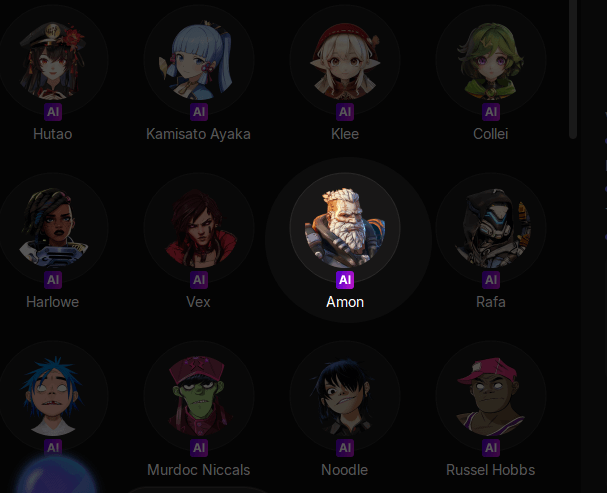
EaseUS VoiceWave is a Windows app that enables you to transform your voice into any other voice in real time, whether you're live streaming, gaming, participating in voice chats, or making online calls. It comes with multiple AI voices, categorized by game, anime, celebrity, movie, and more. More specifically, there are AI voices from Borderlands 4, including Amon, Vex, Rafa, and Harlowe.
There is also an extensive library of voices from anime like Nezuko from Demon Slayer, Son Goku from Dragon Ball, Naruto Uzamaki from Naruto, Eren Yeager from Attack on Titan, and more.
Features
Real-time Voice Changing
EaseUS VoiceWave is installed on the system level, so every application that uses a microphone or other audio capture device will be captured. Your voice will be modified with AI whether you are palying games like Call of Duty and R.E.P.O., having an online meeting on Zoom or TeamSpeak, or streaming live on OBS or Twitch. You sound like any character you like with minimal delay, since EaseUS VoiceWave's delay is 50% lower than that of other voice-changing devices on the market.
AI Voice Effects & Soundboards
As an entertainment app, VoiceWave is committed to offering the latest and popular AI voices you could find on TikTok, YouTube, Twitch, and other social platforms. Up to now, there are more than 300 AI voices, including Harlowe AI voice, Amon AI voice, and Rafa AI voice from Borderlands 4. You can also discover more AI-generated game voices, such as c00lkidd, Reyna, Hutao, and Jinx, among others. There are also soundboards that you can quickly trigger and play through your microphone during a call or stream.
AI Voice Cloning
Just provide a clean human voice file between 1 and 30 minutes long, and then wait 48-72 hours while the AI trains the audio, you can then create custom voices. As for the voice quality, EaseUS VoiceWave, with state-of-the-art technology, ensures precise voice duplication. Free users have the opportunity to clone a voice. Please note that the output quality is directly linked to the quality of your audio files.
Price
- $14.95/mon for one license for one computer
- $29.95/year for one license for one computer
- $39.95/lifetime for one license for one computer
Pros & Cons
- Wide compatibility
- High-quality AI voice changing
- Low latency
Cons:
- Only available for Windows 10 & 11
How to Use the Amon AI Voice with Communication & Streaming Platforms
EaseUS VoiceWave is a beginner-friendly application, so you can use its built-in Amon the Forgeknight voices with communication apps like WhatsApp, Discord, Google Chat, or Streamlabs. Here, we take using VoiceWave with Discord as an example.
Before using EaseUS VoiceWave with Discord, you need to install and follow its setup tutorial to configure your input and output devices.
Then go to Discord:
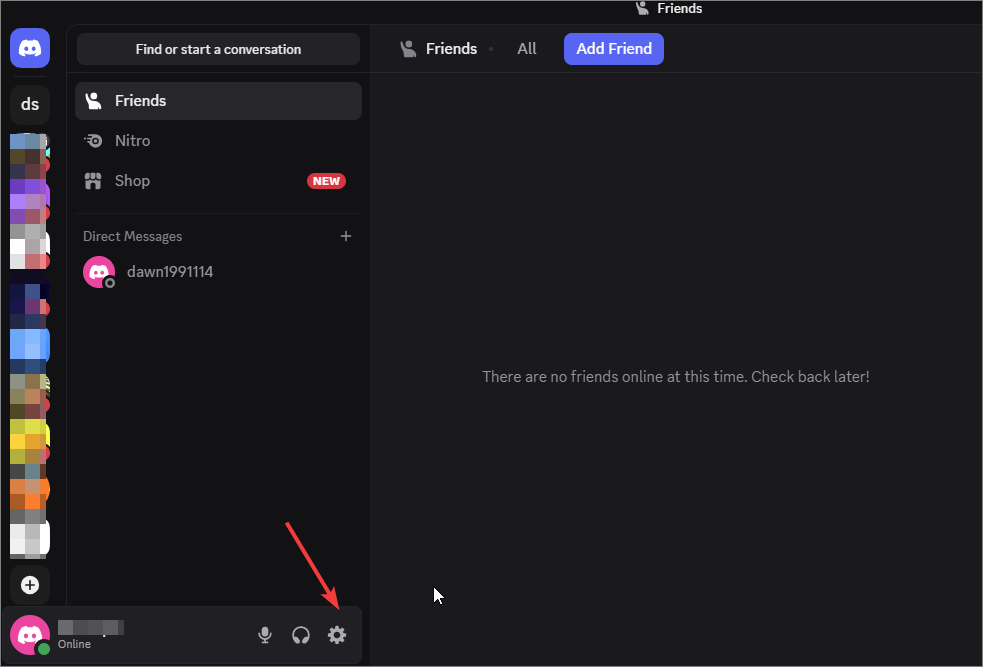
Step 1. Go to "Settings."
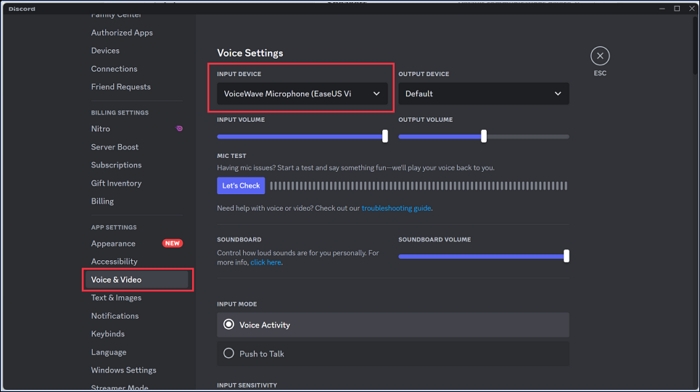
Step 2. Locate the "Voice & Video" section and select "VoiceWave Microphone" as your input device.
Step 3. Go back to EaseUS VoiceWave, and click to select "Amon" voice effect. Then, whenever you speak with your microphone, you sound like Amon.
How to Use EaseUS VoiceWave in Borderlands 4
EaseUS VoiceWave also works seamlessly with Borderlands 4. With it, you could transform your voice into any voice you like. After installing and setting up EaseUS Voicewave, follow these steps to activate voice chat in Borderlands 4.
Step 1. Follow the instructions to set your input and output devices in VoiceWave.
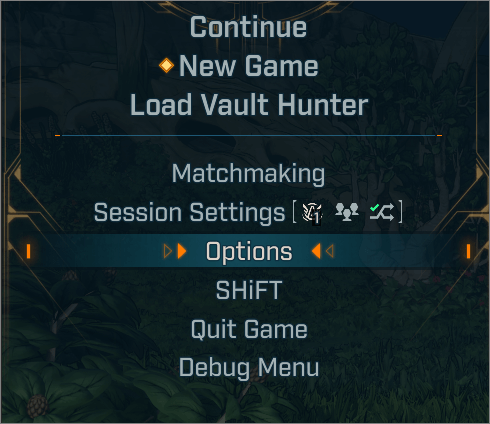
Step 2. Open Borderlands 4, and go to the "Options" menu.
Step 3. Navigate to the "Network/Social" tab and scroll down to "Communication." Enable "Voice Chat."
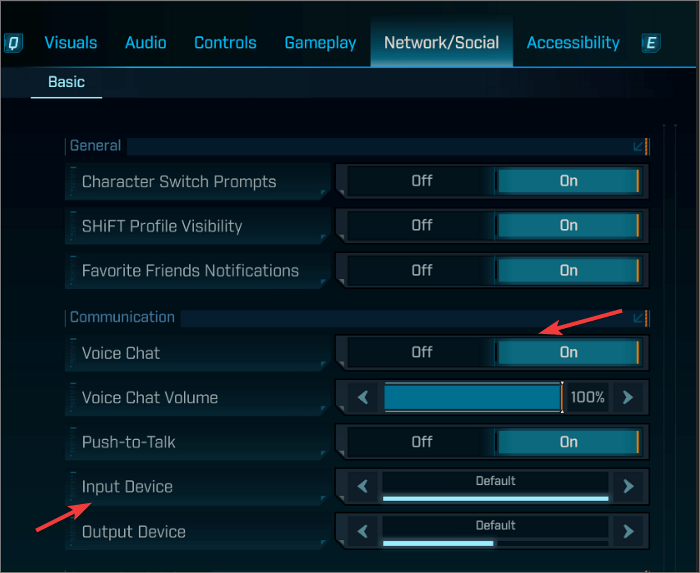
Step 4. Choose "VoiceWave Microphone" as the input device.
After that, select any AI voice in VoiceWave to use it as your target voice when having a voice chat in Borderlands 4.
Final Thoughts
Whether you want to recreate Amon's commanding tone from Borderlands 4 or simply add futuristic character effects to your own projects, EaseUS VoiceWave can achieve that signature robotic intensity. With it, you can sound like Amon, experiment with other Borderlands-inspired voices, or craft your own AI persona with a few clicks.
Share it on:

FAQs on Amon Voice Changer
1. Who voices Amon in Borderlands 4?
In Borderlands 4, Ray Chase is the voice actor for the character Amon the Forgeknight.
2. What is Amon's skill in Borderlands 4?
Amon in Borderlands 4 is the "Forgeknight" class that uses three core action skills and three skill trees: Crucible (Cybernetics), Onslaughter (Calamity), and Scourge (Vengeance).
3. Who is the hardest boss in Borderlands 4?
There isn't a single "hardest" boss in Borderlands 4, as difficulty is subjective and depends on player skill and character builds.