-
![]()
Joey Albert
Joey has been involved with tech ever since she joined the EaseUS editor team in March 2011 and now she is a senior website editor. She is good at solving various issues, such as video downloading and recording.…Read full bio -
![]()
Alin
Alin is a sophisticated editor for EaseUS in tech blog writing. She is proficient in writing articles related to screen recording, voice changing, and PDF file editing. She also wrote blogs about data recovery, disk partitioning, data backup, etc.…Read full bio -
Jean has been working as a professional website editor for quite a long time. Her articles focus on topics of computer backup, data security tips, data recovery, and disk partitioning. Also, she writes many guides and tutorials on PC hardware & software troubleshooting. She keeps two lovely parrots and likes making vlogs of pets. With experience in video recording and video editing, she starts writing blogs on multimedia topics now.…Read full bio
-
![]()
Gorilla
Gorilla joined EaseUS in 2022. As a smartphone lover, she stays on top of Android unlocking skills and iOS troubleshooting tips. In addition, she also devotes herself to data recovery and transfer issues.…Read full bio -
![]()
Rel
Rel has always maintained a strong curiosity about the computer field and is committed to the research of the most efficient and practical computer problem solutions.…Read full bio -
![]()
Dawn Tang
Dawn Tang is a seasoned professional with a year-long record of crafting informative Backup & Recovery articles. Currently, she's channeling her expertise into the world of video editing software, embodying adaptability and a passion for mastering new digital domains.…Read full bio -
![]()
Sasha
Sasha is a girl who enjoys researching various electronic products and is dedicated to helping readers solve a wide range of technology-related issues. On EaseUS, she excels at providing readers with concise solutions in audio and video editing.…Read full bio
Page Table of Contents

Dawn Tang
Updated on Jan 21, 2026
0 Views |
0 min read
Battlefield 6, a first-person shooter set in 2027, is launching on October 10, 2025, for PlayStation 5, Windows, and Xbox Series X/S. The game centers around a conflict between a fractured NATO and the private military company Pax Armata, featuring four classes: Assault, Engineer, Support, and Recon.
After early gameplay leaks in March 2025 and an official reveal on July 22, 2025, two open beta tests in August drew over 500,000 players.
This page introduces the best Battlefield 6 voice changer and soundboard tool for PC to enhance your gaming experience.
Best Battlefield 6 Voice Changer for PC Free Download
EaseUS VoiceWave stands out as the top free Battlefield 6 voice changer for PC, offering gamers the ability to transform their voice into a wide range of characters and styles.
Whether you want to sound like a fierce soldier, a stealthy recon, or add a fun twist to your gameplay, VoiceWave provides high-quality, real-time voice modulation with easy-to-use controls. It's designed to seamlessly integrate with Battlefield 6, making your gaming sessions more immersive and entertaining.
Why should you choose EaseUS VoiceWave for your Battlefield voice conversion?
Seamless Integration with 2000+ Games and Apps
EaseUS VoiceWave is compatible with ARC Raiders, Battlefield, Discord, Minecraft, WhatsApp, R.E.P.O., and thousands of other online games and communication platforms. Designed to work flawlessly with any app that supports a virtual microphone, VoiceWave delivers an immersive audio experience for gamers, streamers, content creators, and casual users alike.
Whether you're coordinating strategies in multiplayer games or chatting with friends, VoiceWave's seamless integration ensures your voice transformations come through crystal-clear without any lag or technical hassle.
An Extensive, Ever-Growing AI Voice Library
Whether you want to switch from male to female, sound like characters from Kpop Demon Hunters, mimic Trump, C00lkidd, Mickey Mouse, Vex, Morgan Freeman, or Alastor, this real-time PC voice changer has you covered.
Our team continually expands the library with trending voices requested by users, while refining audio quality through advanced, updated algorithms.
From anime and cartoons to celebrities, singers, politicians, actors, and iconic game characters, you'll always find fresh and exciting voice options to match your mood or gameplay style.
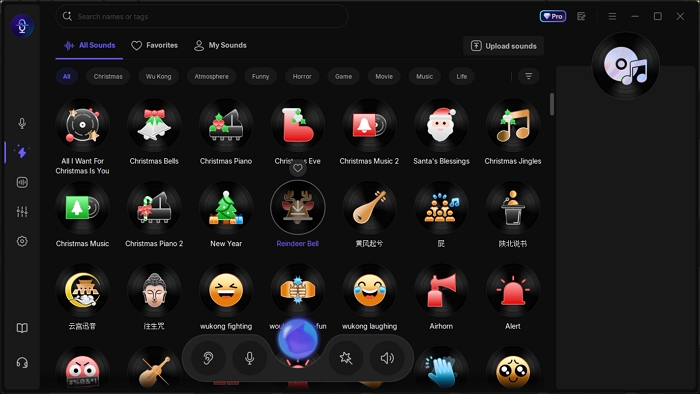
300+ Soundboards for Battlefield Ambience
In games like Battlefield, Borderlands 4, or GTA RP, a soundboard lets you drop meme sounds, funny quotes, or iconic lines that match your character's personality—right at the perfect moment to crack up your teammates.
With a single hotkey, you can trigger instant audio effects like applause, music clips, or censor beeps to make livestreams and videos more engaging.
You can even upload your own sounds to create custom soundboards filled with inside jokes or legendary game effects, giving your Battlefield sessions a unique and unforgettable twist.
Realistic and Natural Voice Changing Without Delay
Powered by Retrieval-based Voice Conversion (RVC), an advanced AI algorithm, EaseUS VoiceWave delivers highly realistic speech-to-speech transformations while preserving the original speaker's intonation and unique audio characteristics.
This ensures every voice change sounds natural and authentic. With near-instant processing, there's no noticeable delay between speaking and hearing the transformed voice—making the experience seamless and incredibly immersive.
Personalize Your AI Voice with Customization Tools
Pitch too high? Volume too loud? EaseUS VoiceWave gives you complete control with adjustable pitch, volume, and timbre settings.
You can also layer on environmental sound effects to make it seem like you're in a specific location—perfect for pranks or immersive roleplay.
For even more variety, the advanced settings offer dozens of unique effects, including robot voice, chorus, distortion, echo, reverb, and more, letting you perfectly mimic different characters or create entirely new ones.
Pricing💵
- 5 free voices
- $14.95/month
- $29.95/year
- $39.95/lifetime
User Review✍️
This powerful tool offers endless possibilities for streamers, gamers, content creators, and anyone looking to add a unique twist to online interactions. --Toolify.ai
Related Reading:
How to Use Battlefield 6 Voice Changer
Now, we know why EaseUS VoiceWave is a preference, but how to use the Battlefield 6 voice changer? Set up EaseUS VoiceWave, select it as your input device in Battlefield 6, choose and customize your voice effect, then start speaking or trigger soundboard effects in-game. Here's the specific:
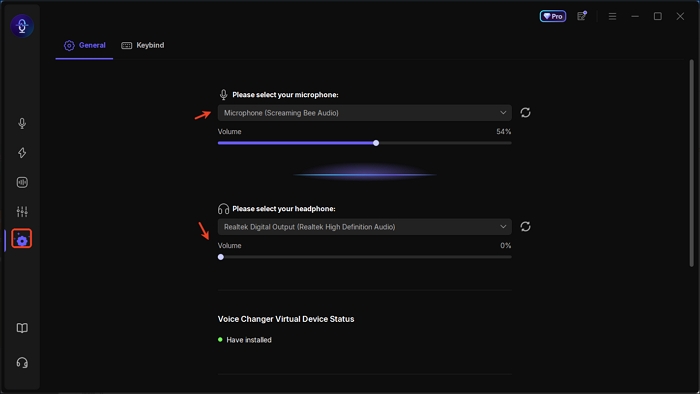
Step 1. Download, install, and launch EaseUS VoiceWave. In the Settings tab, select your microphone and headphones.
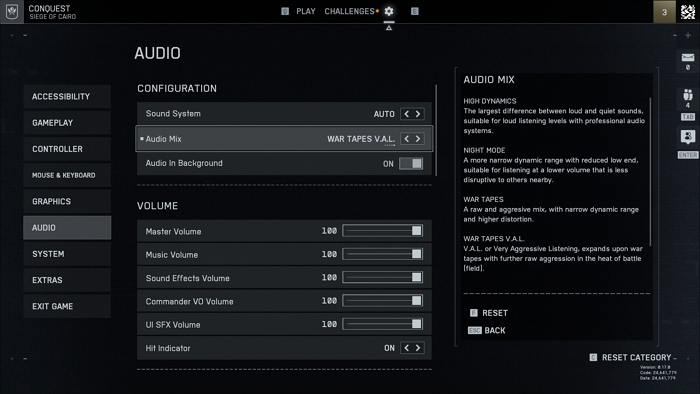
Step 2. Open the Battlefield 6 Beta, navigate to Audio Settings, and set VoiceWave Virtual Microphone as your input device.
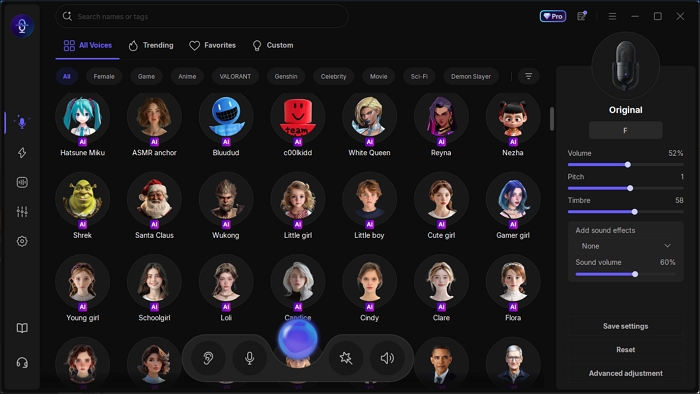
Step 3. Return to VoiceWave, choose the voice effect you want, and—if it's an AI voice—download the model within seconds. Adjust pitch, volume, and other parameters in the right panel.
Step 4. Start speaking to hear yourself in the selected voice. Switch to the Soundboard tab if you want to trigger custom audio effects during gameplay.
Wrapping up
If you're looking for the best Battlefield 6 voice changer, EaseUS VoiceWave is hard to beat. Its seamless compatibility with thousands of games and apps, massive and ever-growing AI voice library, realistic voice conversion with zero lag, and fun soundboard features make it a must-have for gamers who want to enhance immersion and entertainment.
Whether you're roleplaying as a Battlefield soldier, pulling pranks on friends, or adding flair to livestreams, VoiceWave delivers the tools to make every session memorable. Download it for free and take your Battlefield 6 experience to the next level.