-
![]()
Joey Albert
Joey has been involved with tech ever since she joined the EaseUS editor team in March 2011 and now she is a senior website editor. She is good at solving various issues, such as video downloading and recording.…Read full bio -
![]()
Alin
Alin is a sophisticated editor for EaseUS in tech blog writing. She is proficient in writing articles related to screen recording, voice changing, and PDF file editing. She also wrote blogs about data recovery, disk partitioning, data backup, etc.…Read full bio -
Jean has been working as a professional website editor for quite a long time. Her articles focus on topics of computer backup, data security tips, data recovery, and disk partitioning. Also, she writes many guides and tutorials on PC hardware & software troubleshooting. She keeps two lovely parrots and likes making vlogs of pets. With experience in video recording and video editing, she starts writing blogs on multimedia topics now.…Read full bio
-
![]()
Gorilla
Gorilla joined EaseUS in 2022. As a smartphone lover, she stays on top of Android unlocking skills and iOS troubleshooting tips. In addition, she also devotes herself to data recovery and transfer issues.…Read full bio -
![]()
Rel
Rel has always maintained a strong curiosity about the computer field and is committed to the research of the most efficient and practical computer problem solutions.…Read full bio -
![]()
Dawn Tang
Dawn Tang is a seasoned professional with a year-long record of crafting informative Backup & Recovery articles. Currently, she's channeling her expertise into the world of video editing software, embodying adaptability and a passion for mastering new digital domains.…Read full bio -
![]()
Sasha
Sasha is a girl who enjoys researching various electronic products and is dedicated to helping readers solve a wide range of technology-related issues. On EaseUS, she excels at providing readers with concise solutions in audio and video editing.…Read full bio
Page Table of Contents

Sasha
Updated on Jan 21, 2026
0 Views |
0 min read
Have you ever wondered how Daft Punk created their iconic robotic voices in songs like "Harder, Better, Faster, Stronger" or "Around the World"? Their smooth, metallic tones became a symbol of futuristic music and digital artistry. Now, with the help of a Daft Punk voice changer, you can recreate that same vocoder-style sound whether for singing, streaming, or producing your next electronic track. This guide shows you how to easily get the Daft Punk voice effect using AI-powered voice changers and online tools.
EaseUS VoiceWave
- 💲Pricing: 1 free for 24 hours per day, starts from $14.95/month
- 💻OS supported: Windows 10 & 11
As one of the most powerful real-time voice changers for PC, EaseUS VoiceWave offers more than 300 AI voice effects that range from game characters like c00lkidd (from Forsaken/Roblox), Hutao (from Genshin Impact ), to anime figures like Son Goku, to celebrities like Donald Trump. Even if you are a beginner, you could use it easily.
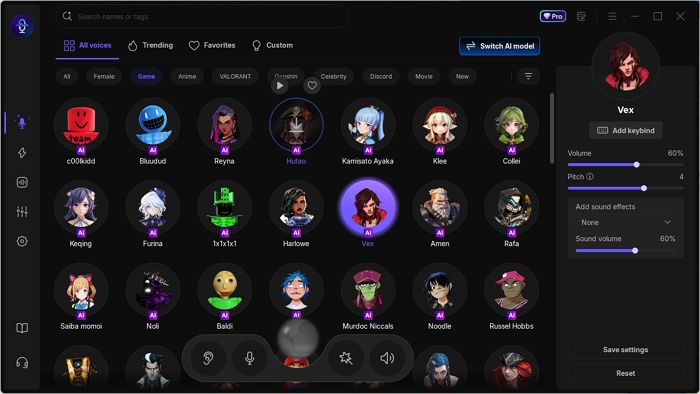
See What Makes VoiceWave Stand out:
Wide Compatibility: It works seamlessly with more than 1,000 online video games and 1,000 instant messaging apps, such as Battlefield 6, Call of Duty, R.E.P.O, and Discord.
Regularly Updated Voice Filters: It updates its voice effects and soundboards weekly, ensuring you get the most famous effects and audio clips.
Minimum Delay: This feature ensures that every vocoder effect stays in sync with your speech, making it ideal for live use.
Voice Customization: Just upload a clear audio clip to clone any voice you love, and explore limitless new voices for your next creation.
Safely get EaseUS VoiceWave from here!
✅Pros:
- Large library of voice effects and soundboard
- Real-time voice transforming
- More custom options
❎Cons:
- Only available for Windows users
- 🗣️What Users Say:
- It works fantastically and has a wide selection of different voices. I used it in Discord with some friends as a test run, and it worked really well. - From App Sumo
Voicemod
- 💲Pricing: 2 free voices, 4 limited-time voices, $17.97/3 months, $29.98 /year, $49.99/permanent
- 💻OS supported: Windows 7, 8, 10, 11, Mac
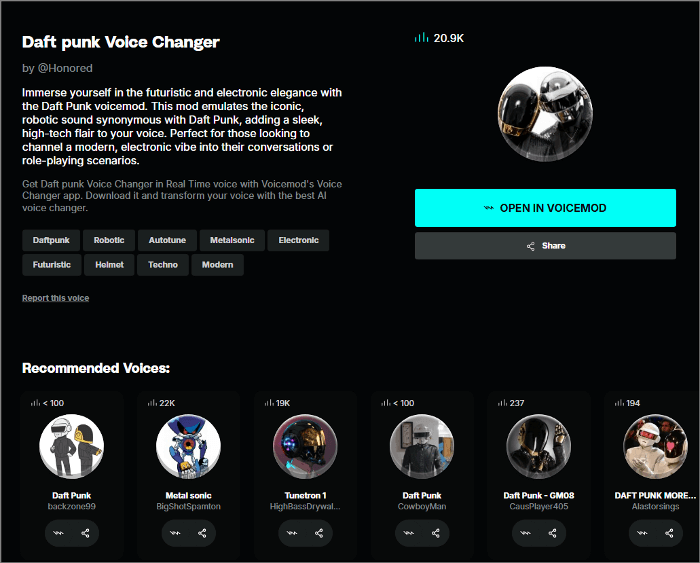
Voicemod, one of the most popular voice changer apps with a massive user community, also offers a Daft Punk-style voice effect. However, this effect isn't part of its built-in voice library—it's available on Tuna, Voicemod's community platform. The best part is that several users have uploaded different versions of Daft Punk voices, so you can try them all and choose the one that sounds most authentic.
- ‼️Notice:
- This feature is only available for its pro users.
✅Pros:
- Plenty of sound effects
- Soundboard for custom voices
- Works in real time
❎Cons:
- Limited free voices
- Lags or bugs sometimes on lower-end systems
- 🗣️What Users Say:
- This app was very fun to use, simple and overall really large variety of sounds and voices, good sound quality mostly. - From Product Hunt
Jammable
💲Pricing: limited free credits for new accounts, $1.99/month Basic
💻OS supported: web-based
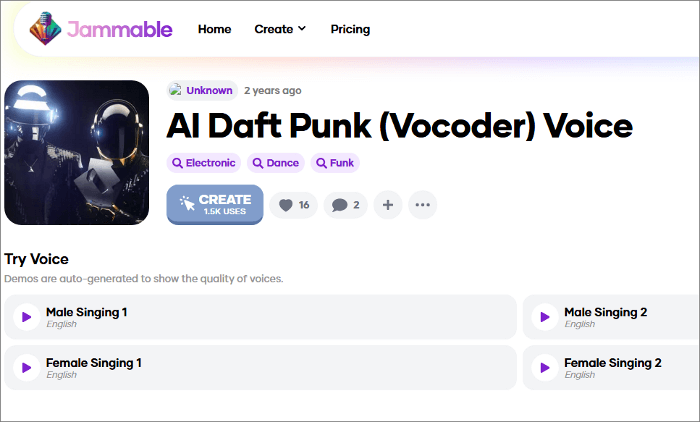
Jammable might also be the one that you are searching for ways to use the AI Daft Punk voice to make covers or generate duets. There are thousands of AI voice models, from iconic cartoon characters and public figures to trending voices in the anime and gaming worlds. You can also upload voice samples to create custom voices.
✅Pros:
- Allow to create AI covers with various voice models
- Allow to create and share your custom AI voice models
❎Cons:
- Lack quality control for voice outputs
- No free trial to test the service
- 🗣️What Users Say:
- The AI picked up most of the lyrics correctly, and the end result is just mind-blowing. - From Trustpilot
To Conclude
So, there are two main ways to get the AI Daft Punk voice: a real-time Daft Punk voice changer and an online AI Daft Punk voice generator. If you want to use the voice for gaming, streaming, or online chatting, try EaseUS VoiceWave. But if you prefer creating song covers or converting text to speech, Jammable is your best choice.
FAQs on Daft Punk Voice Changer
Continue reading to learn more about the frequently asked questions regarding the Daft Punk voice changer.
1. What voice changer did Daft Punk use?
Daft Punk did not use a single voice changer. They used a variety of vocoders, effects, and other equipment, including the DigiTech Talker and the Sennheiser vocoder.
2. Are voice changers illegal?
No, voice changers are not inherently illegal; however, using them for malicious purposes, such as fraud, harassment, or impersonation without consent, is both illegal and unethical.
3. How does Daft Punk make their vocal effects?
Daft Punk creates its signature robotic vocal effects primarily through vocoders and talk boxes.
4. What is the Daft Punk voice called?
The Daft Punk voice is called a vocoder, but they also used other effects like a talkbox and Auto-Tune on different tracks.
5. Do Daft Punk use autotune?
Yes, according to Wikipedia, auto-tune has been used by many artists in different genres, including Daft Punk.
Share it on: