-
![]()
Joey Albert
Joey has been involved with tech ever since she joined the EaseUS editor team in March 2011 and now she is a senior website editor. She is good at solving various issues, such as video downloading and recording.…Read full bio -
![]()
Alin
Alin is a sophisticated editor for EaseUS in tech blog writing. She is proficient in writing articles related to screen recording, voice changing, and PDF file editing. She also wrote blogs about data recovery, disk partitioning, data backup, etc.…Read full bio -
Jean has been working as a professional website editor for quite a long time. Her articles focus on topics of computer backup, data security tips, data recovery, and disk partitioning. Also, she writes many guides and tutorials on PC hardware & software troubleshooting. She keeps two lovely parrots and likes making vlogs of pets. With experience in video recording and video editing, she starts writing blogs on multimedia topics now.…Read full bio
-
![]()
Gorilla
Gorilla joined EaseUS in 2022. As a smartphone lover, she stays on top of Android unlocking skills and iOS troubleshooting tips. In addition, she also devotes herself to data recovery and transfer issues.…Read full bio -
![]()
Rel
Rel has always maintained a strong curiosity about the computer field and is committed to the research of the most efficient and practical computer problem solutions.…Read full bio -
![]()
Dawn Tang
Dawn Tang is a seasoned professional with a year-long record of crafting informative Backup & Recovery articles. Currently, she's channeling her expertise into the world of video editing software, embodying adaptability and a passion for mastering new digital domains.…Read full bio -
![]()
Sasha
Sasha is a girl who enjoys researching various electronic products and is dedicated to helping readers solve a wide range of technology-related issues. On EaseUS, she excels at providing readers with concise solutions in audio and video editing.…Read full bio
Page Table of Contents

Dawn Tang
Updated on Jan 21, 2026
0 Views |
0 min read
Want realistic voiceovers for videos, podcasts, or audiobooks — without recording every line yourself? AI voice cloning can create a natural, personalized voice from a short recording. In this article, you'll learn how AI voice cloning works, the legal and ethical rules to follow, and a step-by-step method to create your own voice clone safely.
- How Voice Cloning Works?
- Why Choose EaseUS VoiceWave?
- How to Clone Your Voice?
- Legal & Ethical Essentials
How Voice Cloning Works?
Voice cloning uses artificial intelligence (AI) to create a digital replica of someone's voice by analyzing recorded speech. Essentially, instead of having that person read every line you need, you feed a short sample of their voice into an AI model, it learns the characteristics of that voice, and then you can generate new speech in that voice.
At a technical level, the process typically begins with collecting audio data – usually recordings of the person speaking in clear, quiet conditions. The AI then performs feature extraction: it looks at things like pitch, tone, rhythm, pace, inflection, pronunciation, and other vocal markers.
Next, a neural network or other machine‑learning model is trained on that data. It builds a "voice model" that mathematically represents the unique voice features, often via spectrograms, mel‑frequency coefficients, and so on.
Once the model is trained, it enters the synthesis (or inference) stage: you give it a new text (or sometimes an audio input) and it generates speech that sounds like the original speaker — using the learned voice model. So, the voice clone can say things that the person never actually recorded. Post‑processing may follow: fine‑tuning tone, removing artifacts, adjusting speed, or emotion to make the voice sound more natural.
It's worth noting that the quality of the clone depends heavily on how good the original audio sample is, how much variation (tones, emotions, etc) is in it, and how advanced the technology behind the tool is. With newer models, you can get pretty realistic results with only a few minutes of voice data.
Why Choose EaseUS VoiceWave?
EaseUS VoiceWave's latest version now includes a powerful voice cloning feature. With just 1 minute of a clear, noise-free voice clip, you can clone your voice instantly—no complicated setup needed. After a short processing time, you can preview the generated voice and decide whether to use it. For added flexibility, you can adjust volume, pitch, and timbre to make the clone sound just the way you want.
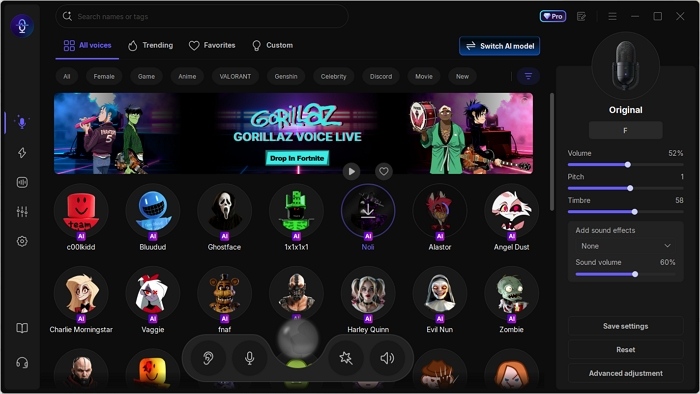
This voice cloner is powered by the RVC (Retrieval-based Voice Cloning) AI model, known for producing high-quality, natural-sounding clones from only a few seconds of audio, making it fast, efficient, and user-friendly.
Key Features:
- Clone your voice easily without setup
- Customize pitch, timbre, and volume
- Support WAV, MP3, M4A, OGG, AAC, MP4, FLAC
- Upload 1-30 minutes audio files less than 500 MB
- Preview the cloned voice in real time
- Fast generation for immediate results
- Integration with Discord, Twitch, and 2,000+ apps
- Large preset library of AI voices
How to Clone Your Voice?
Before you upload the audio clip to any voice cloning app, you should clone your own voice or others with explicit consent. We do not encourage harassment or fraud.
Step 1. Prepare a clean recording.
Ensure your audio clip is between 1 and 30 minutes and features only a single speaker without background music or noise. Any noise or interference can reduce the quality of the generated voice.
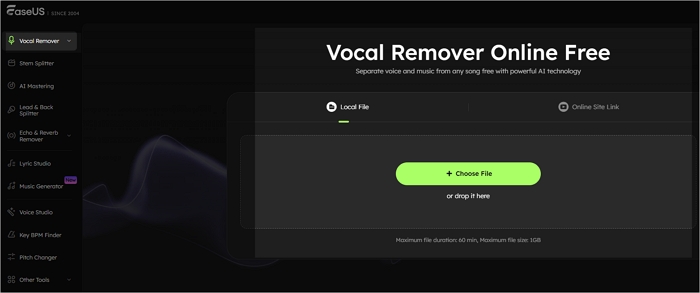
If your recording isn't clean, you can easily remove background noise using EaseUS Online Vocal Remover. Simply upload your file, separate the vocals from the noise, and get a crisp, clear voice ready for voice cloning.
Step 2. Clone your voice.
- Download and open EaseUS VoiceWave.
- Go to "Voice Creation" > "Clone Voice Now."
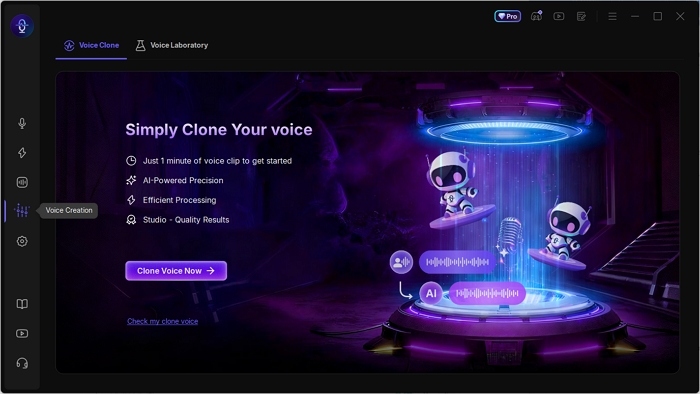
- Name your voice and upload your recording.
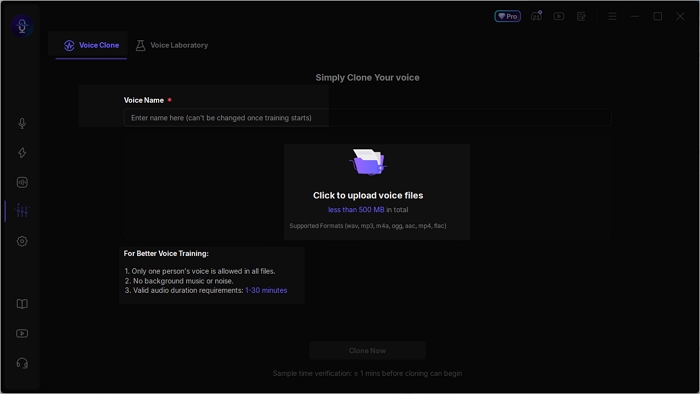
- Click "Clone Now" to start the process.
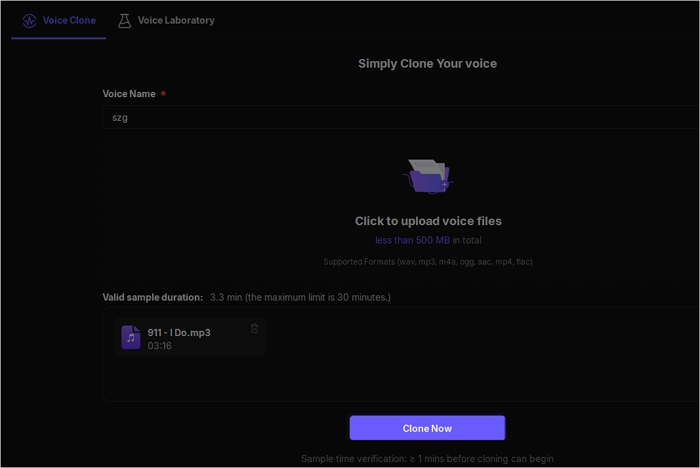
- Wait about an hour for the system to process your voice and generate your clone.
Step 3. Use your cloned voice.
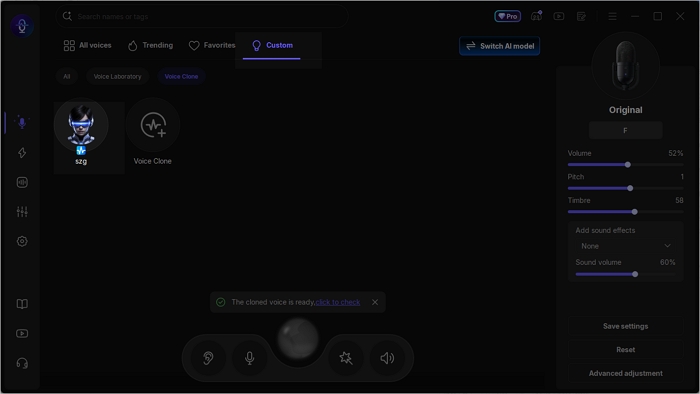
Next, you can tap "Check Out My Cloned Voice" or find your cloned voice in the Custom tab. From there, adjust its volume, pitch, timbre, and other settings to suit your needs.
Once ready, you can use your cloned voice for real-time voice transformation or as a voiceover in videos.
Legal & Ethical Essentials
While cloning your own voice does not infringe any copyright, replicating someone else's voice requires explicit written permission. Using another person's voice without consent for impersonation, fraud, political persuasion, or harassment is both illegal and unethical. When publishing synthetic audio, it is best practice to clearly label it as a synthetic or AI-generated voice to ensure transparency and maintain trust with your audience.
Wrapping up
How to clone someone's voice with AI? Simply open EaseUS VoiceWave and upload a clear recording for fast and easy voice cloning—no complicated setup required. The tool also offers 300+ AI voices, including celebrities, anime and game characters, and meme soundboard effects. You can have fun with preset voices or customize your own AI voice instantly.
FAQ
How to clone any voice with AI?
- Open EaseUS VoiceWave and set up microphone.
- Go to "Voice Creation" > "Clone Voice Now" > name your voice > upload the audio file with a clear voice > "Clone Now."
- Preview the cloned voice and use it as an AI voice.
Can I use AI to replicate someone's voice?
Yes, you can use AI to replicate someone's voice — but only with their clear permission. Doing it without consent can break laws or platform rules and is considered unethical. Always get consent and label the audio as AI-generated.
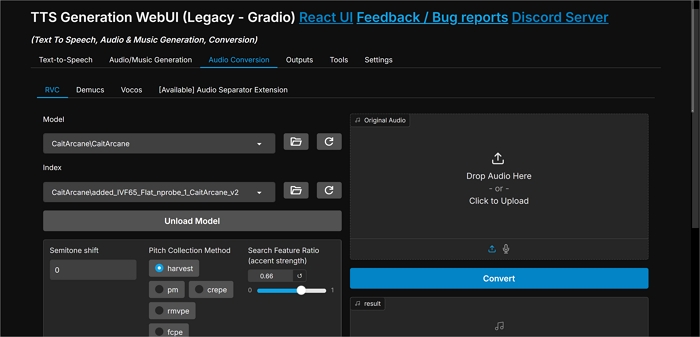
How to clone someone's voice with AI for free?
- Download the latest version of TTS-WebUI.
- Unpack the exe file and run start_tts_webui.bat or start_tts_webui.sh.
- Choose the GPU/Chip you are using.
- Open the GUI and choose "Audio Conversion" > "RVC" > customize your model > upload your audio.
- Hit "Convert."
Is there an AI that can clone my voice?
Yes, several AI tools can clone your own voice safely. Examples include EaseUS VoiceWave, ElevenLabs, Resemble AI, and Listnr AI.
Just record and upload a short voice sample, and the tool creates a digital version of your voice for text-to-speech or content creation. Make sure to use it only for yourself and review each platform's privacy and usage terms.