-
![]()
Joey Albert
Joey has been involved with tech ever since she joined the EaseUS editor team in March 2011 and now she is a senior website editor. She is good at solving various issues, such as video downloading and recording.…Read full bio -
![]()
Alin
Alin is a sophisticated editor for EaseUS in tech blog writing. She is proficient in writing articles related to screen recording, voice changing, and PDF file editing. She also wrote blogs about data recovery, disk partitioning, data backup, etc.…Read full bio -
Jean has been working as a professional website editor for quite a long time. Her articles focus on topics of computer backup, data security tips, data recovery, and disk partitioning. Also, she writes many guides and tutorials on PC hardware & software troubleshooting. She keeps two lovely parrots and likes making vlogs of pets. With experience in video recording and video editing, she starts writing blogs on multimedia topics now.…Read full bio
-
![]()
Gorilla
Gorilla joined EaseUS in 2022. As a smartphone lover, she stays on top of Android unlocking skills and iOS troubleshooting tips. In addition, she also devotes herself to data recovery and transfer issues.…Read full bio -
![]()
Rel
Rel has always maintained a strong curiosity about the computer field and is committed to the research of the most efficient and practical computer problem solutions.…Read full bio -
![]()
Dawn Tang
Dawn Tang is a seasoned professional with a year-long record of crafting informative Backup & Recovery articles. Currently, she's channeling her expertise into the world of video editing software, embodying adaptability and a passion for mastering new digital domains.…Read full bio -
![]()
Sasha
Sasha is a girl who enjoys researching various electronic products and is dedicated to helping readers solve a wide range of technology-related issues. On EaseUS, she excels at providing readers with concise solutions in audio and video editing.…Read full bio
Page Table of Contents

Sasha
Updated on Jan 21, 2026
0 Views |
0 min read
Use the distinctive voice of Kasane Teto for your creative projects. Modern AI tools make it simple to generate Teto's crisp, recognizable tones for various applications, including streaming, professional voiceovers, or even creating original musical compositions. This guide outlines four of the most effective methods to integrate her AI voice into your work, from real-time voice changing to producing complex duets.
Who Is Kasane Teto?

Kasane Teto is a virtual singer who started as a fan-made character in the UTAU voice software. She first appeared in an April Fool’s joke claiming she was a new VOCALOID from Crypton Future Media. Later, she officially became part of UTAU, a free program similar to VOCALOID. Her voice is provided by voice actress Mayo Oyamano. Over time, Teto gained immense popularity in the Vocaloid and UTAU communities.
Transform Your Voice Into Kasane Teto AI Voice in Real Time
- 🏞️Use Case: Online gaming, video & audio chatting, live stream.
- 💲Pricing: Starts from $14.95
- 💻Compatibility: Windows 10 & 11
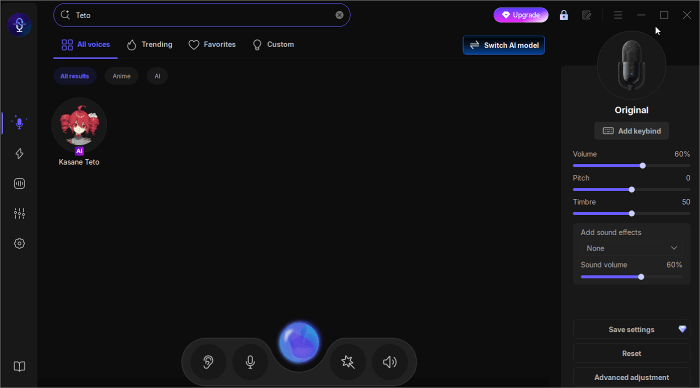
The first and most powerful one is the real-time voice changer, EaseUS VoiceWave, which helps transform your voice into that of Kasane Teto, Hatsune Miku, Otomachi Una, and others. You can easily make your voice sound clear and crisp. As one of our most popular AI voice effects, it is trained by AI to mimic her voice. Besides these popular virtual singing voices, it also offers AI effects inspired by anime characters such as Nezuko (from Demon Slayer), Luffy (from One Piece), Naruto Uzumaki (from Naruto), and more. Let's see what it offers:
- Real-time voice changing
- Wide compatibility with 2,000+ applications
- Large library of AI voice effects and soundboards
- Voice customization & cloning
See how to use EaseUS VoiceWave to make you sound like Kasane Teto:
Step 1. Download it from here.
Step 2. Go to "Settings" to set up your microphone and headphones.
Step 3. Go to "Real-time Voice Changer," and search for "Teto." Select it to use.
Turn Any Text into Kasane Teto AI Voice Easily
- 🏞️Use Case: Anime dubs, narration, YouTube/TikTok videos, voiceover for content.
- 💲Pricing: Starts from $8.99/month
- 💻Compatibility: Web-based
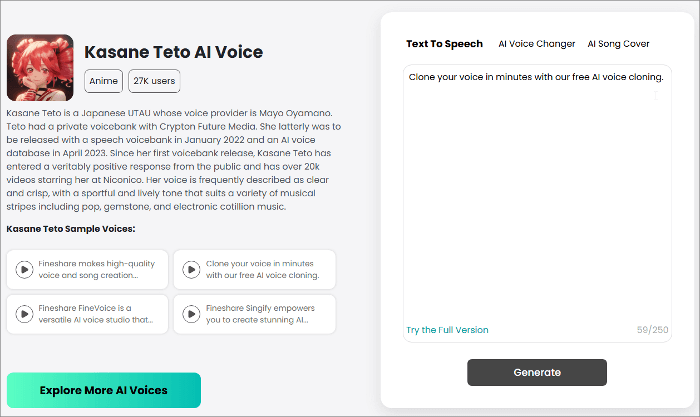
Looking to create voiceovers with the Kasane Teto AI voice? The Fineshare Online AI Voice Generator offers a powerful solution for generating realistic speech in Teto's distinctive voice. This web-based platform eliminates the need for downloads while providing access to multiple voice options, including popular characters like Vegeta, Eric Cartman, Shrek, and Rick.
Follow these 3 simple steps to create voiceovers using Fineshare's online voice generator with Teto's AI voice:
Step 1. Input your text.
Step 2. Click the "Generate" button and wait for the process to complete.
Step 3. Preview the generated audio, and download it if you are satisfied.
Create Fun Duets with the Kasane Teto AI Voice
- 🏞️Use Case: Karaoke singing, fun music covers, collaboration videos, virtual idol projects.
- 💲Pricing: Starts from $1.99/mo
- 💻Compatibility: Web-based
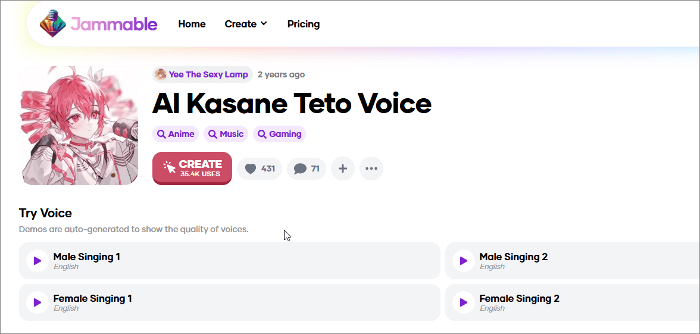
Like Fineshare, Jammable features a text-to-speech function that instantly converts written text into spoken audio using a range of AI voice models, including Kasane Teto, Akita Neru, and Kagamine Rin. However, its standout feature is the powerful AI-generated cover. This tool enables you to upload an existing song or audio file, or even a new recording of your own voice, and the software will transform it into a track performed by an AI voice, such as Kasane Teto.
Follow the steps below to get Kasane Teto AI voice:
Step 1. Sign up and log in to your account.
Step 2. Find and choose the AI Kasane Teto voice, and click the "CREATE" button. This will open a small window; upload your audio.
Step 3. It will then generate a vocal cover using the Teto voice.
Share it on:

Generate Full Songs with Kasane Teto's AI Voice
- 🏞️Use Case: Original music creation, covers/remixes, fandom works.
- 💲Pricing: Starts from $5.99
- 💻Compatibility: Web-based
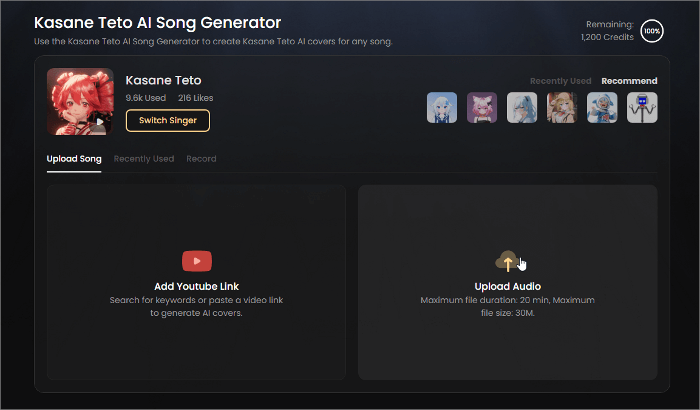
Looking to create AI covers with the voice of Kasane Teto? Singify is an AI music generator that lets you produce professional-sounding tracks with no musical expertise required. With Singify, you can create a cover song using Kasane Teto's AI voice model or compose an original song from scratch. The platform features over 100 other AI voice models and 15 stem separation modes, giving you the tools to craft unique, high-quality audio.
How to create a full cover in Kasane Teto's AI voice with Singify:
Step 1. Upload an audio file or paste a YouTube link into the tool.
Step 2. Generate your custom cover, now sung in Teto's signature AI voice.
Final Words
Still looking for the Kasane Teto AI voice? This guide introduces four reliable ways to access and utilize Teto's voice—whether for online gaming, chatting, creating voiceovers, or even generating duets and full songs. These tools are versatile enough to meet a wide range of needs. For users seeking real-time voice modification, EaseUS VoiceWave provides a powerful voice-changing solution specifically designed for gaming enthusiasts and content creators.
FAQs on Kasane Teto AI Voice
1. Who is the voice behind Kasane Teto?
Kasane Teto's voice comes from Mayo Oyamano, a Japanese voice actress who recorded the samples used in her UTAU voicebank.
2. Is Teto 15 or 31?
Officially, Teto's character profile says she is 31 years old but has the appearance of a 15-year-old.
3. Why does Kasane Teto sound so realistic?
Unlike fully synthetic Vocaloid voices, Teto's voicebank was built from real human recordings of Mayo Oyamano. That's why her singing and speaking sound more natural and lifelike compared to some other virtual singers.