-
![]()
Joey Albert
Joey has been involved with tech ever since she joined the EaseUS editor team in March 2011 and now she is a senior website editor. She is good at solving various issues, such as video downloading and recording.…Read full bio -
![]()
Alin
Alin is a sophisticated editor for EaseUS in tech blog writing. She is proficient in writing articles related to screen recording, voice changing, and PDF file editing. She also wrote blogs about data recovery, disk partitioning, data backup, etc.…Read full bio -
Jean has been working as a professional website editor for quite a long time. Her articles focus on topics of computer backup, data security tips, data recovery, and disk partitioning. Also, she writes many guides and tutorials on PC hardware & software troubleshooting. She keeps two lovely parrots and likes making vlogs of pets. With experience in video recording and video editing, she starts writing blogs on multimedia topics now.…Read full bio
-
![]()
Gorilla
Gorilla joined EaseUS in 2022. As a smartphone lover, she stays on top of Android unlocking skills and iOS troubleshooting tips. In addition, she also devotes herself to data recovery and transfer issues.…Read full bio -
![]()
Rel
Rel has always maintained a strong curiosity about the computer field and is committed to the research of the most efficient and practical computer problem solutions.…Read full bio -
![]()
Dawn Tang
Dawn Tang is a seasoned professional with a year-long record of crafting informative Backup & Recovery articles. Currently, she's channeling her expertise into the world of video editing software, embodying adaptability and a passion for mastering new digital domains.…Read full bio -
![]()
Sasha
Sasha is a girl who enjoys researching various electronic products and is dedicated to helping readers solve a wide range of technology-related issues. On EaseUS, she excels at providing readers with concise solutions in audio and video editing.…Read full bio
Page Table of Contents

Myra
Updated on Dec 29, 2025
0 Views |
0 min read
About Theodore Perterson from Hello Neighbor
Theodore Masters Peterson, commonly known as The Neighbor or Mr. Peterson, is the primary antagonist in the video game Hello Neighbor. He is depicted as an unemployed, unhinged engineer who obsessively guards his basement secrets from the protagonist, Nicky Roth.
Peterson's Character Arc
Peterson evolves from a seemingly monstrous figure, chasing intruders with gadgets and axes, to a tragic one, driven mad by grief and paranoia. In Hello Neighbor 2, he hides Aaron from authorities amid missing children investigations, highlighting his twisted paternal instincts amid deeper lore of family trauma and town conspiracies.
 (Image from Hello Neighbor Fandom)
Why You Need a Theodore Peter Voice Changer
Theodore Peterson's chilling presence in Hello Neighbor extends beyond gameplay, captivating fans with his distinctive grunts, yells, and eerie voice lines that amplify the horror atmosphere.
Peterson's vocal traits, deep, menacing tones, and panicked shouts, have inspired AI voice changers, allowing users to mimic him for content creation, streams, or memes. Voice changers democratize Peterson's iconic audio, letting creators role-play stealth chases or narrate lore videos.
3 Ways to Get Theodore Peterson AI Voice
Now that fans can channel Theodore Peterson's haunting voice, several AI-powered tools make it simple to generate or transform your voice into his. Each tool below leverages advanced AI models trained on Peterson's game audio, offering a user-friendly interface for beginners.
EaseUS VoiceWave
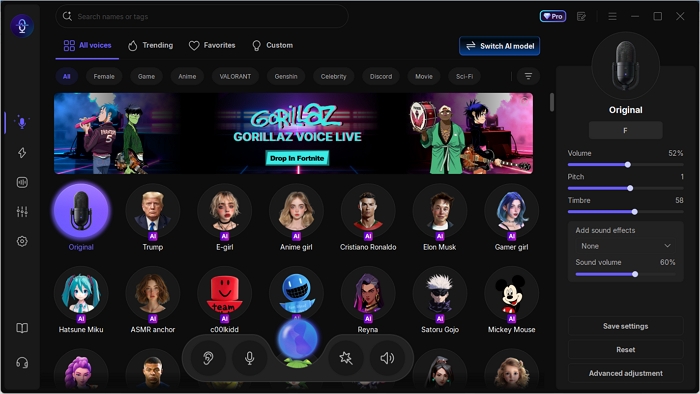
EaseUS VoiceWave stands out as a versatile real-time AI voice changer, perfect for gamers and streamers who want to embody Theodore Peterson's deep, guttural growls during live sessions. This Windows-based tool can mimic the Neighbor's panicked yells and heavy breathing, with low-latency processing for seamless Twitch or Discord use.
Key Features:
- Changes your voice instantly during gaming, streaming, or calls with minimal lag, perfect for live role-play.
- Simple setup on Windows, integrates with Discord, OBS, and Steam, no technical expertise needed.
- Expansive voice library with hundreds of voice filters and soundboards for versatile, immersive content creation.
- Basic features at no cost, with Premium unlocks for unlimited use and advanced voice cloning of recorded clips.
How to Use:
Launch the EaseUS VoiceWave on your computer, set the earphones and microphone, select the voice filter (or train one via uploaded game audio in the Voice Creation tab), and choose VoiceWave Microphone as input in apps like Discord.
VoiceDub
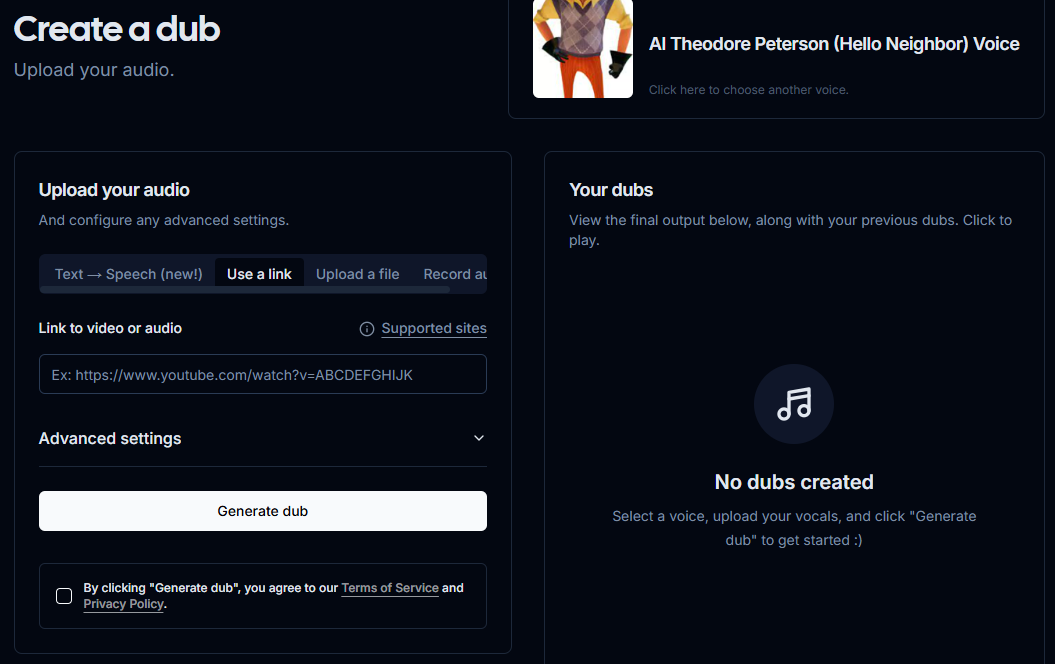
VoiceDub offers a straightforward online AI voice generator tailored for creating Theodore Peterson covers from Hello Neighbor. This web-based platform lets you upload audio files or paste URLs from YouTube/TikTok, then select the Peterson voice model for instant dubs.
Key Features:
- Train custom voices or convert text to speech for voiceovers, covers, and podcasts.
- Generates dubs with a user-friendly interface and active Discord community support.
- Multiple AI voices, covering diverse styles, accents, and characters.
How to Use:
Choose the Theodore Peterson voice, upload or record your audio, tweak settings like pitch, and hit "Generate dub" to preview and download results, ideal for quick memes or video narration without software installs.
101 Soundboard
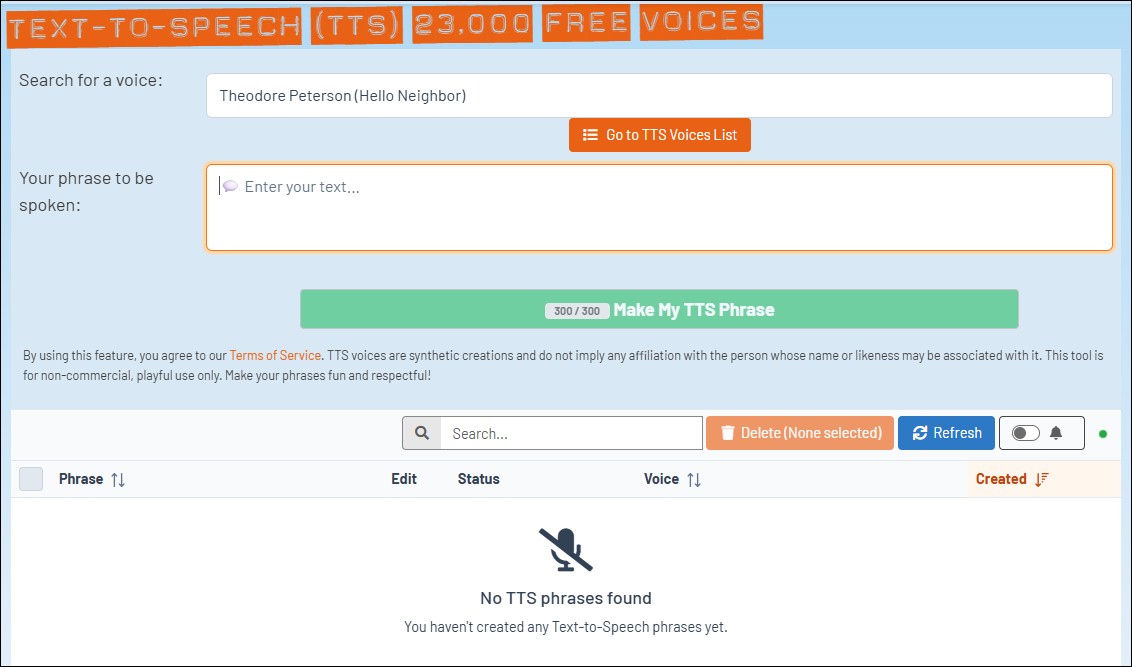
101 Soundboard provides a fun, accessible platform for Theodore Peterson's voice effects, specializing in TTS and soundboard playback for instant game-like audio. You can turn typed phrases into his signature voice from Hello Neighbor and enjoy one-click playback.
Key Features:
- Get custom audio added to the soundboard in seconds.
- Features categories like AI Voices, Funny, and Games, with easy sharing.
- Type any text to instantly convert it into Peterson's gruff voice, with many MP3 sound effects and quotes ready to play.
How to Use:
Visit its official website, search for the Theodore Peterson (Hello Neighbor) voice, and type your phrase to be spoken. Then it will generate the audio clip immediately, making it perfect for quick content without downloads or complex setups.
Conclusion
Theodore Peterson's iconic voice from Hello Neighbor brings unmatched tension to horror gaming, and AI tools like EaseUS VoiceWave, VoiceDub, and 101 Soundboard make it easy for anyone to recreate that spine-chilling sound.
These platforms empower creators, streamers, and fans to produce immersive content, from live role-plays to viral dubs, without needing pro audio skills. Experiment with them to capture Peterson's grunts and shouts perfectly.
FAQs
Is using Theodore Peterson AI voices legal?
Yes, for personal, non-commercial use like memes or streams is legal, as they draw from public game audio. However, avoid monetized content without fair use checks to respect copyrights.
Can I train a custom Peterson voice variant?
Yes, EaseUS VoiceWave supports cloning with your own game clips. You can upload an audio file longer than 1 minute to train the AI model and make it sound like Peterson.
What is the best tool for Peterson soundboards in Discord?
EaseUS VoiceWave excels in real-time calls with low latency, while 101 Soundboard integrates via bot for live playback.