-
![]()
Joey Albert
Joey has been involved with tech ever since she joined the EaseUS editor team in March 2011 and now she is a senior website editor. She is good at solving various issues, such as video downloading and recording.…Read full bio -
![]()
Alin
Alin is a sophisticated editor for EaseUS in tech blog writing. She is proficient in writing articles related to screen recording, voice changing, and PDF file editing. She also wrote blogs about data recovery, disk partitioning, data backup, etc.…Read full bio -
Jean has been working as a professional website editor for quite a long time. Her articles focus on topics of computer backup, data security tips, data recovery, and disk partitioning. Also, she writes many guides and tutorials on PC hardware & software troubleshooting. She keeps two lovely parrots and likes making vlogs of pets. With experience in video recording and video editing, she starts writing blogs on multimedia topics now.…Read full bio
-
![]()
Gorilla
Gorilla joined EaseUS in 2022. As a smartphone lover, she stays on top of Android unlocking skills and iOS troubleshooting tips. In addition, she also devotes herself to data recovery and transfer issues.…Read full bio -
![]()
Rel
Rel has always maintained a strong curiosity about the computer field and is committed to the research of the most efficient and practical computer problem solutions.…Read full bio -
![]()
Dawn Tang
Dawn Tang is a seasoned professional with a year-long record of crafting informative Backup & Recovery articles. Currently, she's channeling her expertise into the world of video editing software, embodying adaptability and a passion for mastering new digital domains.…Read full bio -
![]()
Sasha
Sasha is a girl who enjoys researching various electronic products and is dedicated to helping readers solve a wide range of technology-related issues. On EaseUS, she excels at providing readers with concise solutions in audio and video editing.…Read full bio
Page Table of Contents

Sasha
Updated on Jan 21, 2026
0 Views |
0 min read
You've got a new playable killer to play in Forsaken - Nosferatu. Despite his skills like lacerate, bloodhook, caraclysm, and hunter's feast, you could make your killer experience more immersive, that is, by using a Nosferatu voice changer. EaseUS VoiceWave, as one of the real-time voice changers that offers most of the presets of Forsaken killers' voices, makes you sound like Nosferatu instantly. That's not the limitation, since here, we select tools to help you get the Nosferatu voice.
About Nosferatu in Forsaken/Roblox
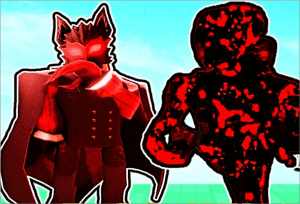
Nosferatu, or simply Nos, is a new killer added to FORSAKEN. He first appeared as an NPC during the Masquerade event and officially became a playable killer on November 28, 2025, with the release of the 3.4.0 update.
Nosferatu embodies the classic vampire aesthetic: dark skin, black hair tied in a high ponytail, a black suit paired with a flowing cloak, and a deep red masquerade mask.
For players who enjoy immersive, atmospheric horror experiences, Nosferatu's terrifying lore, vampire-themed design, and his silent movement, sudden ambushes, and blood/darkness mechanics perfectly match what they're looking for.
Instant Nosferatu Voice Transformation with EaseUS VoiceWave [Windows]
- ✍️What Users Say:
- So far, it's useful that VoiceWave offers popular AI voices, a lifetime purchase option, and performance features that allow it to be run while gaming on heavy games. - From VoiceWave Discord
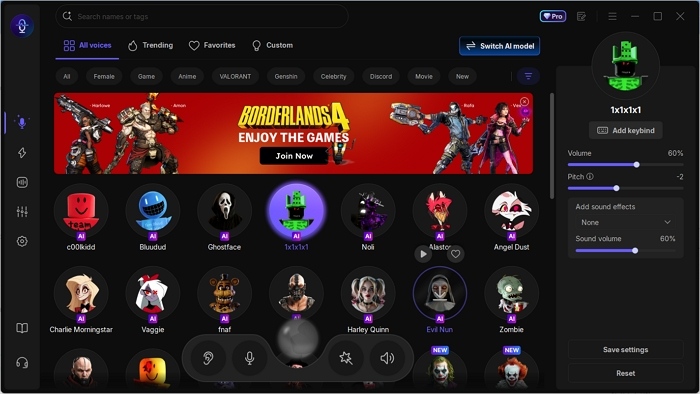
You could instantly sound like Nosferatu with EaseUS VoiceWave. This real-time voice modulation tool is powered by multiple voice models, including RVC and self-developed AI voice models, so as to deliver you a realistic Nosferatu AI voice. You could change your real voice into that of Nosferatu, for it is installed on the system level; any app or platform that uses your microphone could be affected, such as messaging apps like Discord, WhatsApp, or Zoom, video games supporting voice chat like Among Us, Battlefield 6, or streaming apps like Twitch.
Besides Nosteratu AI voice, you could also get other killers' voices from Forsaken, like c00lkidd, John Doe, Slasher, Noli, etc. Other classic game characters include Klee from Genshin Impact, Amon from Borderlands 4, and Kratos from God of War. Related soundboards are also available here.
Key Features of EaseUS VoiceWave:
- Real-time Nosferatu voice changing
- An extensive library of soundboard (audio clips, sounds)
- 200+ AI voice effects
- Voice cloning and customization options
✅Pros:
- Extensive voice library
- Broad compatibility
- Offers free AI voices daily
❎Cons:
- Windows only
Nosferatu Voice Anytime, Anywhere with Voicemod [Windows & Mac]
- ✍️What users say:
- It uses minimal RAM and has good performance. You get tons of things to use when it comes to soundboards. The voice changers are great, and even without premium, you get to use some premium voices, which I love. - From Trustpilot
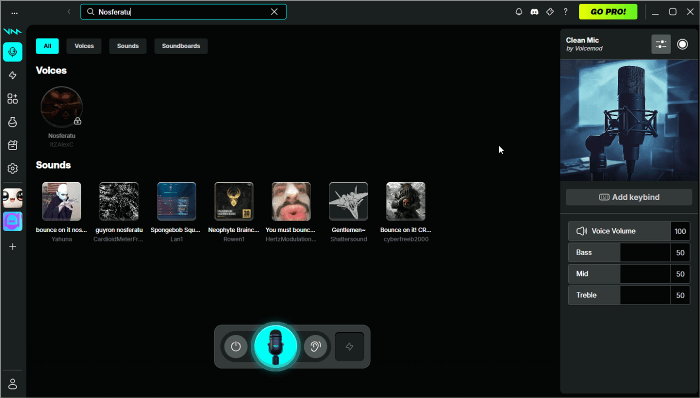
If you want the Nosferatu AI voice when playing games on your Mac, then consider Voicemod. It is one of the most famous AI voice changers used by most VTubers, streamers, and gamers. What makes it stand out is that it has a large community, called Tuna, where you can find thousands of user-made voices, and allows you to create your own content or share it with people who have the same interests. But note that adding Tuna's content, such as voices or audio clips, to Voicemod only works for pro users.
Voicemod also shines with its cross-platform support (Windows + macOS) and advanced editing tools. You can refine the Nosferatu tone using the voice vocoder, equalizer, effect chain, filters, and background effects to create anything from a subtle vampire whisper to a full demonic predator growl.
✅Pros:
- Massive library of high-quality voices
- Active community
- Works seamlessly with platforms like Discord and OBS
❎Cons:
- The free version is very restrictive
- The Voicelab is not beginner-friendly
Comparison: EaseUS VoiceWave VS Voicemod
| Tool | Free Voices | Price | Supported OS | Editing Depth |
| EaseUS VoiceWave | 3 rotating daily voices | $14.95/mon $29.95/year $39.95/lifetime (for individual) |
Windows | Easy preset control |
| Voicemod | 7 rotating daily voices | $17.97/quarter $23.88/year $109.99/lifetime |
Windows & Mac | Advanced audio editing |
In Short
This post shares with you two real-time voice changers that you can use to change your voice into Nosferatu's voice effortlessly. It also offers a simple comparison. To help you choose, EaseUS VoiceWave delivers a faster, more stable, and more realistic Nosferatu voice with true one-click simplicity. Voicemod offers greater creative freedom, macOS support, and a rich community-driven library.
Share it on:

FAQs on Nosferatu Forsaken Voice Changer
1. Is it legal to use a voice changer while gaming?
Yes. Using a voice changer is generally legal as long as you're not impersonating real individuals with malicious intent or violating a game's terms of service. Most games allow voice changers for fun, role-play, or streaming.
2. How to get a c00lkid voice changer?
You can get a c00lkid voice changer from tools like EaseUS VoiceWave. Install the tool, search for "c00lkid," and apply it in real time during games or streams.
3. Do VTubers use voice changers?
Yes, many VTubers use voice changers to match their character's personality, create stylized voices, or maintain privacy. Tools like VoiceWave are commonly used for this purpose.
4. Are Nosferatu voice changers available on Mac?
Yes. Voicemod supports macOS and includes a Nosferatu voice preset. EaseUS VoiceWave currently supports Windows only.
5. Is the Nosferatu voice filter free?
No, both EaseUS VoiceWave and Voiceod need you to pay for their AI voices, including the Nosferatu voice.
6. Can I customize the Nosferatu voice?
Yes. VoiceWave offers basic customization options, including volume, pitch, and timbre. Voicemod offers more advanced editing, including vocoders, EQ, audio chains, and filters.