-
![]()
Joey Albert
Joey has been involved with tech ever since she joined the EaseUS editor team in March 2011 and now she is a senior website editor. She is good at solving various issues, such as video downloading and recording.…Read full bio -
![]()
Alin
Alin is a sophisticated editor for EaseUS in tech blog writing. She is proficient in writing articles related to screen recording, voice changing, and PDF file editing. She also wrote blogs about data recovery, disk partitioning, data backup, etc.…Read full bio -
Jean has been working as a professional website editor for quite a long time. Her articles focus on topics of computer backup, data security tips, data recovery, and disk partitioning. Also, she writes many guides and tutorials on PC hardware & software troubleshooting. She keeps two lovely parrots and likes making vlogs of pets. With experience in video recording and video editing, she starts writing blogs on multimedia topics now.…Read full bio
-
![]()
Gorilla
Gorilla joined EaseUS in 2022. As a smartphone lover, she stays on top of Android unlocking skills and iOS troubleshooting tips. In addition, she also devotes herself to data recovery and transfer issues.…Read full bio -
![]()
Rel
Rel has always maintained a strong curiosity about the computer field and is committed to the research of the most efficient and practical computer problem solutions.…Read full bio -
![]()
Dawn Tang
Dawn Tang is a seasoned professional with a year-long record of crafting informative Backup & Recovery articles. Currently, she's channeling her expertise into the world of video editing software, embodying adaptability and a passion for mastering new digital domains.…Read full bio -
![]()
Sasha
Sasha is a girl who enjoys researching various electronic products and is dedicated to helping readers solve a wide range of technology-related issues. On EaseUS, she excels at providing readers with concise solutions in audio and video editing.…Read full bio
Page Table of Contents

Dawn Tang
Updated on Jan 21, 2026
0 Views |
0 min read
"Things just got a lot bluer," said Bluudud (or Bluudude) — a 12-year-old blue Roblox Forsaken killer known for his round head, sharp teeth, and mischievous attitude. He's mean, blunt, and causes chaos for fun. Despite being derived from C00lkidd, he hates everything C00lkidd likes. Players love his cool design and memorable voice lines, making him one of the most iconic first skins in Roblox's Dead World.
This article introduces practical ways to get the Bluudud voice changer so you can use his unique AI voice in your favorite games, videos, or messages.
|
Bluudud Voice Changer |
System |
Real-Time |
Feature |
AI Voice Variety |
Ease of Use |
|
Windows 10/11 |
✅ |
Voice Change & Soundboard |
300+ |
Easy |
|
|
Windows, Mac |
✅ |
Voice Change & Soundboard |
200+ |
Easy |
|
|
Web |
❌ |
AI Cover & TTS |
93,000+ |
Middle |
|
|
Windows, Mac, Linux |
❌ |
Change recorded voice |
/ |
Difficult |
EaseUS VoiceWave – Real-Time Bluudud Voice Changer for PC
- 💵Pricing: Free, $14.95/mo, $29.95/yr, , $39.95/life
EaseUS VoiceWave is an AI-powered Bluudud voice changer that perfectly replicates Bluudud's deep, distorted, and slightly robotic voice — both eerie and playful — in real time for gaming, streaming, and chatting. Here's its voice effect:
Original
Modified
Beyond the Bluudud voice, this Roblox voice changer features 400+ AI voices, including C00lkidd, 1x1x1x1, Noli, 007n7, Demon Slayer characters, and more. It works seamlessly with 2000+ apps and games such as R.E.P.O., Discord, Minecraft, ARC Raiders, WhatsApp, and Skype. Users can also customize pitch, timbre, and effects with minimal delay for a realistic experience.
✅Pros
- Expanding library of 400+ voices.
- Works with thousands of platforms and games.
- Natural, high-quality sound powered by AI.
- Real-time voice change with ultra-low latency.
- Built-in soundboards for instant fun.
- Clone someone else's voice with AI.
⛔Cons
- Available only on Windows at the moment.
How to get the Bluudude voice changer?
Step 1. Open EaseUS VoiceWave, go to "Settings," and select the devices. You can add a keybind here.
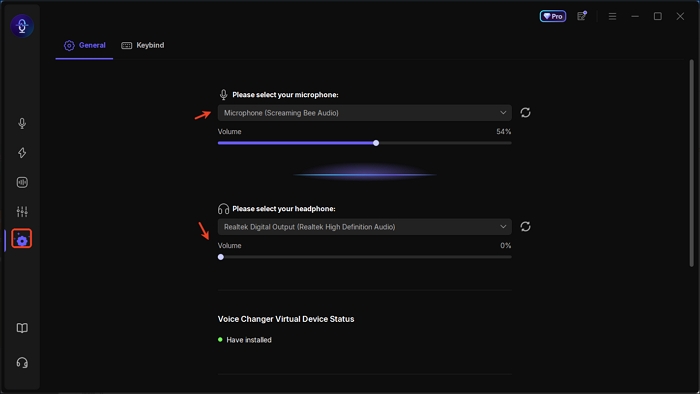
Step 2. Back to the main interface and search for Bluudud. Preview and download the AI model in seconds.
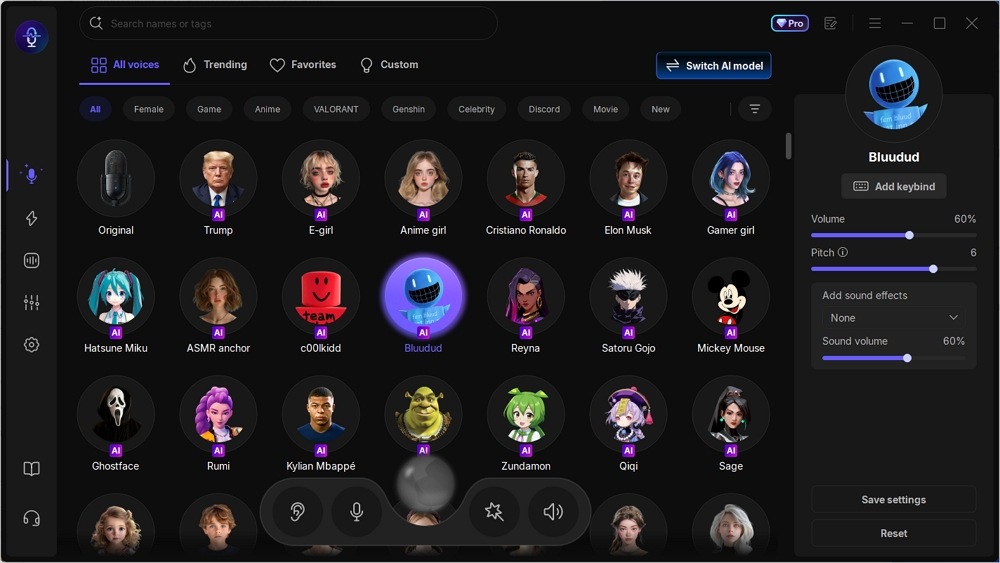
Step 3. Speak now and optionally adjust the volume, pitch, and background sound effects.
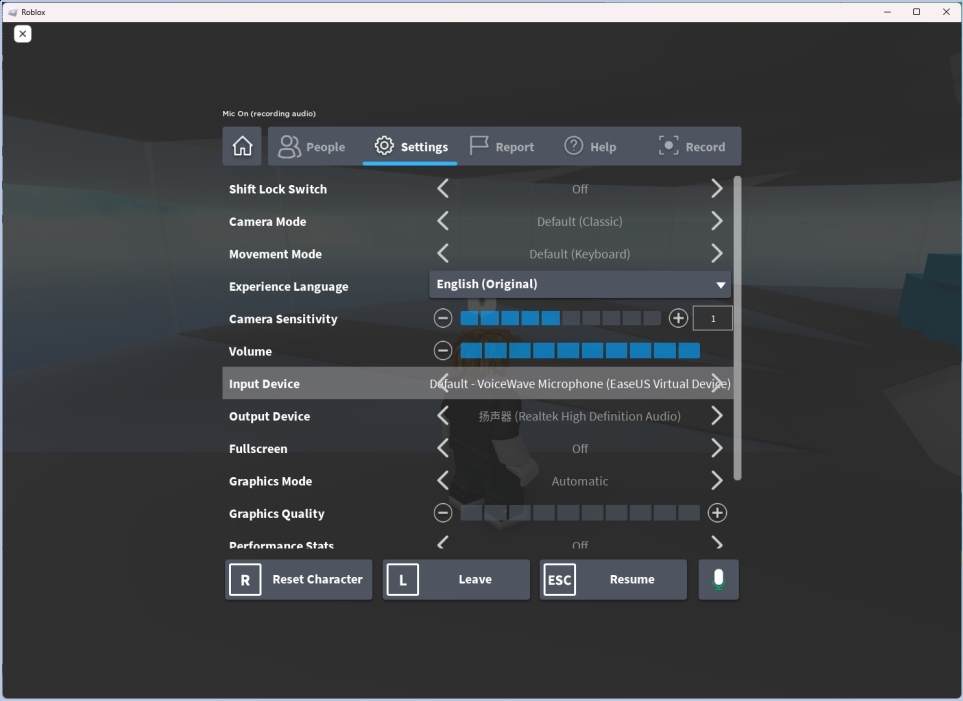
Step 4. To use the voice changer in Roblox or Discord, go to settings and select "Settings" > "Input Device" > "VoiceWave Microphone".
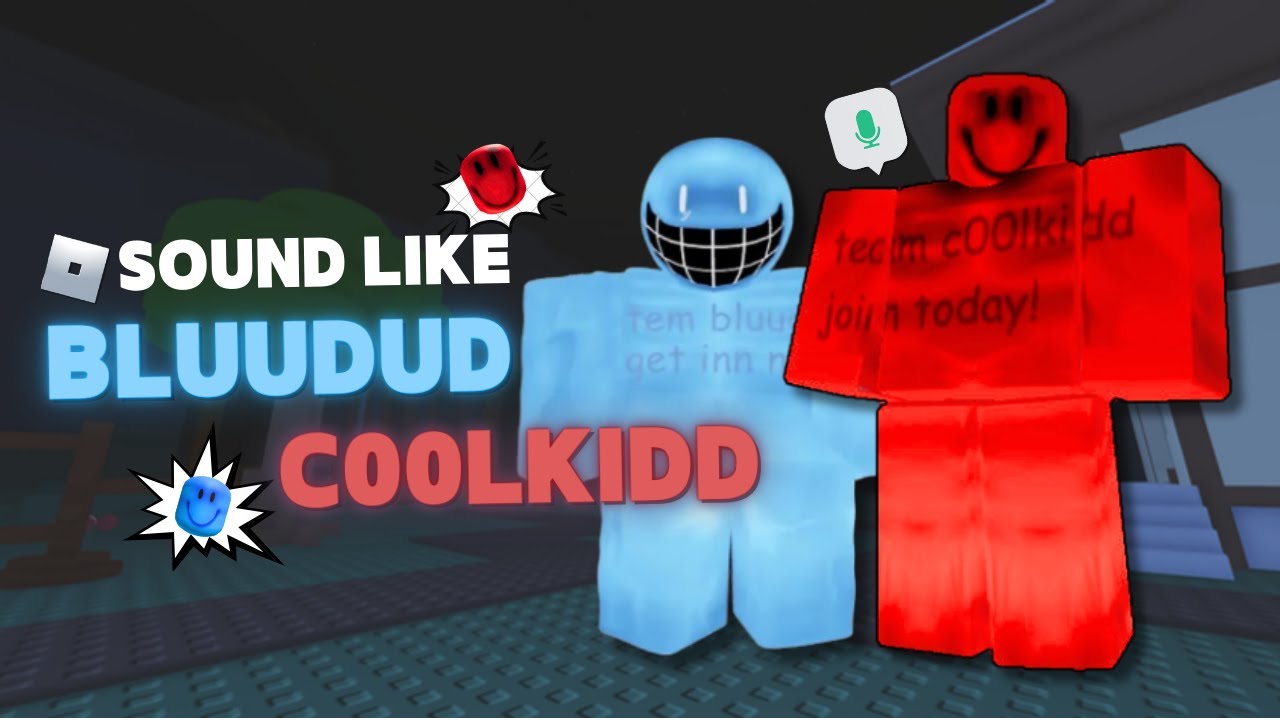
Here's a video about how he sounds when talking:
VoiceMod – Community-Powered Voice Changer for PC and Mac
- 💵Pricing: $5.99/mo Quarterly, $1.99/mo Annual, $109.99/mo One Time
VoiceMod is a real-time, community-based voice changer available for Windows, Mac, Android, iOS, and gaming consoles, offering hundreds of creative and evolving voice effects. Thanks to its active community, new voices are frequently added — and many effects come with multiple variations, giving users plenty of room to experiment and find their perfect sound.
The C00lkidd voice changer works with almost any game or app with voice chat, including Discord, Valorant, Fortnite, and more. The software also features soundboards for instant audio reactions and a Voice Lab for creating custom voice effects. While the free version offers limited daily voices, upgrading unlocks the full voice collection.
✅Pros
- Expansive, community-driven voice library with variations.
- Simple setup and user-friendly interface.
- Custom voice creation in Voice Lab.
- Built-in soundboard for quick reactions.
⛔Cons
- Free version offers limited voices.
- Occasional bugs, crashes, and lag issues.
- Some voice effects sound slightly distorted.
- High CPU and memory usage.
How to get the Bluudud voice changer?
Step 1. Launch VoiceMod and go to settings for basic setup.
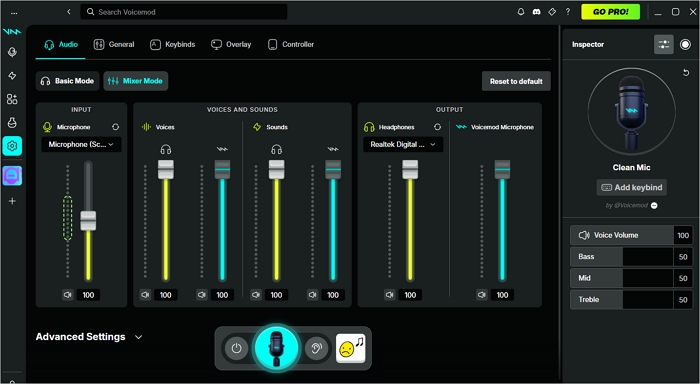
Step 2. Search for Bluudud and upgrade to unlock them.
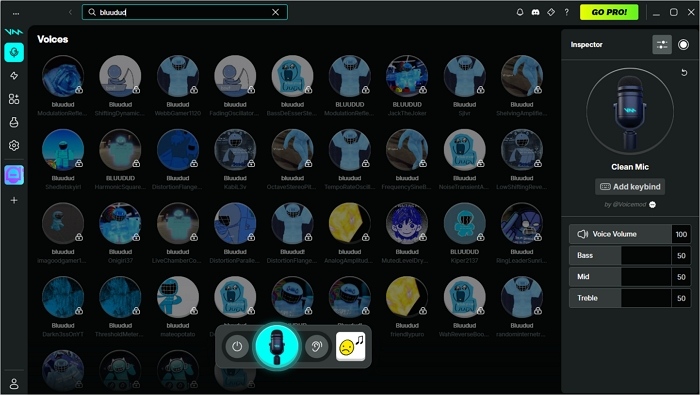
Step 3. Tap the voice and speak now.
Related Reading:
Jammable – Bluudud AI Voice Cover and Text to Speech Online
- 💵Pricing: $1.99/mo Basic, $9.99/mo Creator
Jammable is an AI-powered online platform for creating song covers and text-to-speech voices, featuring over 93,000 community-contributed voice models. You can record, upload, or type text to generate speech in Bluudud's distinct tone. Each model includes basic fine-tuning tools and community feedback, like ratings and comments, to help you choose the best one.
Users can also train and share their own custom voice models via the Jammable Voice Lab, contributing to the growing voice ecosystem. However, the Bluudud voice changer lacks real-time voice changing and offers no free trial, so testing options are limited before purchase.
✅Pros
- 93,000+ community-created AI voices.
- Supports song cover creation and text-to-speech.
- Users can train and share their own voice models.
- Voice models include ratings and user feedback.
⛔Cons
- No free trial or demo.
- Doesn't support real-time voice changing.
- Fine-tuning options are limited.
- Occasional processing delay for long files.
How to get Bluudud text to speech?
Step 1. Go to jammable.com and log in.
Step 2. Search for Bluudud in the search box.
Step 3. Select a high-rated AI voice and hit "CREATE."
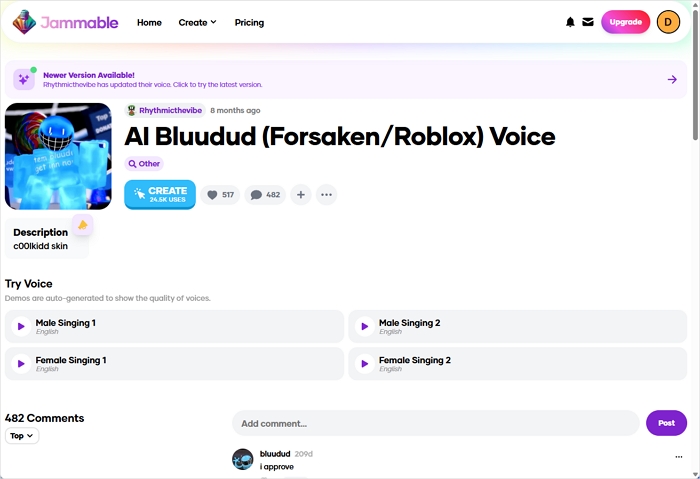
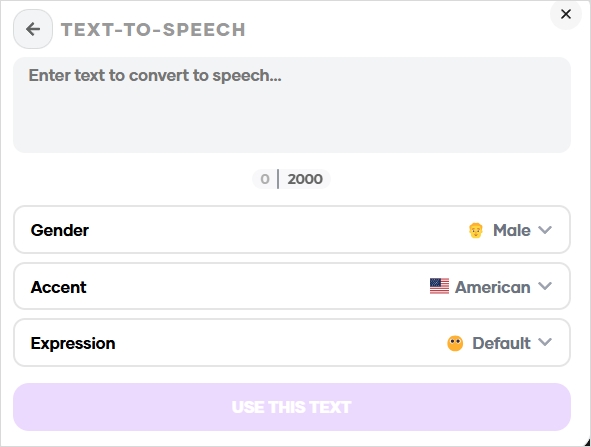
Step 4. Click "Audio to sing" > "Text to Speech," enter your text, and choose the gender, accent, and expression. Tap "Use the text."
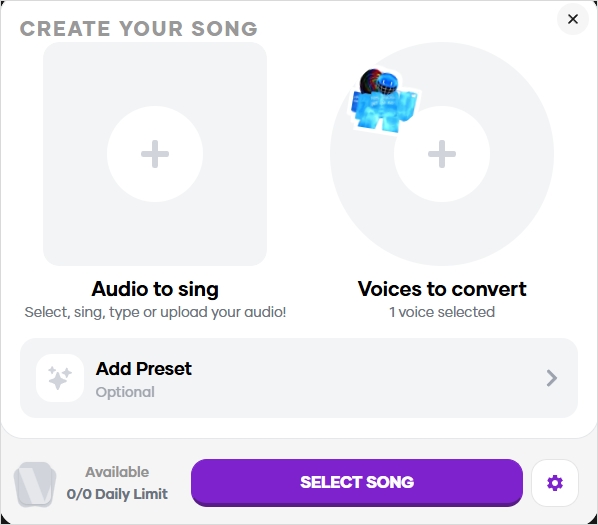
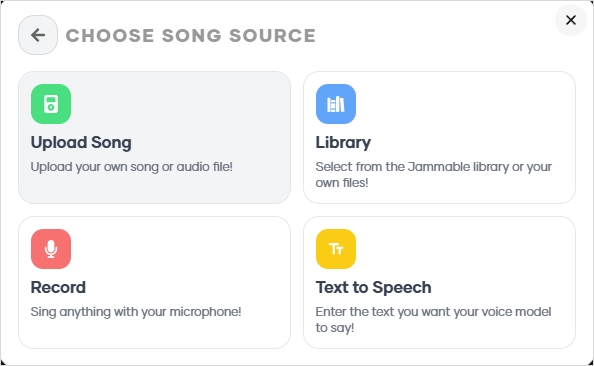
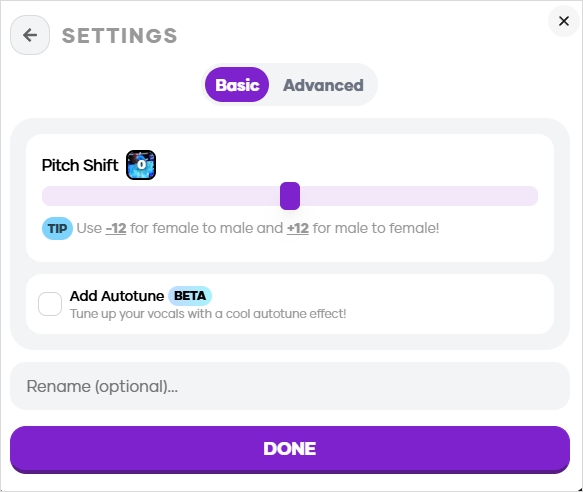
Step 5. Click the gear icon for more voice fine-tuning and hit "DONE" > "START COVER."
Audacity – Free Bluudud Voice Changer Cross Platform
- 💵Pricing: Free
Audacity is a free, open-source audio editor and recorder that supports VST and Nyquist plugins for advanced sound customization. You can record, edit, reduce noise, and apply effects to create a distorted Bluudud-style voice. Using plugins like Bit Crusher, you can modify bit depth and sample rate to achieve Bluudud's rough, digital tone.
While Audacity offers great flexibility and control, it's less beginner-friendly than dedicated Bluudud voice changers and lacks real-time voice modification features.
✅Pros
- Completely free and open-source.
- Supports VST and Nyquist plugins for custom effects.
- Powerful for post-processing and audio editing.
- Works on Windows, macOS, and Linux.
⛔Cons
- No real-time voice changing.
- Complex interface for beginners.
- Requires manual plugin installation.
- Limited prebuilt voice effects.
How to get Bluudud voice using Audacity (I'm using 3.7.5)?
Step 1. Download BitCrusher.ny and place it under "Audacity" > "Plug-Ins."
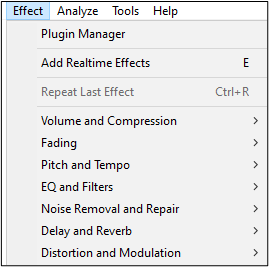
Step 2. Open Audacity, click "Effect," "Analyze" or "Tools" > "Plugin Manager" and rescan the folder.
Step 3. Record your voice or import an audio file to change.
Step 4. Go to "Effect" and find the imported plugin.
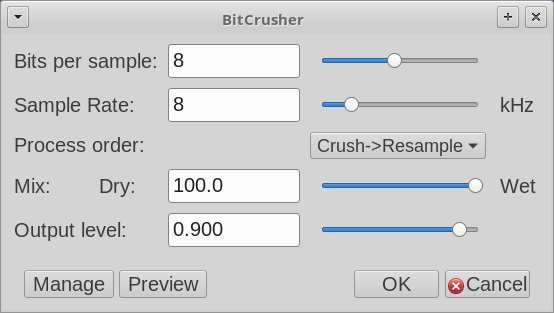
Step 5. Set the value as listed:
- Bits per sample: 4
- Sample Rate: 24
- Process order: Crush > Resample
- Mix: Dry: 100
- Output level: 0.900
Step 6. Tap "OK."
Wrapping up
This article lists four effective ways to get the Bluudud voice changer — from real-time AI-powered tools to plugin-based editing. Whether you want Bluudud's distorted, mischievous tone for gaming, streaming, or content creation, these options let you bring his voice to life anywhere.
Free download the real-time Bluudud voice changer for immersive live streaming!
FAQ
1. Does Blue Yeti have a voice changer?
No, the Blue Yeti microphone itself doesn't have a built-in voice changer, but you can use it with software like Blue VO!CE through Logitech G HUB to apply effects such as robot, monster, or alien voices. The mic acts as a high-quality input device, while the software processes your voice in real time to create those effects. This allows you to use the Blue Yeti as a voice changer for streaming, gaming, or recording, even though the hardware alone doesn't include that feature.
2. How to activate voice changer?
Select the VoiceWave virtual microphone as your microphone input in your game or app's audio settings.
3. Is Voicemod allowed on Roblox?
Yes, you can use Voicemod on Roblox, but only under certain conditions. It works best if you're using the desktop version of Roblox (not the Microsoft Store app) and have voice chat enabled on your account. To make it work, you'll need to set Voicemod's virtual microphone as your input device in both your system and Roblox settings.