-
![]()
Joey Albert
Joey has been involved with tech ever since she joined the EaseUS editor team in March 2011 and now she is a senior website editor. She is good at solving various issues, such as video downloading and recording.…Read full bio -
![]()
Alin
Alin is a sophisticated editor for EaseUS in tech blog writing. She is proficient in writing articles related to screen recording, voice changing, and PDF file editing. She also wrote blogs about data recovery, disk partitioning, data backup, etc.…Read full bio -
Jean has been working as a professional website editor for quite a long time. Her articles focus on topics of computer backup, data security tips, data recovery, and disk partitioning. Also, she writes many guides and tutorials on PC hardware & software troubleshooting. She keeps two lovely parrots and likes making vlogs of pets. With experience in video recording and video editing, she starts writing blogs on multimedia topics now.…Read full bio
-
![]()
Gorilla
Gorilla joined EaseUS in 2022. As a smartphone lover, she stays on top of Android unlocking skills and iOS troubleshooting tips. In addition, she also devotes herself to data recovery and transfer issues.…Read full bio -
![]()
Rel
Rel has always maintained a strong curiosity about the computer field and is committed to the research of the most efficient and practical computer problem solutions.…Read full bio -
![]()
Dawn Tang
Dawn Tang is a seasoned professional with a year-long record of crafting informative Backup & Recovery articles. Currently, she's channeling her expertise into the world of video editing software, embodying adaptability and a passion for mastering new digital domains.…Read full bio -
![]()
Sasha
Sasha is a girl who enjoys researching various electronic products and is dedicated to helping readers solve a wide range of technology-related issues. On EaseUS, she excels at providing readers with concise solutions in audio and video editing.…Read full bio
Page Table of Contents

Dawn Tang
Updated on Jan 21, 2026
0 Views |
0 min read
Who Is Lionel Messi?
Lionel Andrés "Leo" Messi is widely regarded as one of the greatest football players of all time. Born in Rosario, Argentina, he began his professional career at FC Barcelona, where he spent over 20 years and became the club's all-time leading scorer. Famous for his dazzling dribbling, vision, and goal-scoring ability, Messi has consistently redefined modern football.
Over his career, he has earned 8 Ballon d'Or awards, 4 UEFA Champions League titles, and multiple European Golden Shoes. In 2022, he led Argentina to a historic FIFA World Cup victory in Qatar, cementing his legacy as the most decorated player in football history with more than 40 trophies.
Beyond the records, Messi is admired for his humility, sportsmanship, and inspirational journey from a boy with growth hormone deficiency to a global icon.

How to Sound Like Messi?
For passionate fans, sounding like Lionel Messi can make streaming, fan dubs, memes, or TikTok voiceovers more entertaining and authentic. Whether for fun or creative projects, a reliable Messi AI voice changer is essential. When choosing the right tool, focus on:
- Accuracy – Does the AI capture Messi's distinctive Argentine-Spanish accent and soft-spoken tone?
- Emotion & Expression – Can it deliver both excitement (like match commentary) and calm delivery (interviews or greetings)?
- Naturalness – Steer clear of robotic or overly generic Spanish voices.
- Real-Time Mode – Ideal for gaming, streaming, or calls if you want to sound like Messi instantly.
One of the best options is EaseUS VoiceWave, a real-time Messi AI voice changer compatible with Discord, WhatsApp, Zoom, and thousands of other platforms. It offers hundreds of AI voices and soundboards to match different scenarios.
Key Features
- Real-Time AI Conversion – Instantly and naturally transform your voice into Messi's with RVC-powered AI, adjusting timbre, pitch, and volume in the built-in Voice Lab without lag or distortion.
- 2,000+ Supported Games & Apps – Use Messi's voice to stream football matches on Discord, surprise teammates in Roblox soccer games, or prank friends on WhatsApp or Facebook calls.
- Expansive Voice Library – Access 300+ AI voices, including Messi, Ronaldo, Mbappé, James, Curry, anime icons, and more, with new voices added regularly.
- Meme Soundboard – Over 300 sound effects spanning festive, horror, gaming, music, and movies for instant fun.
- Wide File Support – Upload or record in MP3, WAV, AAC, MP4, M4A, MP2, and more, giving you flexibility for all your projects.
How to sound like Messi in real time on your PC?
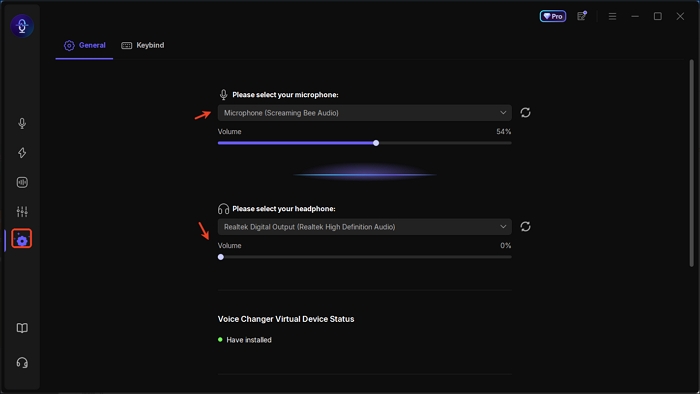
Step 1. Open EaseUS VoiceWave, move to the settings tab, and select your media devices.
Step 2. Back to the voice effect interface, tap and download the Messi AI voice model quickly.
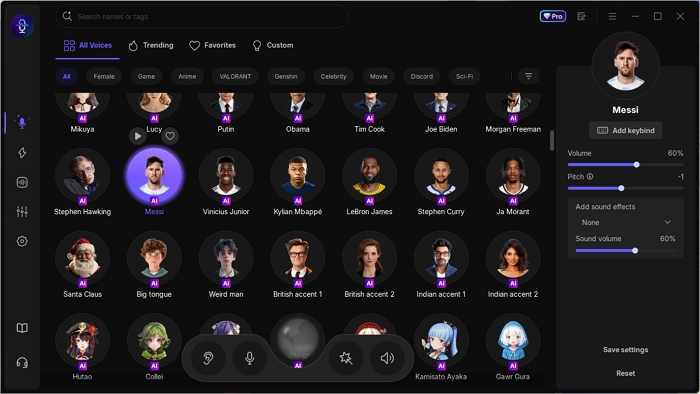
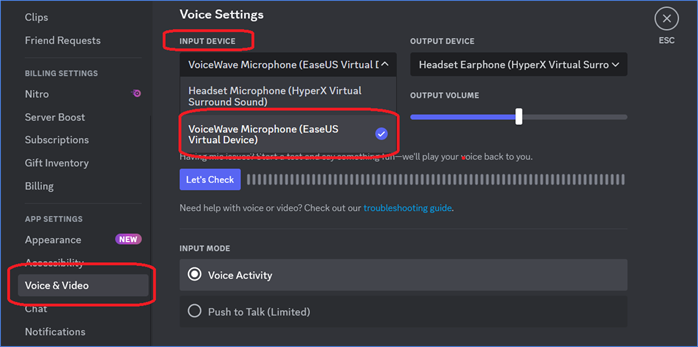
Step 3. You can speak now and tweak your voice optionally. If you want to use the Messi voice changer on other apps like Discord, you need to select VoiceWave Virtual Microphone as its input device. Then you can speak like Messi in the app.
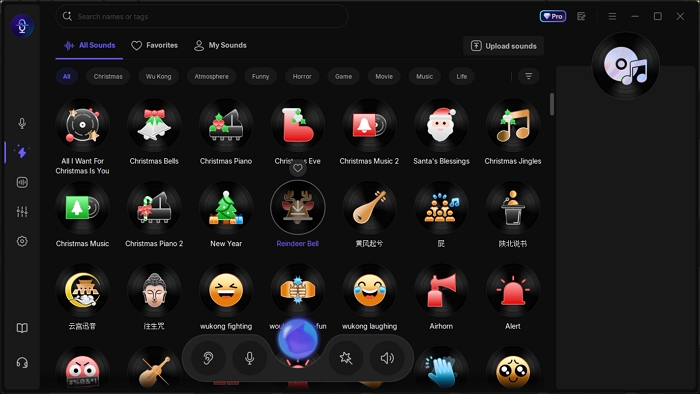
Step 4. Play any hilarious sound effects in the soundboard tab.

Cristiano Ronaldo AI Voice: Sound Like Superstar
Explore the best Cristiano Ronaldo AI voice generators & text-to-speech tools for gaming, streaming, TikTok, and fan content.

Wrapping up
If you've ever dreamed of speaking with Messi's voice, today's AI technology makes it possible. Among the available tools, EaseUS VoiceWave stands out as the best Messi AI voice changer thanks to its realistic AI model, multilingual support, seamless real-time conversion, hundreds of celebrity and character voices, and an extensive soundboard library for added atmosphere.
Whether you're live-streaming, gaming, pranking friends, or making TikTok content, EaseUS VoiceWave lets you capture Messi's unique tone and style with ease. Try it out and bring the voice of your football idol to your conversations and creative projects today.