-
![]()
Joey Albert
Joey has been involved with tech ever since she joined the EaseUS editor team in March 2011 and now she is a senior website editor. She is good at solving various issues, such as video downloading and recording.…Read full bio -
![]()
Alin
Alin is a sophisticated editor for EaseUS in tech blog writing. She is proficient in writing articles related to screen recording, voice changing, and PDF file editing. She also wrote blogs about data recovery, disk partitioning, data backup, etc.…Read full bio -
Jean has been working as a professional website editor for quite a long time. Her articles focus on topics of computer backup, data security tips, data recovery, and disk partitioning. Also, she writes many guides and tutorials on PC hardware & software troubleshooting. She keeps two lovely parrots and likes making vlogs of pets. With experience in video recording and video editing, she starts writing blogs on multimedia topics now.…Read full bio
-
![]()
Gorilla
Gorilla joined EaseUS in 2022. As a smartphone lover, she stays on top of Android unlocking skills and iOS troubleshooting tips. In addition, she also devotes herself to data recovery and transfer issues.…Read full bio -
![]()
Rel
Rel has always maintained a strong curiosity about the computer field and is committed to the research of the most efficient and practical computer problem solutions.…Read full bio -
![]()
Dawn Tang
Dawn Tang is a seasoned professional with a year-long record of crafting informative Backup & Recovery articles. Currently, she's channeling her expertise into the world of video editing software, embodying adaptability and a passion for mastering new digital domains.…Read full bio -
![]()
Sasha
Sasha is a girl who enjoys researching various electronic products and is dedicated to helping readers solve a wide range of technology-related issues. On EaseUS, she excels at providing readers with concise solutions in audio and video editing.…Read full bio
Page Table of Contents

Gorilla
Updated on Jan 21, 2026
0 Views |
0 min read
ARC Raiders surprised many players by shipping with a built-in voice changer, something rarely seen in modern multiplayer shooters. In this guide, we'll break down how ARC Raiders' voice changer works, how to enable it, its limitations, and when you might want to use a professional third-party voice changer instead. We'll also cover common ARC Raiders voice chat issues and how to fix them.
Quick Answer:
ARC Raiders lets you change your voice in two ways: in-game Raider Voice or an external voice changer.
❇️ In-game Raider Voice: ARC Raiders includes Raider Voice (Beta) with preset effects like deep, distorted, and radio-style voices. It's easy to enable and works directly with proximity and party chat, but customization is limited.
❇️ EaseUS VoiceWave: For better quality and control, EaseUS VoiceWave applies voice effects before the game. Popular presets include deep raider, radio communication, robotic, and light distortion voices, ideal for immersive gameplay and stable voice chat.
Part 1. Does ARC Raiders Have a Built-in Voice Changer or AI Voices?
Yes — ARC Raiders includes a built-in real-time voice changer called Raider Voice (Beta).
However, it's important to clear up a common misconception seen on Reddit:
Raider Voice is not AI text-to-speech. It's a real-time voice filter that processes your microphone input and alters how other players hear you during voice chat.
What Raider Voice Actually Is
- A real-time voice filter applied to in-game voice chat
- Works with proximity chat and party chat
- Includes multiple preset voice profiles (players report around 10 presets)
- Designed for immersion, anonymity, and tactical communication
Many Reddit users expressed genuine surprise that ARC Raiders shipped with this feature at all, calling it ''unexpected but super useful'', ''great for immersion'' or ''a smart way to protect your real voice''.
Some players even compared it to older console-era voice masking systems, but more polished and integrated into gameplay.
Part 2. How to Use the Built-in Raider Voice in ARC Raiders
Using Raider Voice is straightforward once you know where to look.
Here's how to Enable Raider Voice in ARC Raiders:
- Open Settings from the bottom right corner in ARC Raiders
- From the top menu, go to AUDIO > Voice Chat
- Make sure Voice Chat is enabled (Proximity or Party Chat)
- Find Raider Voice Beta
- Choose who hears it (teammates only, nearby players or everyone)
- Preview and select a voice preset (voices 1-10), such as a boy voice changing
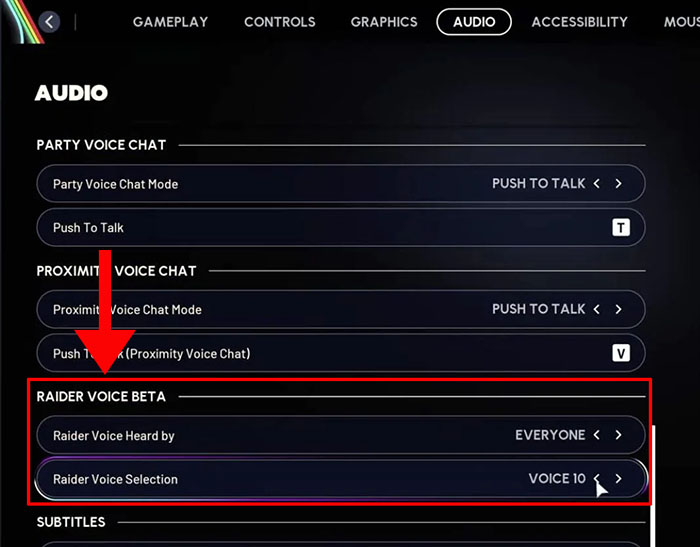
Once enabled, other players will hear the filtered version of your voice instead of your natural mic input.
Recommended Raider Voice Effects:
| Preset Option | Description | Reasons for Popularity |
| 6 (Man Voice) | Medium-low natural male voice | Highest clarity, natural sound, no distortion; preferred by trans players, best for team communication. |
| 7 (Woman Voice) | Medium-high natural female voice | Balanced recognition and realism, great for humor/deception effects. |
| 3-5 (Mid Range) | Mid-tone range | Versatile and natural, avoids 1 (childish) and 9-10 (distorted). |
| 10 (High Pitch) | High pitch/cartoon effect | Purely for memes, like pirate voice. |
Raider Voice in ARC Raiders offers 10 preset filters (1-10, low to high pitch), with Preset 6 (natural male voice) emerging as the most popular and frequently mentioned across Reddit polls, YouTube guides, and TikTok demos.
Limitations of Raider Voice (Beta):
- Audio quality can sound robotic or inconsistent
- Presets are not customizable
- Voice results vary depending on your natural pitch and mic quality
- Occasional bugs after patches or updates
This is why many players still look for external voice changer solutions.
Part 3. Best Professional Voice Changer for ARC Raiders
While Raider Voice is a nice built-in feature, it's still a beta system with limited control. If you want higher-quality voice effects, more customization, or consistency across updates, an external voice changer is often the better choice.

EaseUS VoiceWave works at the system level, meaning it processes your voice before it reaches the game. This makes it fully compatible with ARC Raiders' voice chat system without interfering with gameplay.
Why use a third-party voice changer in ARC Raiders?
- Wanting cleaner audio
- Needing more voice styles
- Raider Voice sometimes “not sounding right” in certain matches
- Built-in filters breaking after patches
Why choose VoiceWave as the voice changer for ARC Raiders?
- 300+ AI voice effects and 300+ funny or horror soundboards
- Real-time processing (no delay)
- Low latency for voice chat
- Works as a virtual microphone
- Compatible with proximity and party chat systems
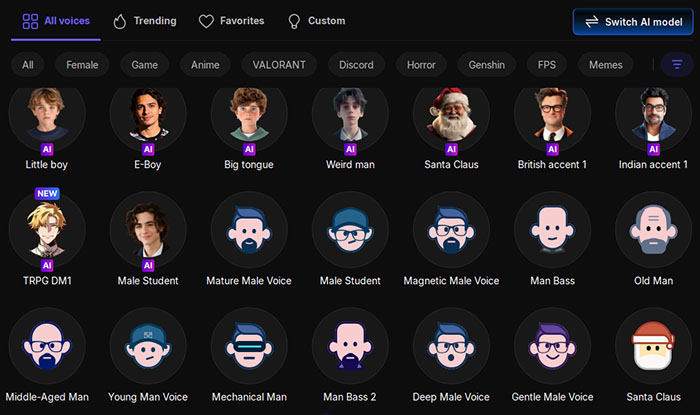
Popular AI male voices for ARC Raiders gameplay in EaseUS VoiceWave:
Part 4. ARC Raiders Voice Chat Not Working — Fixes!
Some players report that voice chat doesn't work at all, even though their microphone functions normally in other games or applications. In certain cases, Raider Voice appears to be enabled in the settings, but other players still hear the user's natural voice instead of the filtered one.
There are also complaints of the microphone icon appearing muted or crossed out during matches, with no clear indication of what caused the issue. Others mention distorted or glitchy audio once voice chat is turned on, where enabling communication negatively affects overall game sound quality.
Platform-specific problems are common as well, with PC, PlayStation 5, and Xbox players experiencing different voice-related bugs depending on system permissions, input devices, or recent patches.
And many players point out that voice chat problems often appear after updates and may require settings to be rechecked or reset.
Common Issues Reported by Players:
- Voice chat not working at all
- Raider Voice enabled but not applied
- Mic icon showing muted or crossed out
- Distorted or glitchy audio
- Platform-specific issues on PC, PS5, or Xbox
Quick Troubleshooting Checklist:
- Make sure Voice Chat is enabled in settings
- Check microphone permissions (especially on console)
- Verify the correct input and output devices
- Disable and re-enable Raider Voice after patches
- Restart the game after changing audio settings

Final Words
ARC Raiders stands out by offering a built-in voice changer, something most shooters still lack. Raider Voice is a creative feature that adds immersion, privacy, and tactical depth — but as a beta system, it has limitations.
If you want simple, in-game voice masking, Raider Voice does the job.
If you want better sound quality, more control, and reliability, a professional voice changer is the better long-term solution.
Ultimately, it comes down to how much control you want over how you sound in the wasteland.
FAQ for ARC Raider AI Voice
1. Is Raider Voice an AI voice or text-to-speech?
No. It's a real-time voice filter applied to your microphone input.
2. Can other players hear my Raider Voice filter?
Yes. Depending on your settings, teammates and nearby players can hear it.
3. Is it safe to use a third-party voice changer in ARC Raiders?
There are currently no official restrictions on voice changers, as long as they don't provide gameplay advantages or cheats. EaseUS VoiceWave is a great and safe option for better gameplay experiences.