-
![]()
Joey Albert
Joey has been involved with tech ever since she joined the EaseUS editor team in March 2011 and now she is a senior website editor. She is good at solving various issues, such as video downloading and recording.…Read full bio -
![]()
Alin
Alin is a sophisticated editor for EaseUS in tech blog writing. She is proficient in writing articles related to screen recording, voice changing, and PDF file editing. She also wrote blogs about data recovery, disk partitioning, data backup, etc.…Read full bio -
Jean has been working as a professional website editor for quite a long time. Her articles focus on topics of computer backup, data security tips, data recovery, and disk partitioning. Also, she writes many guides and tutorials on PC hardware & software troubleshooting. She keeps two lovely parrots and likes making vlogs of pets. With experience in video recording and video editing, she starts writing blogs on multimedia topics now.…Read full bio
-
![]()
Gorilla
Gorilla joined EaseUS in 2022. As a smartphone lover, she stays on top of Android unlocking skills and iOS troubleshooting tips. In addition, she also devotes herself to data recovery and transfer issues.…Read full bio -
![]()
Rel
Rel has always maintained a strong curiosity about the computer field and is committed to the research of the most efficient and practical computer problem solutions.…Read full bio -
![]()
Dawn Tang
Dawn Tang is a seasoned professional with a year-long record of crafting informative Backup & Recovery articles. Currently, she's channeling her expertise into the world of video editing software, embodying adaptability and a passion for mastering new digital domains.…Read full bio -
![]()
Sasha
Sasha is a girl who enjoys researching various electronic products and is dedicated to helping readers solve a wide range of technology-related issues. On EaseUS, she excels at providing readers with concise solutions in audio and video editing.…Read full bio
Page Table of Contents

Gorilla
Updated on Jan 21, 2026
0 Views |
0 min read
R.E.P.O. is a co-op horror game where proximity voice chat is a core part of the experience. Your voice can give you away, calm teammates down, or turn a tense moment into chaos. That's why many players use voice changers and soundboards in R.E.P.O.—to roleplay, scare friends, or simply protect their real voice while playing.
Below, we'll explain why a voice changer matters in R.E.P.O., review the top 3 free R.E.P.O. voice changers & soundboards, and help you fix R.E.P.O. voice chat not working issues.

Why Use a Voice Changer in R.E.P.O.
Using a voice changer in R.E.P.O. isn't just about being funny—it directly enhances gameplay and immersion:
- Stronger horror atmosphere – Deep, distorted, or radio-style voices make encounters feel more intense and unpredictable.
- Roleplay & immersion – Match your voice to a character, creature, or “entity” persona.
- Fun with teammates – Soundboards let you trigger screams, footsteps, whispers, or meme sounds at the perfect moment.
- Privacy protection – Hide your real voice when playing with strangers.
- Content creation – Streamers and YouTubers can create more engaging clips with unique voice effects.
Because R.E.P.O. relies on live voice chat, a real-time voice changer works best.
Top 3 R.E.P.O. Voice Changers & Soundboards
All three tools below support real-time voice changing and can be used with R.E.P.O.'s in-game voice chat.
#1. EaseUS VocieWave (Best Overall for R.E.P.O.)
Popular voice styles for R.E.P.O.: deep voice, monster, radio, robot, creepy, anime-style
EaseUS VoiceWave is a PC-based real-time AI voice changer designed for gaming, streaming, and voice chat. It works smoothly with R.E.P.O. and offers 600+ voice effects and soundboard features. It focuses on immersive and scary voice effects, making it ideal for horror co-op games like R.E.P.O.
Key Features
- Real-time AI voice changer for games and voice chat
- 600+ built-in voice effects & sound effects
- Built-in soundboard with hotkey support
- Works with Discord, Steam voice chat, and most PC games
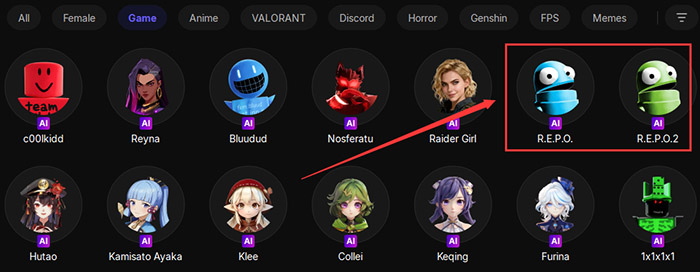
To better match R.E.P.O.'s tense atmosphere, EaseUS VoiceWave includes two R.E.P.O. voices and ready-made horror-style audio effects you can preview and use in real time, such as:
R.E.P.O. #1
R.E.P.O. #2
Pros:
- Free version available
- Easy setup for beginners
- Combine realism and horror-style effects
- Low latency for real-time gameplay
Cons:
- Some advanced AI voices require the paid version
#2. Voicemod (Most Popular Soundboard Option)
Voicemod is one of the most well-known voice changers among gamers. It's especially popular for its soundboard system. If you mainly want to trigger jump-scare sounds or meme audio, Voicemod's soundboard shines.
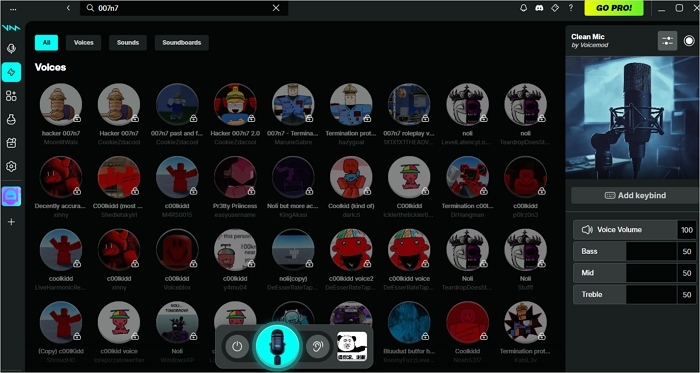
Key Features
- Real-time voice changer with preset effects
- Customizable soundboard with hotkeys
- Community sound library
- Compatible with Steam, Discord, and most games
Pros:
- Very easy to use
- Huge user base and community presets
- Excellent soundboard functionality
Cons:
- Free version has limited rotating voices
- Many features locked behind Pro version
#3. Voice.ai
Voice.ai focuses on AI-generated voices that can sound surprisingly realistic or highly stylized. It is ideal if you want distinct character-style voices instead of classic effects.
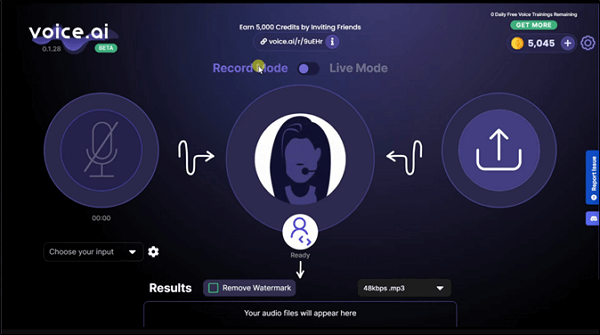
Key Features
- AI-powered real-time voice changer
- Large library of AI voice models
- Supports gaming and voice chat apps
- Community-created voices
Pros:
- Unique AI voices not found in traditional voice changers
- Free version available
- Regularly updated voice models
Cons:
- Heavier system resource usage
- Setup can be less beginner-friendly
R.E.P.O. Voice Chat Not Working
If your voice changer works but R.E.P.O. voice chat isn't picking up your voice, try these fixes:
1️⃣Set the correct microphone in R.E.P.O.: Open R.E.P.O. settings > Audio > Microphone and select the virtual microphone created by your voice changer.
2️⃣Set the voice changer as default input (Windows): Go to Windows Settings > Sound > Input and choose the voice changer's virtual mic.
3️⃣Run the voice changer as administrator to prevents permission conflicts with games.
4️⃣Disable exclusive mode: Head to Sound Settings > Recording > Properties > Advanced and uncheck "Allow applications to take exclusive control"
5️⃣Restart the game after setup. R.E.P.O. often detects audio devices only at launch.
The Bottom Line
A well-chosen voice changer can significantly enhance your R.E.P.O. experience, especially in a game where proximity voice chat directly affects tension, teamwork, and immersion.
EaseUS VoiceWave stands out as the best overall option thanks to its balance of horror-style voice effects, built-in soundboard, and beginner-friendly setup. Voicemod is a strong choice if your focus is on triggering sound effects and jump scares through hotkeys, while Voice.ai is better suited for players who prefer AI-generated character voices with a unique personality.
Ultimately, the best R.E.P.O. voice changer depends on how you play. If you want scary, immersive, and fun voice effects with minimal setup, EaseUS VoiceWave is the most beginner-friendly choice.
FAQ
1. Why can't my teammates hear me in R.E.P.O.?
Most issues come from selecting the wrong microphone. Make sure the voice changer's virtual mic is chosen in both Windows and R.E.P.O. settings.
2. How do players use text-to-speech voices in R.E.P.O.?
Most players rely on external tools that convert text into audio and route it through a virtual microphone. Once the virtual mic is selected in R.E.P.O.'s audio settings, the game treats the TTS output as normal voice input.
3. Is using TTS or a voice changer allowed in R.E.P.O.?
Using voice changers or TTS-style audio for fun, roleplay, or accessibility is generally acceptable, as long as it doesn't exploit the game or disrupt other players excessively.