-
![]()
Joey Albert
Joey has been involved with tech ever since she joined the EaseUS editor team in March 2011 and now she is a senior website editor. She is good at solving various issues, such as video downloading and recording.…Read full bio -
![]()
Alin
Alin is a sophisticated editor for EaseUS in tech blog writing. She is proficient in writing articles related to screen recording, voice changing, and PDF file editing. She also wrote blogs about data recovery, disk partitioning, data backup, etc.…Read full bio -
Jean has been working as a professional website editor for quite a long time. Her articles focus on topics of computer backup, data security tips, data recovery, and disk partitioning. Also, she writes many guides and tutorials on PC hardware & software troubleshooting. She keeps two lovely parrots and likes making vlogs of pets. With experience in video recording and video editing, she starts writing blogs on multimedia topics now.…Read full bio
-
![]()
Gorilla
Gorilla joined EaseUS in 2022. As a smartphone lover, she stays on top of Android unlocking skills and iOS troubleshooting tips. In addition, she also devotes herself to data recovery and transfer issues.…Read full bio -
![]()
Rel
Rel has always maintained a strong curiosity about the computer field and is committed to the research of the most efficient and practical computer problem solutions.…Read full bio -
![]()
Dawn Tang
Dawn Tang is a seasoned professional with a year-long record of crafting informative Backup & Recovery articles. Currently, she's channeling her expertise into the world of video editing software, embodying adaptability and a passion for mastering new digital domains.…Read full bio -
![]()
Sasha
Sasha is a girl who enjoys researching various electronic products and is dedicated to helping readers solve a wide range of technology-related issues. On EaseUS, she excels at providing readers with concise solutions in audio and video editing.…Read full bio
Page Table of Contents

Gorilla
Updated on Oct 23, 2026
0 Views |
0 min read
Quick Answer:
If you're looking to convert a YouTube URL to MP3 quickly and safely:
EaseUS Video Downloader (macOS, Windows, Android) offers high-quality MP3 conversion with no ads or watermark, supporting 1000+ websites. Select the audio format (MP3) and quality (up to 320 kbps), paste the URL, and download it to your device.
Any MP3 converter mentioned in this article is for personal, legal use only—stick to content you own, or that is publicly available.
Can You Convert a URL to MP3?
Yes, you can convert a YouTube URL to MP3 using third-party tools, but it comes with legal and technical considerations. Platforms like YouTube don't offer a built-in download button for MP3s because of copyright restrictions. However, if you need to extract audio for personal use (which is generally legal), such as saving a soundtrack, speech, or podcast, you can do so using trusted MP3 converters. Always remember to seek permissions from copyright holders before conversion.
In this guide, we'll introduce both desktop software and online tools that help you download YouTube videos in laptop and convert video URLs into MP3s quickly and safely. We'll also explain how each tool works, what features they offer, and how to avoid risky or spam-filled websites.
EaseUS Video Downloader: Convert Any URL to MP3 Efficiently
EaseUS Video Downloader is a universal video downloader and MP3 converter. With its built-in MP3 converter feature, all you need is an audio/video link from YouTube, YouTube Shorts, Facebook, or other sites, and paste it into the software. The main feature of this software is high-quality video downloading, but it also stands out when talking about audio downloads.
Main Features:
- Download MP3 from Various Sites: EaseUS Video Downloader supports analyzing URLs from over 1,000 video streaming sites, including YouTube, Dailymotion, Vimeo, Facebook, TikTok, etc.
- Batch Download Option: It supports batch downloads and MP3 conversion. You can paste up to 50 URLs for MP3 conversion or just a playlist link from YouTube, making it efficient for multiple files.
- No Time Limit: You can convert YouTube videos longer than 2 hours to MP3 or WAV, making it ideal for scholars who want to download lectures or podcasts for offline listening.
- 100% Safe & Privacy Secured: Unlike online converters, it is free of intrusive ads and malicious redirects, ensuring a secure user experience. It does not require sign-up, safeguarding your privacy.
Free Download video downloader for Windows
Secure Download
Free Download video downloader for Mac
Secure Download
📚How to convert a URL to MP3 for Personal Use Only:
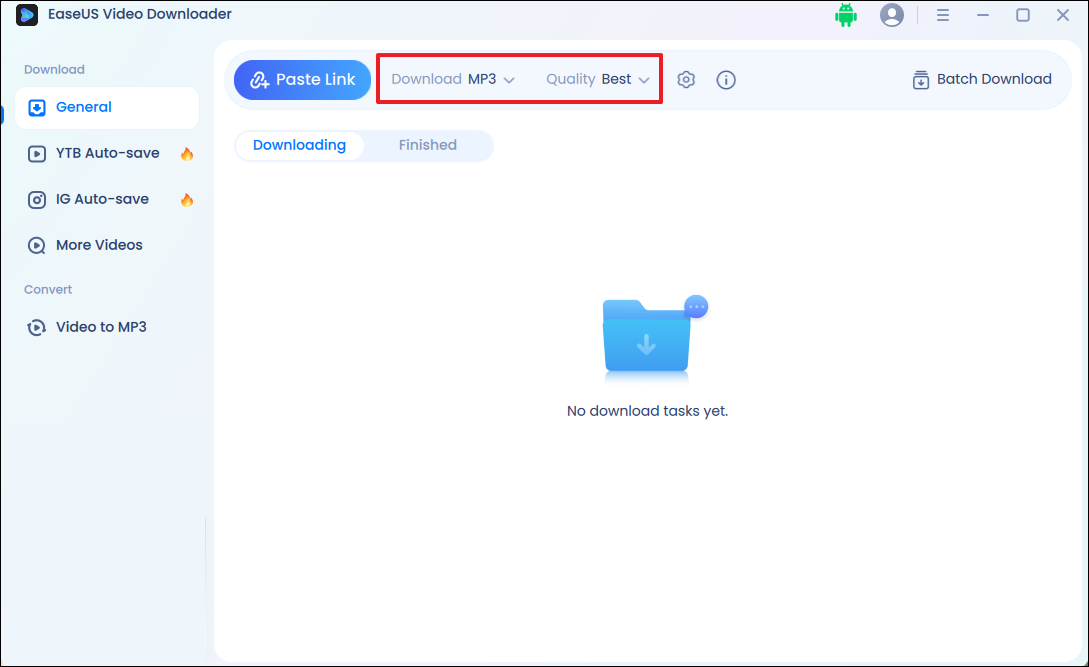
Step 1. Launch EaseUS Video Downloader on your computer. Set the file format to MP3 and choose the desired quality.
Step 2. Copy the video or audio link you want to convert. Click the Paste Link button.
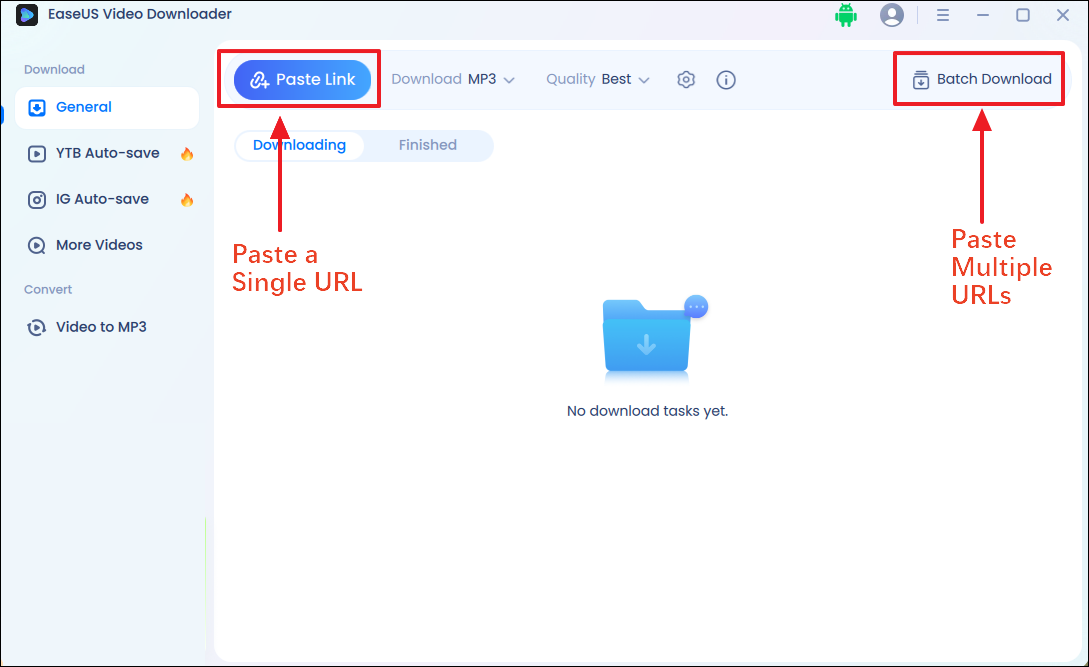
Step 3. It will start analyzing immediately and save the MP3 file locally. Go to the Finished tab to check the converted MP3 file.

Disclaimer: You should be aware that all files downloaded with EaseUS Video Downloader can be used only for personal use. You cannot use these files for commercial or other reasons that are against the copyright protection.
↪️Don't forget to share this helpful content with your friends on your social media:
Online URL to MP3 Converters: Free from Installation
Online URLs to MP3 converters are generally more favored since you don't need to download or install a program on your computer or mobile device. However, given the potential risks that some URL-to-MP3 converters may pose, you should find a trustworthy website to apply to.
There are numerous web links to MP3 converters available. You can use this tool on your computer, tablet, or mobile device. I will provide three sites to choose from. You can check for detailed information below to decide which one you'd like to try.
Cobalt
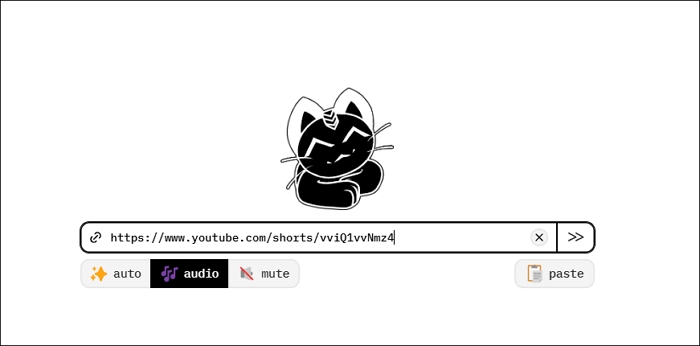
Cobalt.tools is a safe, web-based link to MP3 converter designed to help users save and download publicly accessible content from various websites without ads, tracking, or paywalls. By simply copying the video URL into the platform, users can download content directly. Cobalt operates as a proxy, ensuring that it doesn't cache any content. The platform is open-source and available on GitHub.
YT1S
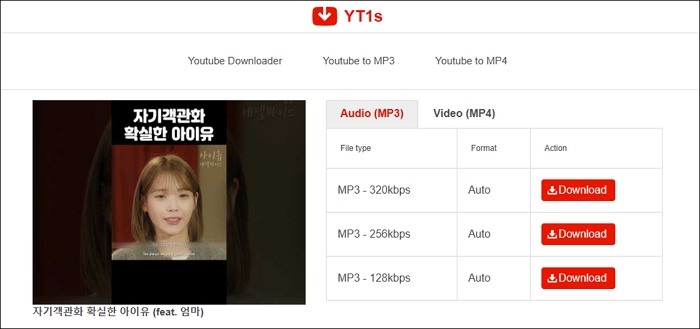
YT1S is an online tool that allows users to easily convert video URLs to MP3 files. This converter supports video conversion in multiple formats, including MP3 and MP4. 3GP, WEBM, M4A, etc. Users can choose MP3 quality up to 320kbps to enjoy high-quality audio offline.
Okmusi
Okmusi is a powerful online tool that allows users to convert video files to MP3 format from 250+ websites easily. This converter supports multiple audio and video qualities, such as 320k.
Once the conversion is complete, users can immediately click on the convert button and save the preferred MP3 file.
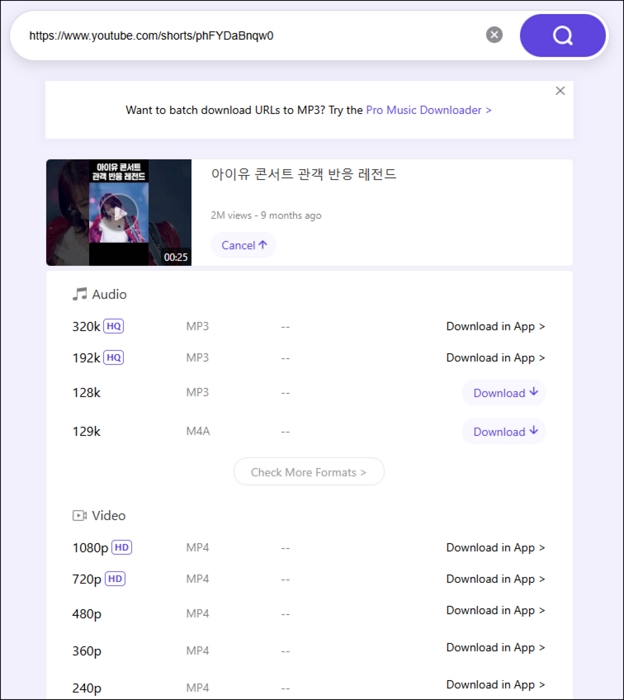
📚As for detailed guide to download URL to MP3, the process of these online tools are similar. Here, I'd like to use the Y1TS as an example.
Step 1. Go to YouTube and copy the link to the video from which you want to extract MP3.
Step 2. Visit the Y1TS with a browser.
Step 3. Copy the URL to the address bar and click the "Download" icon.
Step 4. After processing, click "Download," and you will see all the download options that are available.
Step 5. Click the "Download" button next to the option to download the MP3 file to your device.
👉Key Takeaways:
Tools like YT1S, and Okmusi may violate the terms of service of platforms like YouTube. They also contain intrusive ads or redirect links. If you're looking for a privacy-focused and relatively safe online tool, EaseUS Video Downloader is a better option for downloading publicly available content.
Free Download video downloader for Windows
Secure Download
Free Download video downloader for Mac
Secure Download
YouTube to MP3 Shortcut: Convert URL to MP3 on iPhone
Looking to convert a video URL to MP3 directly on your iPhone? While Apple's ecosystem is known for its security restrictions, there's still a practical method using the Shortcuts app that allows you to extract MP3 from links, especially when the content is your own or publicly permitted.
Apple's Shortcuts app allows automation of tasks, including converting video URLs into audio files. You can use a prebuilt "YouTube to MP3" shortcut (from a reputable source like RoutineHub) to handle this directly on your iPhone.
Step 1. Download a "YouTube to MP3" shortcut from a trusted site (such as RoutineHub) and add it to your Shortcuts app.
Step 2. Go to Settings > Shortcuts and enable Allow Untrusted Shortcuts.
Step 3. Open YouTube and copy the URL of the video you want to convert.
Step 4. Open the Shortcuts app or use the Share Sheet to activate the shortcut. It will process the video and extract the audio.
Step 5. Once done, you'll be prompted to save the MP3 file to your Files app or share it with an audio player.
Optional Alternative:
If you prefer not to use Shortcuts, you can try a lightweight online tool mentioned before, like Cobalt.tools, which works without installing anything. Note that some converters (like YT1S) are not optimized for iPhone and may trigger redirects or unsafe ads. Always stick with ad-free tools.
Stay Within Legal Boundaries When Converting Links to MP3
Before using any URL to MP3 converter to extract background music as an MP3 file—especially for YouTube—you should understand the legal implications. YouTube's Terms of Service strictly prohibit downloading any video content unless a download button or link is explicitly provided by the platform.
According to YouTube's Terms of Service, you are not allowed to access, reproduce, download, distribute, transmit, broadcast, display, sell, license, alter, or modify any content without permission from YouTube or the respective rights holders. You can only view or listen to content for personal or non-commercial use.
If you need to download an MP3 from a link, you will need a third-party URL to MP3 converter to help. Always ensure you're downloading content legally. MP3 converters should only be used to extract audio from videos you own or have permission to use. Downloading copyrighted materials—like music or videos from YouTube—without authorization may violate copyright laws or platform policies.
👉The tools mentioned in this article are shared with personal use in mind and should never be used to bypass copyright protections or download restricted content from YouTube or other streaming platforms.
Final Thoughts
It's quite simple to download MP3 from a link as long as you find a proper tool. With the MP3 file you download, you can turn the audio into a ringtone, make it the background music for your own video, and more.
If you still have no idea which method to try, then EaseUS Video Downloader is always your best choice. Don't forget that you can also download high-quality videos from any streaming site as long as you can get the video link. I'm sure you won't regret its installation!
Free Download video downloader for Windows
Secure Download
Free Download video downloader for Mac
Secure Download
FAQs About URL to MP3 Converters
1. Is it safe to use URL to MP3 converters?
It depends on which tool you use. Some converters, like Cobalt.tools and EaseUS Video Downloader, are considered safe and trustworthy:
- EaseUS Video Downloader is a desktop-based tool developed by a reputable software company. It's ad-free, doesn't bundle malware, and offers a secure download environment for converting URLs to MP3 or video.
- Cobalt.tools is an open-source, web-based converter with no ads or tracking, ideal for privacy-conscious users.
2. What's the best format for high-quality audio?
The MP3 format at 320kbps is widely regarded as the best balance between quality and file size for general listening purposes. If you're an audiophile or working on professional audio projects, you may consider formats like FLAC or WAV, but they're typically not supported by most online converters.
3. What audio quality can I expect from URL to MP3 converters?
Popular converters offer MP3 quality up to 320 kbps, balancing good sound fidelity and file size suitable for most users.
4. How long does it take to convert a URL to an MP3 file?
Conversion time depends on the video length, server speed, and internet connection, but usually takes a few seconds to a couple of minutes.
5. Is there any software that can convert YouTube Shorts or live streams to MP3?
EaseUS Video Downloader supports YouTube Shorts and recorded live streams, but live streams must be completed and available as saved videos to convert.
6. What is CloudConvert, and how does it convert URLs to MP3?
CloudConvert is an online file conversion service that supports over 200 formats, including audio, video, and documents. It converts URLs (such as video links) by uploading the file or directly processing supported links and converts audio to MP3 with customizable quality settings.