Convert Any YouTube Video, No Time Limit
Convert long videos from YouTube, Facebook, Twitter, and more - no buffering, no ads, no subscriptions.
Affiliate
Earn commissions when you drive sales through your affiliate links.
Resellers
Sell EaseUS products as a distributor.

Creators & Influencers
Partner with us on YouTube, TikTok, Twitch to earn commissions.
OEM & Outsourcing Service
Put your brand on EaseUS software, or get custom solutions.

Refer & Earn
Earn rewards when you refer others to EaseUS solutions.

Education
Verified students and teachers get exclusive discounts.
Page Table of Contents

Jun 25, 2026 0 mins read
Quick Answer:
If you want to convert a lengthy YouTube video to MP3 for offline listening, you can use dedicated software or online tools for conversion.
Note: Users should respect copyright laws and avoid downloading content for commercial use or distribution without permission.
Convert Any YouTube Video, No Time Limit
Convert long videos from YouTube, Facebook, Twitter, and more - no buffering, no ads, no subscriptions.
Converting long YouTube videos to MP3 offers great convenience. This MP3 conversion saves storage space by replacing large video files with smaller audio files. It also allows you to enjoy TED talks, music playlists, or tutorials on your various devices, from smartphones to portable music players and car stereos. Whether you are a student reviewing a lengthy course or a music lover wanting uninterrupted playlists, converting long YouTube video to MP3 meets your needs easily.
In this article, we will show you how to convert long YouTube videos to MP3 efficiently while ensuring high-quality audio for the best listening experience, no matter whether the video is longer than 2 hours, 5 hours, or 8 hours.
EaseUS Video Downloader can quickly convert lengthy videos into 320 kbps MP3 files. Whether you are saving lectures or podcasts, this tool ensures your audio remains high-quality and clear. You can use it to extract audio from the video without any length limit, whether it is 2 hours or 8 hours. Other features and functions include:
Secure Download
Secure Download
How to Convert Long YouTube Videos to MP3
Step 1. Launch EaseUS Video Downloader. From the top menu bar, set the file format to Audio.MP3 and the quality to Best.
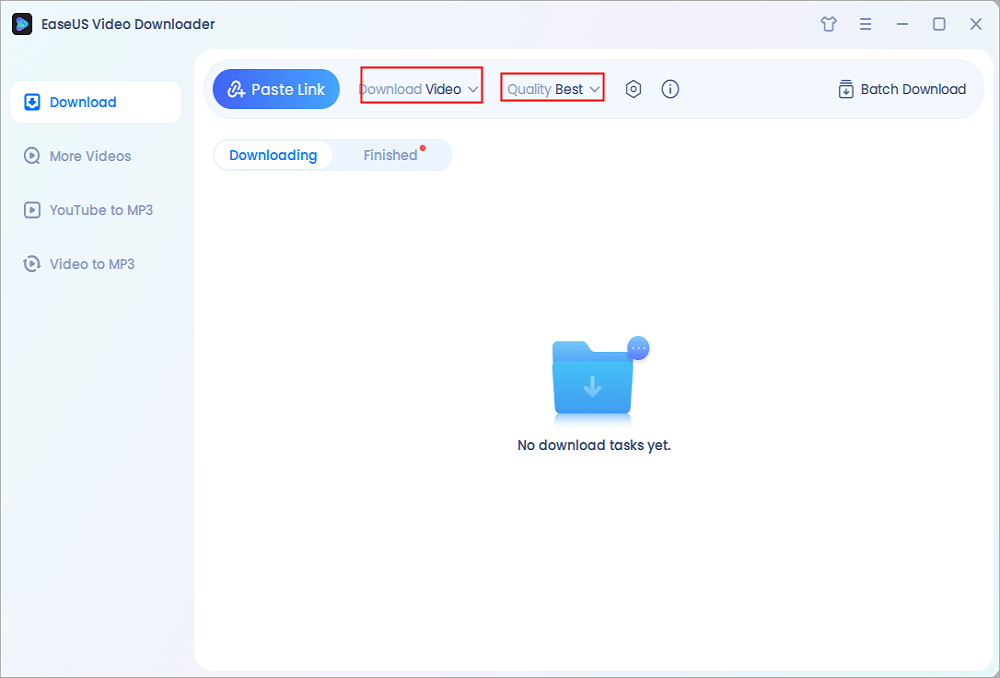
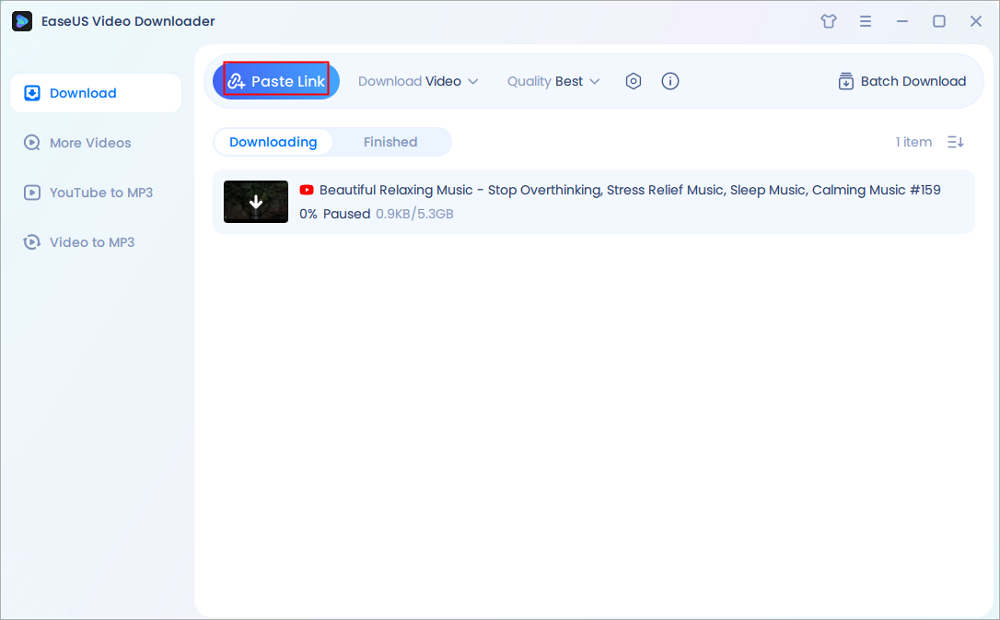
Step 2. Copy the link, open EaseUS Video Downloader, click Paste Link, and it will start analyzing the video.
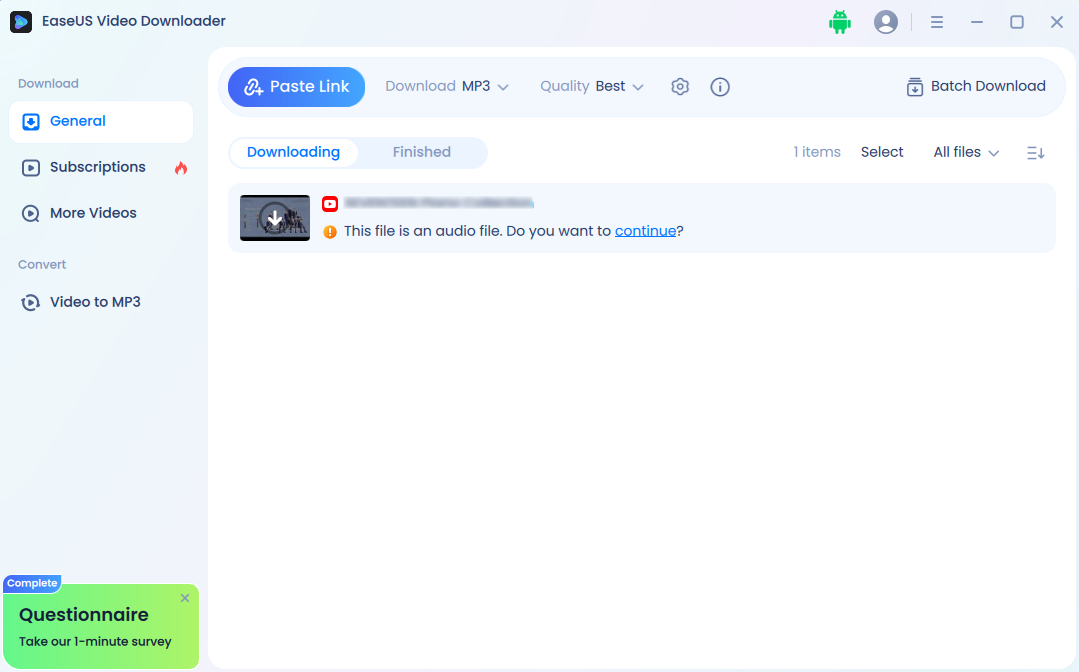
Step 3. Click the downward arrow or the blue word Continue to start the MP3 downloading.
Step 4. When it finishes, you can locate your MP3 file under the Finished tab, or you can browse the folder C:/EaseUS_VideoDownloader, which is the default location to store all downloaded video and audio files.
Disclaimer: Please make sure your behavior doesn't violate the content owner's rights when converting videos from YouTube. EaseUS does not advocate downloading any video/audio for sale, distribution, or other commercial purposes.
| Pros | Cons |
|---|---|
|
|
VLC Media Player is a free, open-source, and cross-platform multimedia player that supports media conversion, streaming, subtitle synchronization, and more. It runs on Windows, macOS, Linux, and mobile platforms. With the built-in transcoding feature, it can convert videos to different formats, including MP3 audio.
Unlike EaseUS Video Download, which can directly convert a YouTube URL to MP3, VLC does not support a one-click way to do that. You need to save the video locally first before converting with VLC. If you want to use VLC to download videos, please follow the instructions in this article: How to Download YouTube Videos in Laptop.
To use VLC to convert long YouTube videos to MP3, especially those that have been downloaded on your device:
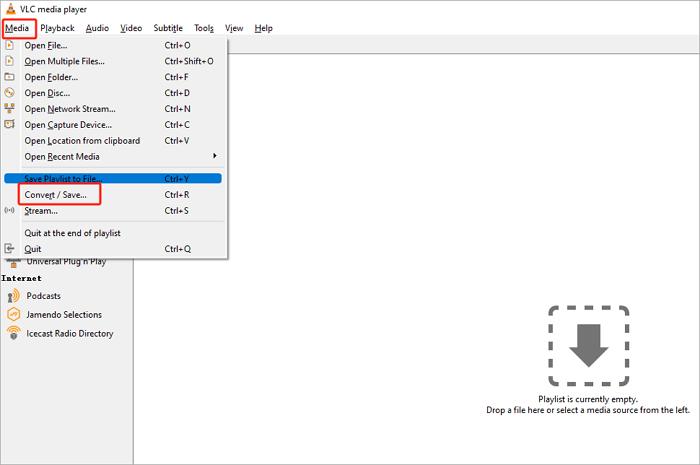
Step 1. Click on "Media" > "Convert/Save."
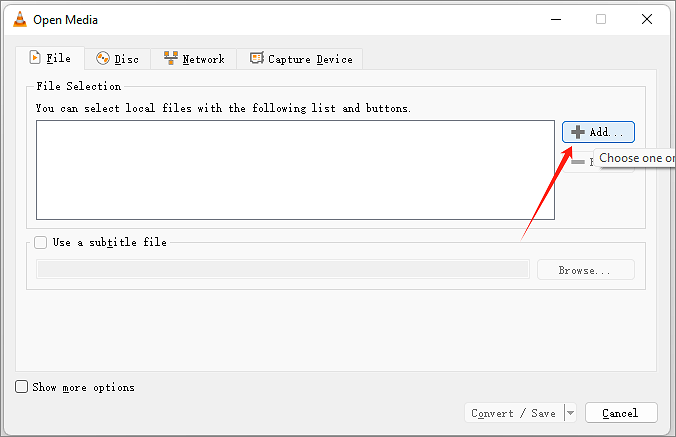
Step 2. Click "Add" to browse and open your video file.
Step 3. Click on "Convert/Save" to download YouTube to MP3 for more than 2 hours or even longer.
Step 4. Under "Settings," in "Profile," choose "Audio - MP3."
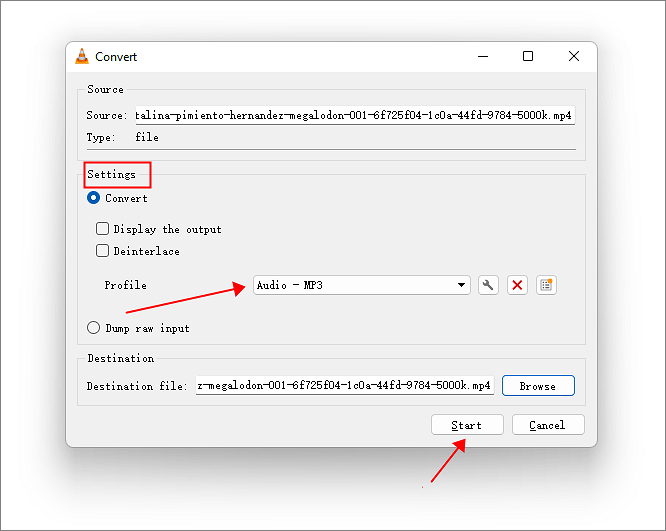
Step 5. Hit Browse and give a destination file name with the extension ending in .mp3.
Step 6. Click Start. The progress will be shown in the VLC interface. Once it is complete, you'll find the converted MP3 file in the destination folder you specified.
| Pros | Cons |
|---|---|
|
|
Updated Info: Recently, you cannot use VLC for playing or downloading YouTube videos. If you enter a YouTube link, you will see the "Your input can't be opened" error. For more information, please go to Reddit and join the conversation.
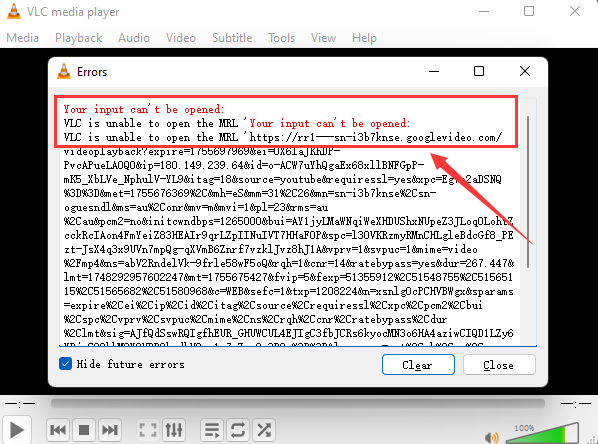
Compared to VLC, EaseUS Video Downloader is a more reliable tool that delivers a higher success rate without compromising video or audio quality.
Secure Download
Secure Download
You might also want to try some free online video downloaders. Honestly, there are so many online tools that you need to test them one by one. So, to save you time, we selected some popular tools and tested their performance. Here are the results:
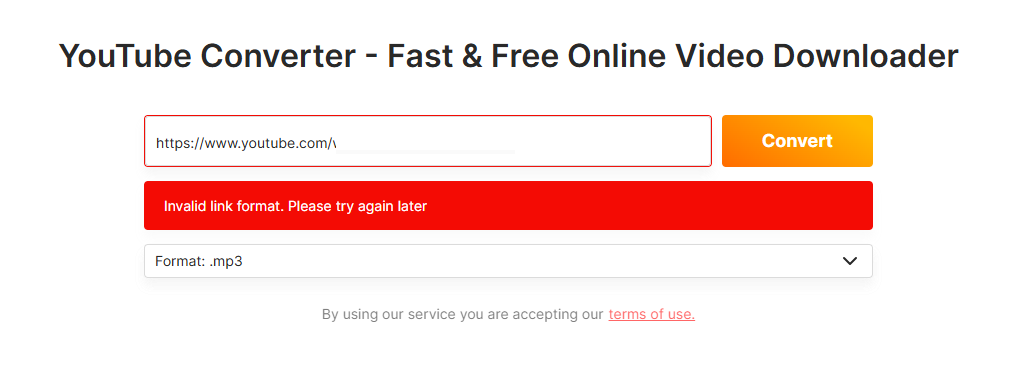
OnlineVideoConverter.to is a fast, free, and user-friendly online platform for converting and downloading videos from popular sites such as YouTube, Facebook, Twitter, Instagram, and more. It allows users to effortlessly convert video URLs into MP3, MP4, AVI, and other formats for offline enjoyment on various devices.
Test Results: Failed - "Invalid link format. Please try again later."
Personal Experience:
The interface is simple and clean, but the test failed. After trying three times, it still prompted me to try again later. I tested a shorter video, about fifteen minutes long, and the download succeeded. However, after clicking the download button, it redirected to another link, making the overall experience not very good.
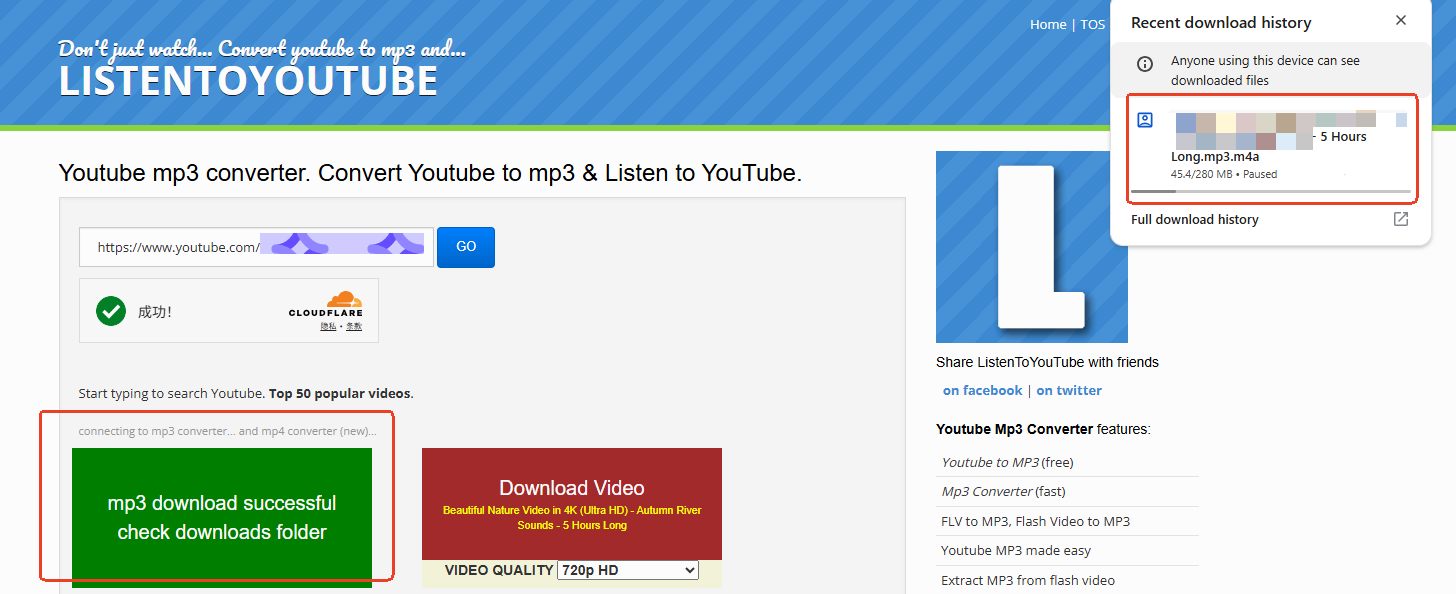
ListenToYouTube is a popular and user-friendly online converter that allows users to quickly convert YouTube videos into high-quality MP3 audio files. It is designed with simplicity and convenience in mind, enabling even those with limited technical skills to extract music and sound effects from YouTube videos in just a few clicks.
Test Results: Succeeded
Personal Experience:
There are many redirect links, and the download button is not obvious. During the first attempt, I kept clicking the Go button, which triggered multiple redirects.
Personal Experience: Every time I entered the page URL, it redirected me to other pages, and the MP3 convert feature page seems inaccessible.
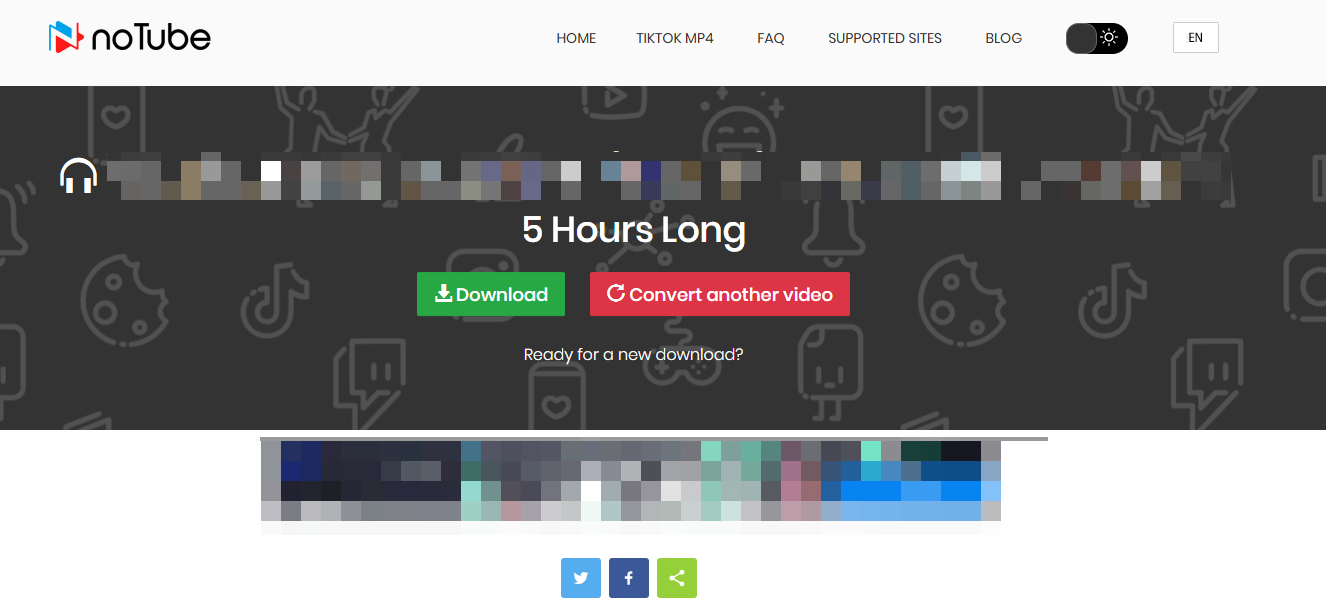
noTube is a free, fast, and user-friendly online converter designed to convert YouTube videos into MP3 audio, MP4 video, and other popular formats. It works across multiple platforms and devices, offering a seamless way to download and save videos or audio tracks directly from YouTube and other supported sites like TikTok and Twitter.
Test Results: Succeeded
Personal Experience:
The conversion process is relatively smooth, but there are pop-up ads in the bottom right corner of the page. The page also contains redirect links, making the overall experience average.
| Pros | Cons |
|---|---|
|
|
If you are seeking a safe alternative, EaseUS Video Downloader has an official site and offers technical support. It ensures a 100% safe downloading environment where you will never encounter ads from other sites, pop-ups, or malware.
Secure Download
Secure Download
Converting YouTube videos to MP3 is generally against YouTube's Terms of Service and may violate copyright laws if the content is protected and used without permission. To stay legal, only convert videos you own, have permission to use, or that are copyright-free. To state the issue of legality more clearly, let's look at the following notes before the MP3 conversion:
Copyright Considerations
YouTube's Terms of Service:
Legality of the Conversion Tools:
Once you have converted and downloaded your MP3 files, you can enjoy them on a variety of devices with ease:
No matter what device you use, most support MP3 format natively, ensuring your converted audio files can be enjoyed anytime, anywhere.
Converting long YouTube videos to MP3 can be simple and efficient when you choose the right tools:
By combining these tools according to your needs, you can effortlessly build a personalized audio library from your favorite long-form YouTube content. Always remember to use these tools responsibly and respect copyright laws.
Download Any Video in High Quality, Anytime
Download publicly available videos from YouTube, Facebook, Twitter, Instagram and more for personal use.
In this section, we address some of the most frequently asked questions regarding the conversion of lengthy YouTube videos into MP3 format.
To convert an 8-hour YouTube video to MP3, use a stable desktop app like EaseUS Video Downloader. Online tools often fail with videos over 6 hours long. No matter which one you choose, just copy the YouTube URL into the tool, then select MP3 as the output format. The conversion will start.
The length limit for converting YouTube videos to MP3 depends on the tool you are using. Some tools have a limit when converting YouTube to MP3 longer than 2 hours. Tools like VLC or online converters often can't handle over 10-hour videos. Desktop applications like EaseUS Video Downloader do not have such restrictions. For long MP3 downloads from YouTube, desktop apps are more reliable.
Whether you choose an online web tool or a YouTube downloader app, you may follow these general steps to convert a 3-hour YouTube video to MP3:
Step 1. Select a Converter Tool.
Step 2. Copy the YouTube URL.
Step 3. Paste the URL.
Step 4. Choose MP3 Format.
Step 5. Initiate the Conversion.
Step 6. Download the MP3 File.
128 kbps is considered the minimum acceptable quality for music, but 192 kbps or higher is recommended for better audio fidelity. Audiophiles often prefer 320 kbps or lossless formats like FLAC for the highest quality.
Conversion failures can occur due to issues with the video URL, copyright restrictions, regional blocks, YouTube's frequent updates blocking converters, or software/browser compatibility problems.

Copyright Disclaimer
This article is for educational and technical reference only. Do not use the described methods to download or share copyrighted content without permission.
Users are fully responsible for any legal consequences. Please:

Respect content creators' rights

Use official or authorized platforms

Avoid unauthorized downloads

Use official or authorized platforms
Columnist
Myra joined EaseUS in 2017. As a big fan of Apple products, she mainly focuses on iOS data transfer and iOS troubleshooting tips. Meanwhile, she is expanding her knowledge and skills in other fields like data recovery and disk management. Myra is open-minded and likes both extensive and intensive reading. Other than reading and writing, she is also fond of mobile games and K-pop stars.
Read Full Bio More Related Articles
Download Embedded Video in 6 Ways [Online/Phone/Computer]
Sometimes, you may want to save an embedded video on a page, but you don't know how to keep the embedded video from the page. We will provide 6 free ways to download embedded videos on your computer and phone.
Myra. Jun 25, 2026
3 min read
5 Methods to Download Telegram Videos on PC
Want to download videos from Telegram, which is rather tricky? Then, follow our guide to learn about multiple methods to download and watch the videos offline. We have also discussed a powerful video downloader that can simplify things.
Myra. Jun 25, 2026
3 min read
Save YouTube Videos with VLC for Personal Use | VLC Alternative
Do you know how to download YouTube videos with VLC on your computer? There's no need to worry if you don't. In this post, we will guide you on how to do it. Read through the post and find the answers.
Myra. Jun 25, 2026
3 min read
Convert TS to MP4 in 8 Free Ways (PC/Mac/Online)
How to convert TS to MP4 on your computer? Dive into the details and figure it out.
Myra. Jun 25, 2026
3 min read