Download Any Video in High Quality, Anytime
Download publicly available videos from YouTube, Facebook, Twitter, Instagram and more for personal use.
Affiliate
Earn commissions when you drive sales through your affiliate links.
Resellers
Sell EaseUS products as a distributor.

Creators & Influencers
Partner with us on YouTube, TikTok, Twitch to earn commissions.
OEM & Outsourcing Service
Put your brand on EaseUS software, or get custom solutions.

Refer & Earn
Earn rewards when you refer others to EaseUS solutions.

Education
Verified students and teachers get exclusive discounts.
Page Table of Contents


Oct 23, 2026 0 mins read
💡If the TikTok video owner has disabled the save video button, then the download button is greyed out, and viewers can not download it directly.
🛠️To download TikTok videos without the save button, you could try copying and pasting the video link, and then:
Option 1. Paste into EaseUS Video Downloader to save them in HD quality.
Option 2. Use the "Inspect" option to get the raw video file URL, then download directly.
Option 3. Share them on Instagram, and then download.
Option 4. Paste the link into an online TikTok Video Downloader, and then download as MP4.
Download Any Video in High Quality, Anytime
Download publicly available videos from YouTube, Facebook, Twitter, Instagram and more for personal use.
When you watch videos on TikTok, you may want to save the videos to your device to watch them later or share them with your friends. You can easily download some videos from TikTok using the app's built-in download option. Sometimes, the save button is grayed out, and you can't download certain TikTok videos. Why does this happen?
According to TikTok Help Center, the reason the save button is disabled for a TikTok video is that the TikTok user has disabled the downloading option for their video, namely unticking the option "Allow your videos to be downloaded" in the TikTok settings. If you need a way to download TikTok videos without the save button, keep reading this article.
EaseUS Video Downloader is a TikTok video downloader that grabs any videos from TikTok easily and fast. The tool lets you download TikTok videos without the save button. You can either download one or multiple videos at a time or download all TikTok videos from a user with EaseUS Video Downloader.
Besides, you will find diversified downloading options provided by EaseUS Video Downloader. You can save a TikTok video in formats like GIF, MP4, MP3, or WAV. What's more, EaseUS Video Downloader is not only a TikTok video downloader but also supports downloading videos and audio from other sites. It captures media files from more than 1,000 sites, including YouTube, Facebook, Instagram, Twitter, Twitch, Vimeo, Bandcamp, SoundCloud, and Myspace. Check the full features of the video downloader below.
Secure Download
Secure Download
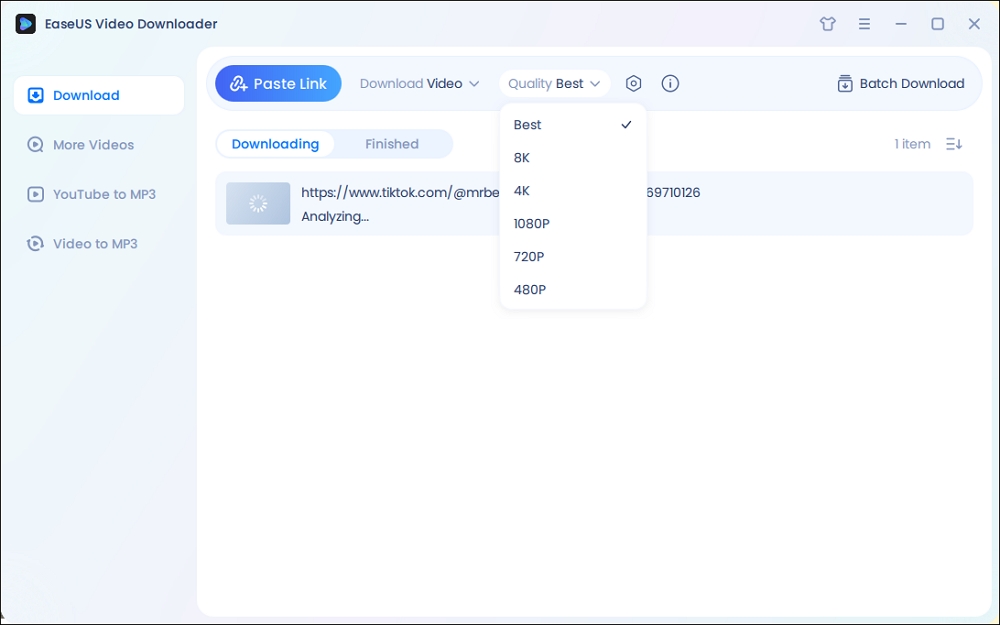
Step 1. Launch EaseUS Video Downloader on your computer. Choose the output format and quality. Click on the gear button for subtitles and thumbnails.
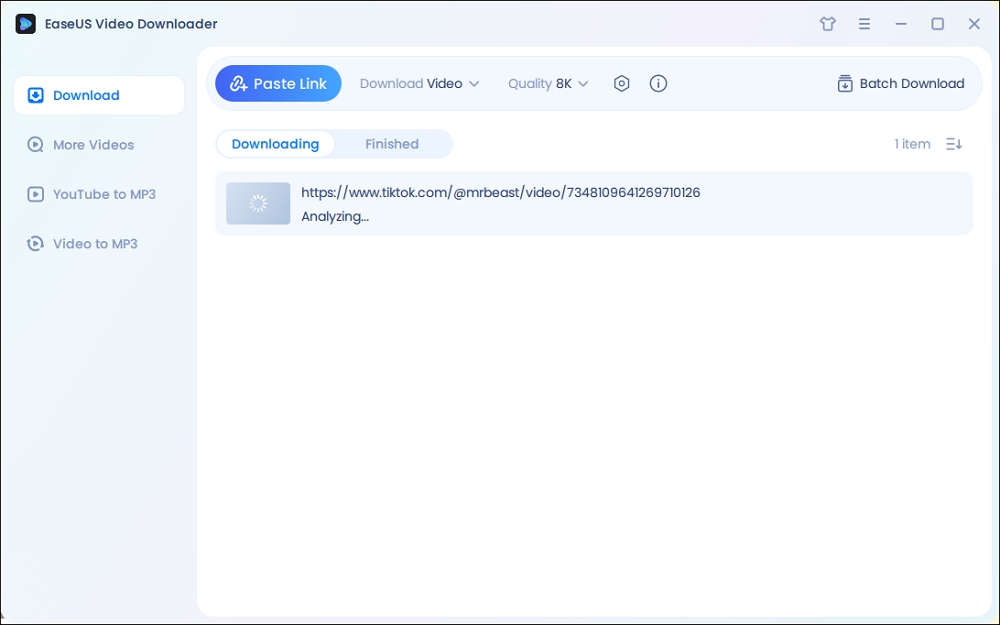
Step 2. Copy the URL of your wanted TikTok video and click "Paste Link" to start downloading.
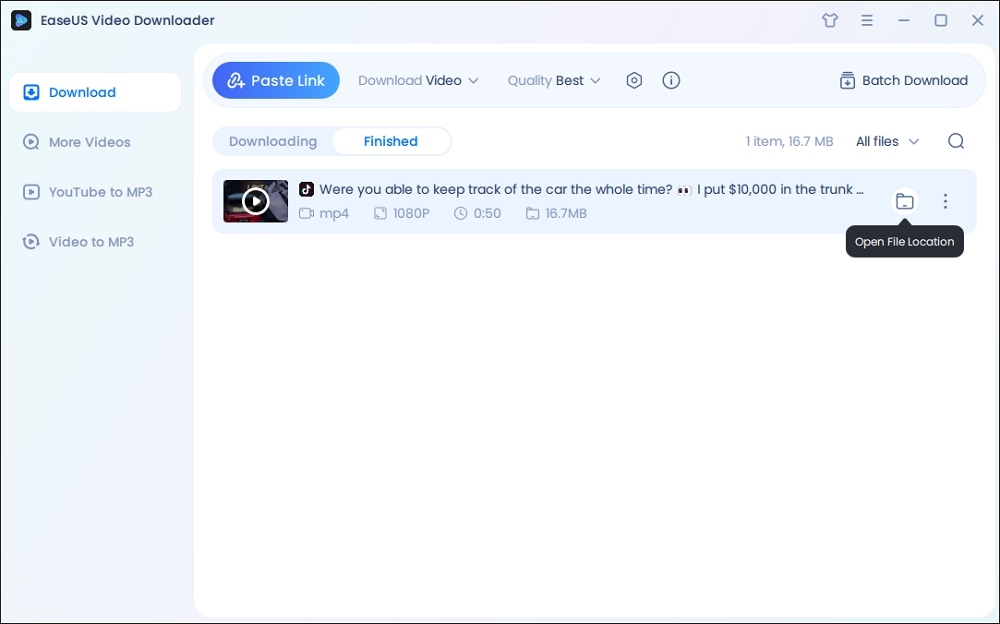
Step 3. Wait for the download to complete. After that, you can find the downloaded TikTok videos in the Finished library and click on the "Open File Location" button to locate them on your PC.
Disclaimer: The information provided in this guide is only for personal fair use. EaseUS never advocates any copyright infringement action.
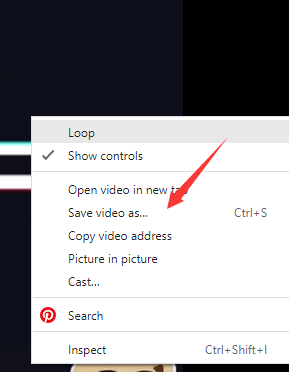
The second way to download a TikTok video without the save button is to use the "Inspect" option in a browser. You can use the inspect option to find the real location of the video file and then save it to your device. Let's show the detailed steps.
Step 1. Go to TikTok.com from a browser on your PC. We take Chrome as an example.
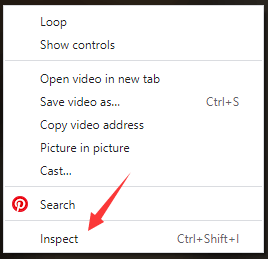
Step 2. Find the video you want to download on TikTok. Right-click on the page and select "Inspect."
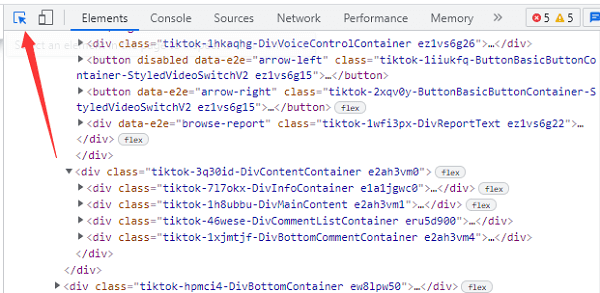
Step 3. Click the arrow icon in the inspector window. You can use it to select an element on the page and inspect it. Hover your mouse to the TikTok video, and there will be a video link.
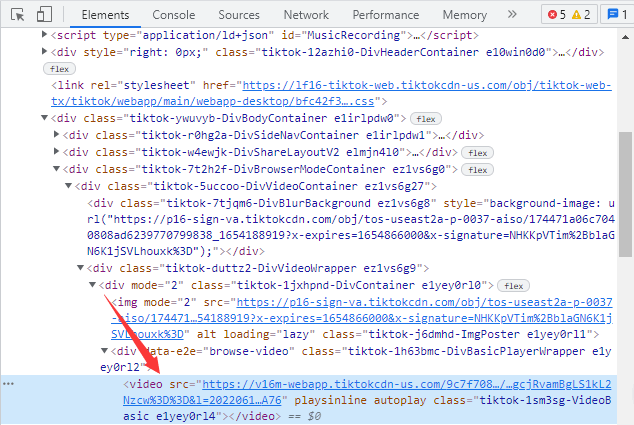
Step 4. Copy the URL and paste it in a new tab. You can see the TikTok video file. Right-click on the screen and select "Save as" or "Save video as" to save the video to your PC.
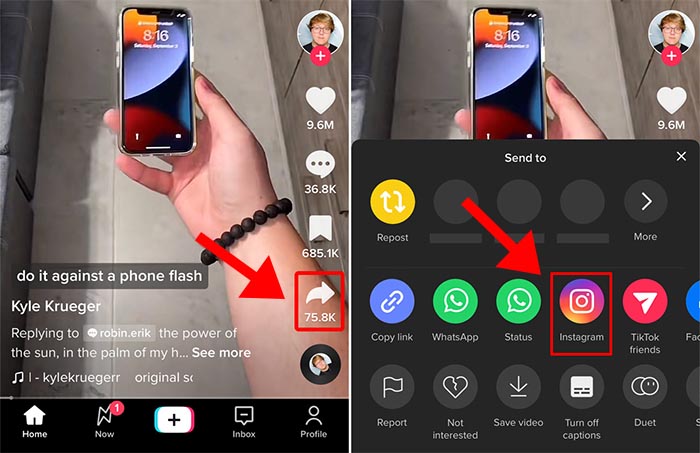
If you want to save a TikTok video without the save button to your camera roll on your mobile phone, you may prefer a mobile solution. Once the Save Video button is missing, you can still save a TikTok video to your camera roll using the Share to Instagram method. This works because TikTok allows users to share videos to Instagram Stories, and from there, you can download the video before posting.
Here's how to save a TikTok to camera roll or gallery without Save button on your phone:
Step 1. Open TikTok and find the video you want to save. Tap the Share button (arrow icon) on the right side of the screen.
Step 2. Select Instagram Stories from the sharing options. TikTok will automatically open Instagram and load the video into a new Story draft.
Step 3. Once the video appears in Instagram Stories, tap the Download or Save icon to save the video to your camera roll without posting it.
Step 4. Exit Instagram if you don't want to upload the Story. The video is now available in your camera roll or gallery.
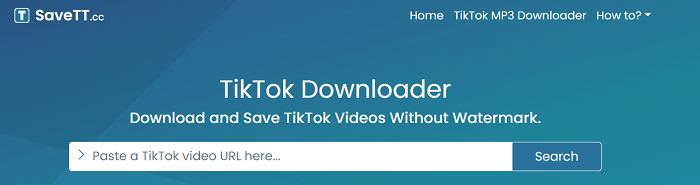
SaveTT is an online TikTok video downloader that converts a URL to MP3 or MP4. What's more, if you want to download a TikTok video without a watermark, SaveTT.cc also meets your needs. You can use SaveTT.cc through a browser on all of your devices: Windows, Mac, iPhone, iPad, and Android.
How to download a TikTok video with the save option using SaveTT.cc on a PC:
Step 1. Copy a TikTok video URL from the Web version. You can also get it from the app.
Step 2. Visit SaveTT.cc with Chrome or other browsers on your PC. Paste the video URL into the bar and click "Search."
Step 3. Select "MP4" as the format. Then click "Download" and select a location on your PC to keep the video.
These are just the three methods we recommend for downloading a TikTok video without the save button. When you are not able to download a TikTok video, you might as well try the solution. Also, if you want to download multiple TikTok or YouTube videos, you can get EaseUS Video Downloader for Windows and Mac.
Download Any Video in High Quality, Anytime
Download publicly available videos from YouTube, Facebook, Twitter, Instagram and more for personal use.
Let's talk about these frequently asked questions about this topic.
If there is no save option, the creator has the save feature off.
To save a video TikToK video directly, whether downloadable or not, copy and paste the video link into the EaseUS Video Downloader, and it will start saving it automatically.
You need to TikTok video downloader like EaseUS Video Downloader that lets you download videos without any watermark.

Copyright Disclaimer
This article is for educational and technical reference only. Do not use the described methods to download or share copyrighted content without permission.
Users are fully responsible for any legal consequences. Please:

Respect content creators' rights

Use official or authorized platforms

Avoid unauthorized downloads

Use official or authorized platforms
Columnist
Sasha is a girl who enjoys researching various electronic products and is dedicated to helping readers solve a wide range of technology-related issues. On EaseUS, she excels at providing readers with concise solutions in audio and video editing.
Read Full Bio More Related Articles
How to Download Rutube Videos [with Rutube Video Downloader on PC/Mac/Mobile]
Rutube is called the YouTube of Russia. There, you can find videos of various types and topics. If you want to download a video from Rutube for offline watching, you can refer to the two ways introduced in this article.
Sasha. Oct 23, 2026
3 min read
How to Download 1080P YouTube Videos in 3 Ways [Full Guide]
Do you want to save your favorite YouTube videos or movies in 1080P for offline viewing? Here, you will learn powerful software and online tools to save YouTube videos in 1080p.
Sasha. Oct 23, 2026
3 min read
How to Download Videos from Any Website in Google Chrome | 100% Free
Downloading any video from any site can be achieved in different ways. If you prefer an online solution, you may want to download videos from any website using Google Chrome, which helps you with online video downloaders and browser extensions. Given that, here I would like to show you how to do it with easy tools.
Sasha. Oct 23, 2026
3 min read
Top 4 Udemy Course Downloader Tools [Online/Application]
How do you download Udemy videos or courses on your PC and mobile? You can go to the course, click the gear icon, and click "Download lecture" to save it. If it is grayed out, get right to this guide on how to download Udemy videos for offline viewing using different tools and methods. Explore both official options and third-party solutions for Windows, Mac, Android, and more.
Sasha. Oct 23, 2026
3 min read