Download Any Video in High Quality, Anytime
Download publicly available videos from YouTube, Facebook, Twitter, Instagram and more for personal use.
Affiliate
Earn commissions when you drive sales through your affiliate links.
Resellers
Sell EaseUS products as a distributor.

Creators & Influencers
Partner with us on YouTube, TikTok, Twitch to earn commissions.
OEM & Outsourcing Service
Put your brand on EaseUS software, or get custom solutions.

Refer & Earn
Earn rewards when you refer others to EaseUS solutions.

Education
Verified students and teachers get exclusive discounts.
Page Table of Contents


Oct 21, 2026 0 mins read
To download videos from RuTube:
Step 1. Get EaseUS Video Downloader on your PC.
Step 2. Copy the Rutube video link and paste it into the tool.
Step 3. The video downloader for Rutube starts downloading.
Download Any Video in High Quality, Anytime
Download publicly available videos from YouTube, Facebook, Twitter, Instagram and more for personal use.
Rutube (rutube.ru) is a leading Russian video platform, and it is called the YouTube of Russia. On Rutube, you can find all types of content, including but not limited to news and media videos, broadcasts, Podcasts, video games, educational content, music, TV shows, and movies. The content is either uploaded by individuals or companies. It would be the perfect site for watching Russian videos for entertainment or learning.
It is legal to download videos from Rutube for personal use. However,
Even so, you cannot download videos directly from the Rutube website. Rutube does not have a download option available. What if you want to have a smooth viewing experience on Rutube without buffering?
Any functional ways to download from Rutube.ru?
byu/SakuraFox512 intechsupport
Is there any way to download Rutibe videos? Yes, you still have practical ways to download the content you want to your device (Windows, Mac, or mobile phones) for offline watching. In this article, we will introduce several Rutube video downloaders and how to use them.
One of the most secure ways to download Rutube videos on PC or Mac is to install a reliable desktop video downloader. EaseUS Video Downloader is a video and audio downloader that you can completely trust. EaseUS Video Downloader supports downloading any video from Rutube by copying and pasting the videos' URLs. EaseUS Video Downloader is also a batch video grabber that allows you to download up to 50 videos at one time. It will be your best option for downloading Rutube videos.
Features of EaseUS Video Downloader:
Secure Download
Secure Download
How to Download Videos from Rutube:
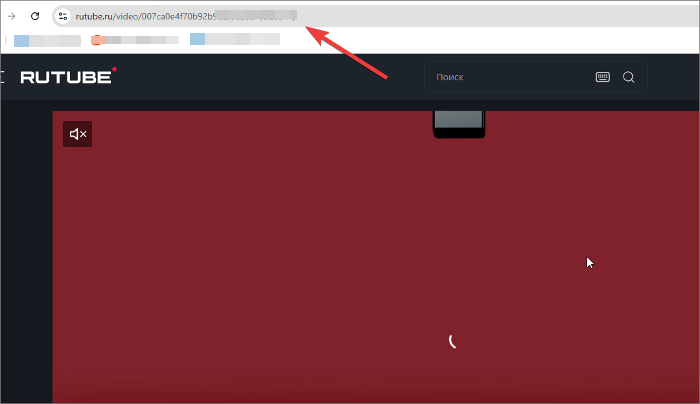
Step 1. Go to Rutube, and copy the video link you are going to download from the address bar.
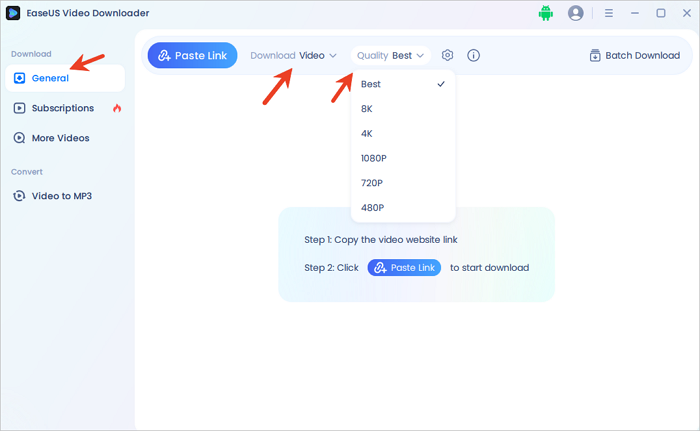
Step 2. Launch EaseUS Video Downloader, then go to "General" to set the download format and quality you prefer.
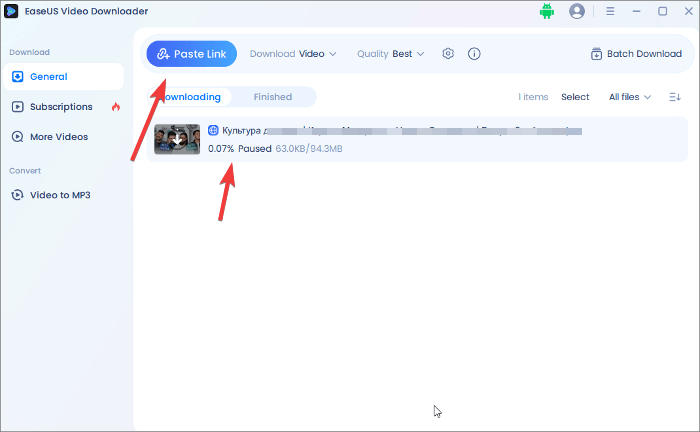
Step 3. Click "Paste Link" to input the link, and it starts parsing and downloading directly.
| 👍Pros | 👎Cons |
|---|---|
|
|
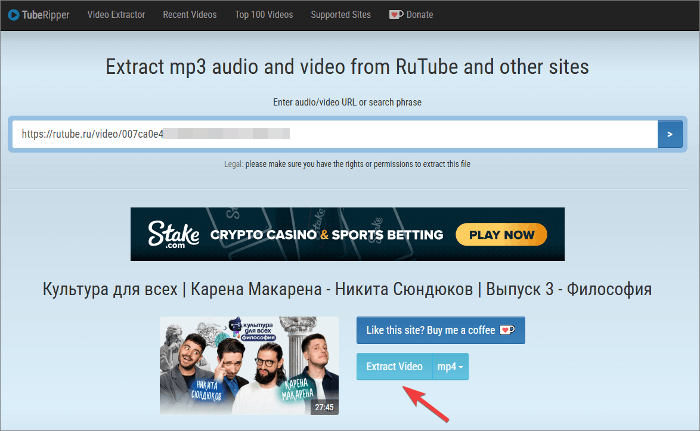
Another way to download Rutube videos is to use an online Rutube downloader. Without installing any application, you can save a video from Rutube using a browser. This way is applicable when you just want to download several Rutube videos. The site we selected for you is tuberipper.com. It is an online Rutube video downloader that allows you to save videos and audio files with minimal ads. It is easy to use, and you can check the detailed solution below.
Step 1. Open the online Rutube video downloader in your browser.
Step 2. Go to Rutube to copy the URL of the video you want to download for offline watching. Paste it into the online downloader.
Step 3. Click the right arrow icon, and it will take several seconds to analyze the link. After the video thumbnail is loaded, click the "Extract Video" on the right to save this video to your PC or Mac.
| 👍Pros | 👎Cons |
|---|---|
|
|
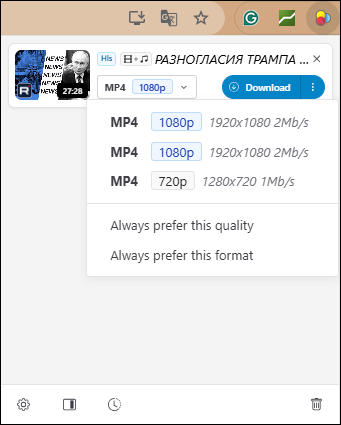
If you don't want to install software on your device, there is another way to download from Rutube with extensions or add-ons. Video Downloadhelper is a popular extension that is designed to save videos from Rutube for free. It is generally considered safe when downloaded from trusted sources like the official Firefox Add-ons site or the Chrome Web Store. Similar to EaseUS Video Downloader, it supports multiple streaming sites and Rutube video downloads in bulk. If you are looking for a browser-integrated solution, it is a convenient tool.
Step 1. Add the extension to your browser and pin it to the toolbar.
Step 2. Locate the video you want to download and play it on Rutube.
Step 3. Click the Video Downloadhelper icon on the toolbar.
Step 4. Then, you can choose the format and resolution you want. Click Download.
| 👍Pros | 👎Cons |
|---|---|
|
|
Mistcs - Video Downloader - Video Player (Скачать видео с Рутуба) is an app specially designed for downloading videos from Rutube to your Android devices. Once it is downloaded, the file is saved in your gallery. It is recently updated and has gained 50K downloads. Therefore, it is considered safe and reliable to use. However, you should be mindful of the potential presence of ads and the data sharing practices.
Step 1. Download the app from the Google Play Store.
Step 2. Copy the video link from Rutube and paste the link into the app.
Step 3. Click the Save button, and it will initiate the downloading process.

| 👍Pros | 👎Cons |
|---|---|
|
|
They are two simple yet effective ways for you to download Rutube videos. With the help of all the solutions above, you can enjoy the video smoothly and offline. But be aware that you can't modify and distribute the downloaded videos or make any commercial use of the downloaded content. We hope you will find our article helpful.
Like YouTube, you can upload videos to Rutube as well. First, you need to create an account, go to the upload section, select your video file, and follow the prompts to complete the upload process.
Rutube allows a wide range of content, including music videos, vlogs, educational content, and more. However, it adheres to strict community guidelines that prohibit explicit or copyrighted content without permission.

Copyright Disclaimer
This article is for educational and technical reference only. Do not use the described methods to download or share copyrighted content without permission.
Users are fully responsible for any legal consequences. Please:

Respect content creators' rights

Use official or authorized platforms

Avoid unauthorized downloads

Use official or authorized platforms
Columnist
Sasha is a girl who enjoys researching various electronic products and is dedicated to helping readers solve a wide range of technology-related issues. On EaseUS, she excels at providing readers with concise solutions in audio and video editing.
Read Full Bio More Related Articles
Cannot Download Videos from Facebook? See Reasons & Fixes
This blog covers some practical methods to fix the can't download Facebook video issue. If you're experiencing the same problem, don't hesitate to use the methods introduced in this guide to fix it.
Sasha. Oct 21, 2026
3 min read
5 Methods to Download Telegram Videos on PC
Want to download videos from Telegram, which is rather tricky? Then, follow our guide to learn about multiple methods to download and watch the videos offline. We have also discussed a powerful video downloader that can simplify things.
Sasha. Oct 21, 2026
3 min read
Top 4 Udemy Course Downloader Tools [Online/Application]
How do you download Udemy videos or courses on your PC and mobile? You can go to the course, click the gear icon, and click "Download lecture" to save it. If it is grayed out, get right to this guide on how to download Udemy videos for offline viewing using different tools and methods. Explore both official options and third-party solutions for Windows, Mac, Android, and more.
Sasha. Oct 21, 2026
3 min read
How to Download Videos from Any Website in Google Chrome | 100% Free
Downloading any video from any site can be achieved in different ways. If you prefer an online solution, you may want to download videos from any website using Google Chrome, which helps you with online video downloaders and browser extensions. Given that, here I would like to show you how to do it with easy tools.
Sasha. Oct 21, 2026
3 min read