-
![]()
How to Save TikTok Videos Without the Save Button
Most videos on TikTok are available for download. You may find that the save button is disabled for certain videos. Why does this happen? We will explain the causes of the issue and provide you with easy ways to save TikTok videos without the save button.
Alin. Feb 28, 2026
3 min read
-
![]()
Top 4 Udemy Course Downloader Tools [Online/Application]
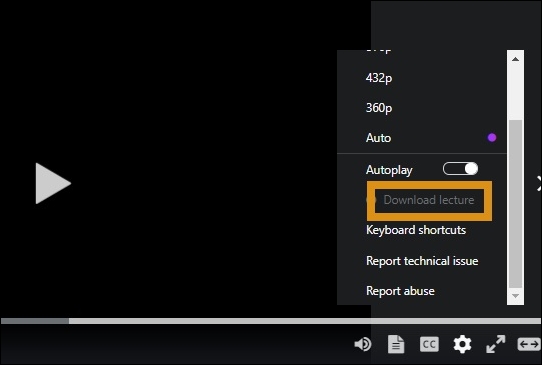
How do you download Udemy videos or courses on your PC and mobile? You can go to the course, click the gear icon, and click "Download lecture" to save it. If it is grayed out, get right to this guide on how to download Udemy videos for offline viewing using different tools and methods. Explore both official options and third-party solutions for Windows, Mac, Android, and more.
Alin. Feb 28, 2026
3 min read
-
![]()
How to Dub a Video in Another Language Easily (AI Video Dubbing)
Learn how to dub a video in another language step by step. Discover the easiest AI video dubbing method to translate and sync voiceovers online.
Alin. Feb 28, 2026
3 min read
-
![]()
Download Video from Facebook Ads Library in 3 Free Ways
How to download videos from the Facebook ads library for free? This post lists four different ways for you: the code, an online downloader, a Chrome extension, and a desktop software. Keep reading.
Alin. Feb 28, 2026
3 min read
Page Table of Contents


Feb 28, 2026 0 mins read
Marketers no longer need to script, storyboard, and edit every product video manually. With URL to Video AI, you can paste a product page, blog post, Shopify listing, or even a YouTube URL and automatically generate a ready-to-publish video, complete with visuals, captions, music, and AI voiceover.
From e-commerce product video automation to SaaS demo explainers, URL-based video generation is becoming one of the fastest-growing categories in AI marketing tools. This guide explains how it works, who it's for, and compares the best URL to video generators available today, including free options and tools designed for business users.
What is URL to Video AI?
URL to Video AI refers to online tools that convert a web page into a ready-to-use marketing video. Instead of writing scripts manually, users simply paste a link, such as a Shopify product page, eBay or Shopee listing, blog article, or SaaS landing page — and the system extracts key information to generate video content automatically.
Technically, these tools use natural language processing to analyze headlines, descriptions, and structured page elements. The AI then turns core selling points into a short video script and matches relevant visuals, either from the page itself or from stock libraries.
Compared with traditional text-to-video workflows, URL-based generation is faster and more scalable, making it especially useful for ecommerce sellers and marketing teams managing multiple products or campaigns.
Why Marketers Are Switching to URL-Based Video Generation?
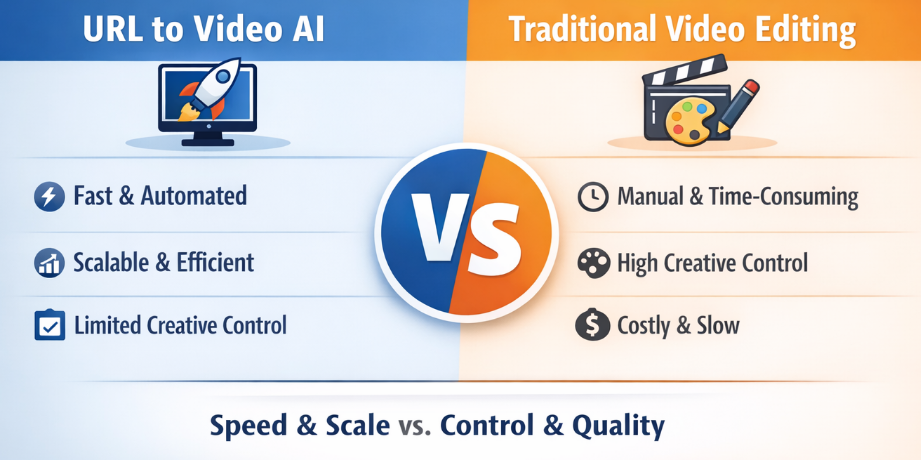
Traditional video creation:
- Takes 2–7 days
- Requires editing software
- Often involves freelancers or agencies
- Difficult to scale across multiple products
With URL to video AI:
- Video created in minutes
- Lower production cost
- Easy A/B testing
- Ideal for ecommerce and dropshipping
- Scales across dozens of SKUs
For Shopify, eBay, and Shopee sellers, this dramatically reduces content bottlenecks.
Feel free to share this blog with others.

How URL to Video AI Works
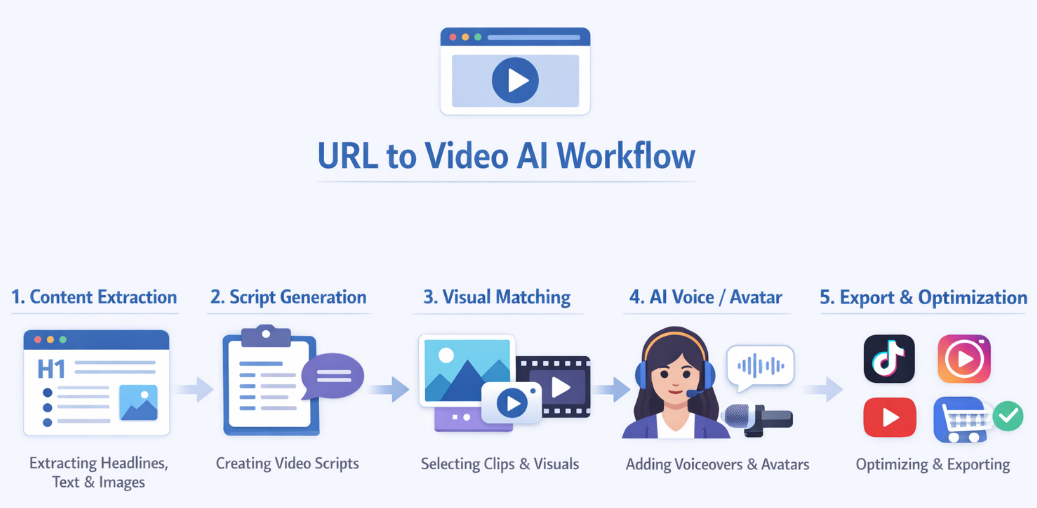
While each platform has its own technology stack, the overall workflow is similar.
1️⃣First, the system extracts structured content from the URL. Clean, well-organized landing pages generate better results because headings and key product highlights are easier for AI to interpret.
2️⃣Next, the AI transforms the extracted content into a marketing-ready script, rewriting descriptions into benefit-focused messaging and adding hooks and calls to action.
3️⃣Then comes visual generation. The tool pulls images from the page or enhances the video with stock media. Advanced platforms allow scene-by-scene editing after the initial draft is created.
4️⃣Finally, the system adds an AI voiceover or avatar presenter. Some tools support realistic talking avatars, while others focus on voice-based motion graphics. The finished video can be exported in formats optimized for YouTube Shorts, TikTok, Instagram Reels, or paid ads.
This streamlined process makes URL-to-video AI especially appealing for businesses that need fast, scalable marketing content.
Best URL to Video AI Tools (2026 Comparison)
Several link to video generators dominate this space, each with a distinct focus.
InVideo AI
Target Audience: Small businesses, marketing teams, social media content creators, and marketing personnel who need to customize their brand visuals.
InVideo AI is one of the most recognized tools offering direct URL-to-video workflows. Its defining advantage lies in script-level customization. After generating the initial draft, users can edit individual scenes before rendering, which gives marketers more control over tone and messaging.
In online discussions, many users praise the speed and template flexibility of this link-to-video tool, especially for e-commerce product video creation. However, some marketers note that highly technical SaaS pages may require manual refinement after extraction.
For business users seeking a balance between automation and editing control, InVideo AI remains a strong contender.
Pictory
Target Audience: Content marketing teams, bloggers transitioning to video, and social media content creators.
Pictory is particularly strong in blog-to-video automation in minutes. Instead of focusing primarily on ecommerce product URLs, it excels at transforming long-form articles into short marketing videos with captions.
Users on marketing forums often mention that Pictory performs well when repurposing content for YouTube and social media. Its automatic summarization is efficient, though less optimized for complex product listings.
For content marketers turning traffic-driven blog posts into video assets, Pictory provides a streamlined workflow.
AI Studios
Target Audience: Corporate training, B2B marketing, product tutorials, and content scenarios featuring AI-powered narrators.
AI Studios differentiates itself through avatar-driven video generation. While not strictly a pure URL to video generator, it integrates structured content into professional AI presenter formats.
Corporate users frequently highlight its multilingual capabilities and realistic avatars. In discussions across business communities, it is often recommended for training videos and SaaS explainers rather than short-form ecommerce ads.
For brands seeking polished spokesperson-style outputs, AI Studios offers strong business appeal.
Lumen5
Target Audience: Beginners, content marketing teams, and social media operators for small and micro-enterprises.
Lumen5 focuses on turning written content into visually branded marketing videos. It is widely used by social media teams for repurposing blog content into short-form videos.
Users generally appreciate its ease of use and brand customization features. However, compared to newer AI-driven automation platforms, its URL extraction capabilities are more limited.
It works well for small marketing teams prioritizing simplicity over deep automation.
HeyGen
Target Audience: Brand content creation, product demonstrations, educational training, and sales support video scenarios.
HeyGen is best known for highly realistic AI talking avatars. While URL import is not its primary strength, marketers often combine URL-generated scripts with HeyGen avatars to create spokesperson videos.
Across Reddit and professional communities, users frequently praise its lip-sync realism and multilingual support. Pricing is positioned toward professional users, making it more suitable for agencies and established brands.
For businesses wanting high-impact avatar-based marketing, HeyGen remains one of the most recognizable names in the space.
Below is a comparison table of information for these AI URL to video tools:
|
Tool |
Key Pros |
Key Cons |
Starting Price |
|
InVideo AI |
Strong templates & branding control; good for marketing & social media; bulk-style editing flexibility |
Auto-generation often needs manual refinement; watermark on free plan |
Free pla; $20–$48/month |
|
Pictory |
Excellent for blog/article-to-video; auto subtitles & summarization |
Limited deep URL product data extraction; less design flexibility |
$19–$39/month |
|
AI Studios |
Realistic AI avatars; strong multilingual support; good for business presentations |
Not focused on direct URL scraping; script-based workflow |
$24–$29/month |
|
Lumen5 |
Easy to use; fast content repurposing; brand toolkit options |
Automation depth is moderate; advanced features cost more |
Free plan; $19–$79/month |
|
HeyGen |
High-quality AI avatars; strong localization; good for global marketing |
Limited structured URL extraction; premium features gated |
Free trial; $24–$29/month |
Feel free to share this blog with others.
Free AI Video URL Generator Options
Demand for "free AI video URL generators," "watermark-free free AI video URL generators," and "free video URL generator downloads" has increased significantly. However, clear expectations are crucial.
Most professional video URL generator tools operate as online SaaS platforms, not as downloadable software. Free versions often limit the number of exports, add watermarks, or restrict video length. Completely free, watermark-free enterprise-grade solutions are extremely rare.
For e-commerce newcomers testing product video marketing, starting with a free plan is feasible. However, to scale up commercial marketing campaigns, a paid plan is usually required to unlock commercial use and brand control.
Final Thoughts
URL to Video AI represents a practical evolution in marketing automation. Instead of reinventing content, businesses can leverage existing web pages to generate scalable video assets.
For ecommerce brands, SaaS marketers, and affiliate creators, the ability to convert any online product or landing page into a marketing-ready video significantly reduces production barriers. While free AI URL to video generators offer a starting point, professional campaigns demand tools that balance automation, control, and commercial reliability.
FAQ about Turn URL to Video with AI
1. Is URL to video AI accurate?
Accuracy depends largely on page structure. Clean landing pages generate better script outputs than cluttered layouts.
2. Can AI-generated videos be used for paid marketing campaigns?
Yes, provided the platform includes commercial usage rights under its paid plans.
3. Does URL to video AI work with Shopify, eBay, or Shopee?
Most tools support publicly accessible product URLs, making them suitable for ecommerce workflows.
4. Is there a URL to video AI free without watermark?
Most professional tools include watermarks on free plans. Removing them usually requires a paid subscription.
5. What is the difference between URL to video and text-to-video AI?
URL to video automatically extracts content from a web page, while text-to-video requires manual script input.
6. Are free URL to video tools enough?
Free plans are useful for testing, but most include watermarks or export limits. Serious ecommerce and marketing use usually requires a paid plan for branding control and commercial rights.