-
![]()
Joey Albert
Joey has been involved with tech ever since she joined the EaseUS editor team in March 2011 and now she is a senior website editor. She is good at solving various issues, such as video downloading and recording.…Read full bio -
![]()
Alin
Alin is a sophisticated editor for EaseUS in tech blog writing. She is proficient in writing articles related to screen recording, voice changing, and PDF file editing. She also wrote blogs about data recovery, disk partitioning, data backup, etc.…Read full bio -
Jean has been working as a professional website editor for quite a long time. Her articles focus on topics of computer backup, data security tips, data recovery, and disk partitioning. Also, she writes many guides and tutorials on PC hardware & software troubleshooting. She keeps two lovely parrots and likes making vlogs of pets. With experience in video recording and video editing, she starts writing blogs on multimedia topics now.…Read full bio
-
![]()
Gorilla
Gorilla joined EaseUS in 2022. As a smartphone lover, she stays on top of Android unlocking skills and iOS troubleshooting tips. In addition, she also devotes herself to data recovery and transfer issues.…Read full bio -
![]()
Rel
Rel has always maintained a strong curiosity about the computer field and is committed to the research of the most efficient and practical computer problem solutions.…Read full bio -
![]()
Dawn Tang
Dawn Tang is a seasoned professional with a year-long record of crafting informative Backup & Recovery articles. Currently, she's channeling her expertise into the world of video editing software, embodying adaptability and a passion for mastering new digital domains.…Read full bio -
![]()
Sasha
Sasha is a girl who enjoys researching various electronic products and is dedicated to helping readers solve a wide range of technology-related issues. On EaseUS, she excels at providing readers with concise solutions in audio and video editing.…Read full bio
Page Table of Contents

Myra
Updated on Dec 29, 2025
0 Views |
0 min read
Who Is MrBeast?
MrBeast, whose real name is James Stephen, is an American YouTuber and businessman known for his huge challenge videos, massive cash giveaways, and philanthropy-focused stunts. His main YouTube channel is the most-subscribed individual creator channel, with hundreds of millions of subscribers and extremely high-budget videos.
Because MrBeast's content is so energetic and instantly recognizable, many creators dream of capturing a similar style and presence in their own videos. That is exactly where a MrBeast voice changer becomes powerful. Instead of copying his video ideas, users can instantly transform their own voice to sound like a MrBeast-style narrator, adding hype, intensity, and entertainment value to intros, commentary, and reaction clips.
 (Image from Wikipedia)
EaseUS VoiceWave: Get MrBeast Voice Changer in Real-Time
EaseUS VoiceWave is a free-to-start AI voice changer for Windows PC that excels at real-time voice modulation, making it perfect for transforming your voice into MrBeast's signature high-energy, hype-filled style during streams or YouTube content creation.
This tool uses AI-powered effects to instantly clone and adapt voices with low latency, capturing MrBeast's enthusiastic tone, fast-paced delivery, and motivational flair—ideal for narrating challenges, giveaways, or Shorts without needing pro editing skills.
It supports over 100 presets (like celebrity-inspired or hype narrator modes) that you can tweak for pitch, volume, and energy to match his iconic sound, plus seamless integration with Discord, OBS, and games.
Step 1. Launch EaseUS VoiceWave. Set your microphone and headphones.
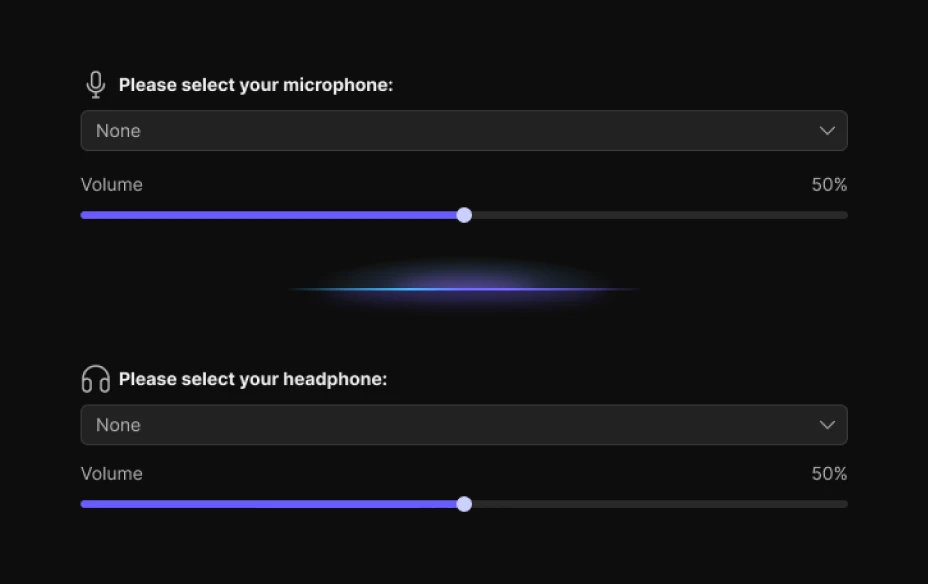
Step 2. Type Mr.Beast in the search bar. Click and download the voice model.
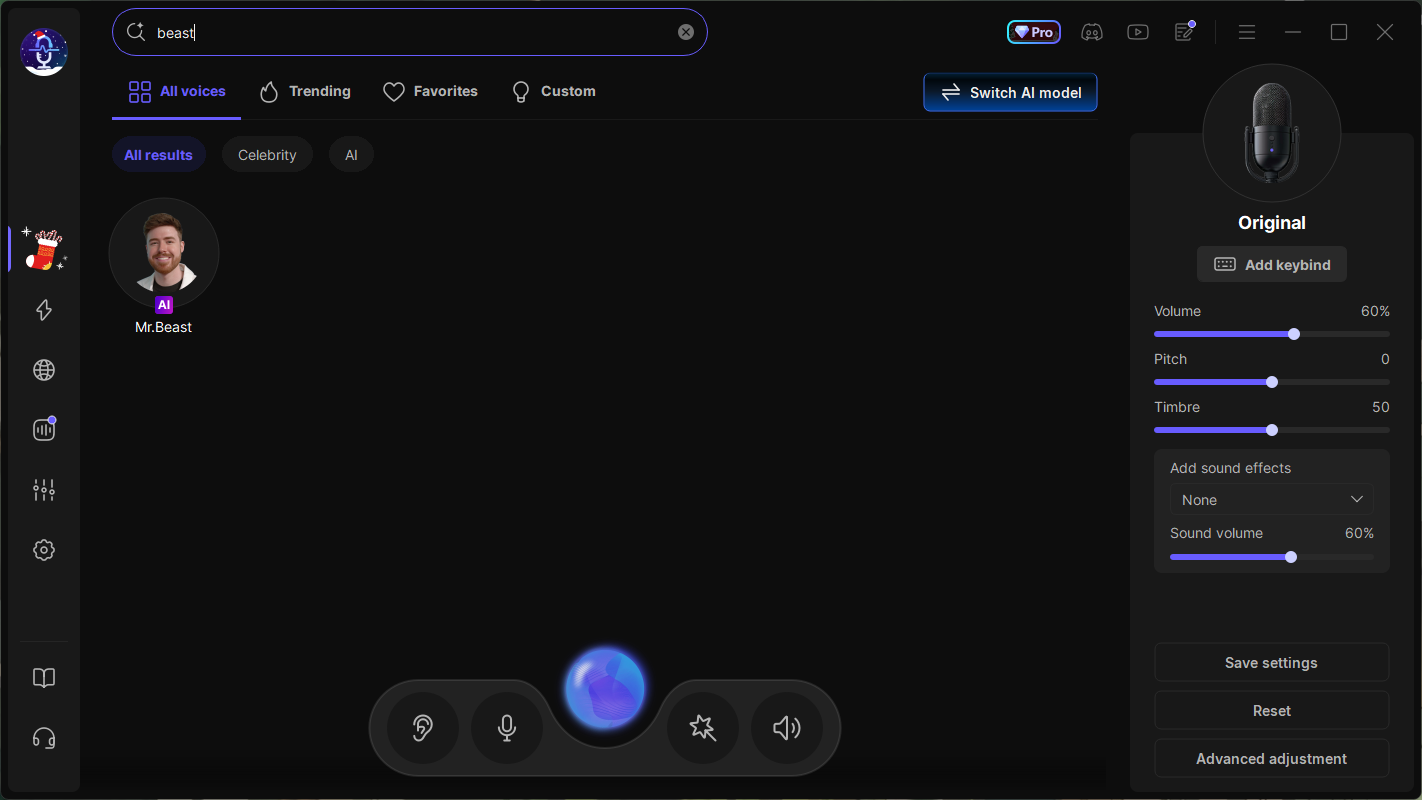
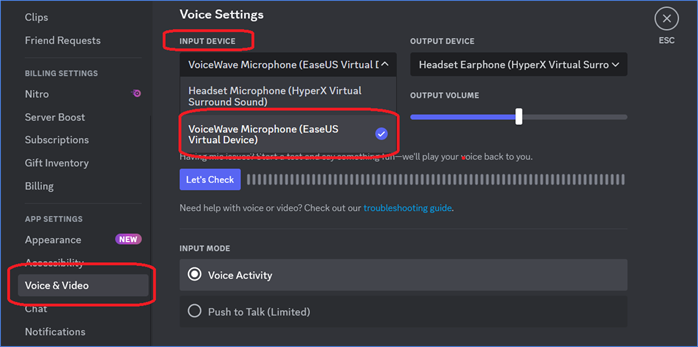
Step 3. You can speak now and optionally tweak your voice. If you want to sound like MrBeast on apps like Discord, you need to select VoiceWave Virtual Microphone as its input device.
Pros:
- Real-time voice changing with minimal latency, perfect for streaming, gaming, or live commentary.
- Simple and intuitive interface, making it beginner-friendly for creators with no technical background.
- AI-powered voice modulation ensures smoother, more realistic transformations than traditional pitch shifters.
Cons:
- Windows-only, currently no native macOS version.
- Limited customization in the free version; advanced tone and emotion controls are Pro-only.
Other AI MrBeast Voice Generators [Pros & Cons Listed]
VoxBox
VoxBox is a versatile AI voice generator that can turn your text to speech in MrBeast's voice. It supports multiple languages and excels in voice cloning for YouTube narration or memes.
Pros:
- Massive voice library
- Cross-platform (Windows, Mac, Android, iOS)
- Multi-language support and emotion customization.
Cons:
- Free version limits characters/voice.
- Cloning quality varies with short samples.
NiceVoice
NiceVoice's MrBeast AI Voice Generator is a free, browser-based text-to-speech tool that instantly creates high-energy MrBeast-style voiceovers from your scripts, perfect for YouTube challenges, giveaways, and viral content.
Pros:
- Free text-to-speech for quick MrBeast-style voiceovers, no signup needed.
- Simple process with fast MP3 downloads.
Cons:
- Free limits audio length.
- Text-only, no real-time or audio input.
FineShare
FineShare offers a dedicated MrBeast voice changer that lets users turn their own recordings into a realistic MrBeast-style AI voice in just a few clicks. It is browser-based, so users can access it anywhere without installing extra software.
Pros:
- Browser-based and available on both PC and mobile.
- Support common formats (MP3, M4A, WAV).
- Let you fine-tune the pitch for better matching.
Cons:
- The free version is limited to very short clips.
- Fully online, so quality and speed depend on your internet connection.
Conclusion
In summary, EaseUS VoiceWave stands out as the top MrBeast voice changer for real-time streaming and PC creators, while FineShare excels in free online conversions, and NiceVoice shines for quick text-to-speech scripts.
Choose based on your needs: real-time hype for live content (VoiceWave), browser simplicity (FineShare), or instant YouTube narration (NiceVoice). All deliver that signature MrBeast energy to boost your videos—test the free versions today and level up your content game.