
Download Any Video in High Quality, Anytime
Download publicly available videos from YouTube, Facebook, Twitter, Instagram and more for personal use.
Affiliate
Earn commissions when you drive sales through your affiliate links.
Resellers
Sell EaseUS products as a distributor.

Creators & Influencers
Partner with us on YouTube, TikTok, Twitch to earn commissions.
OEM & Outsourcing Service
Put your brand on EaseUS software, or get custom solutions.

Refer & Earn
Earn rewards when you refer others to EaseUS solutions.

Education
Verified students and teachers get exclusive discounts.
Page Table of Contents
Updated on Oct 23, 2026
🚨 Important Notice: This article is intended for personal, educational, or legally authorized use only. Downloading videos or audio from YouTube or other platforms without permission may violate their terms of service and applicable copyright laws. Always ensure you have the right to download any content.
#Key Takeaways:
▶️Free Download: EaseUS Video Downloader
▶️Features: Batch-download playlists, channels, or multiple individual URLs
▶️Pros: support up to 8K/4K/HD video quality at 320kbps.
When you only need to download one or two videos, a basic online tool may suffice. But when it comes to downloading multiple YouTube videos, playlists, or even entire channels, such tools often fall short. Most don't support true bulk downloading or offer limited format options.
This is where a YouTube multi downloader or free instant YouTube downloader for Windows or Mac comes in. Whether you're a content creator archiving your own work or an educator preserving licensed videos for offline viewing, a reliable multi downloader can save you time and simplify your workflow.
Before using any YouTube multi downloader to download YouTube videos without losing quality, it's crucial to understand the legal and ethical boundaries associated with downloading online content.
YouTube's Terms of Service strictly prohibit the downloading of any video unless:
Downloading copyrighted material without proper authorization may result in:
Therefore, always ensure that you:
Tools like EaseUS Video Downloader are designed to support authorized downloads, such as archiving personal content, extracting public domain resources, or saving royalty-free media. Misusing such tools is discouraged and may be illegal.
Availability: universally compatible with Windows 11/10/8/7 and macOS 10.13 or later
The video downloader for PC & Mac - EaseUS Video Downloader is a reliable choice for you to download YouTube videos or audio files by playlist or channel. In addition to downloading YouTube video and audio files in bulk, EaseUS Video Downloader helps to:
Even if the videos aren't organized into a playlist, you can paste multiple URLs, and the downloader will download them for you all at once—making it ideal for managing high-volume content collections.
Secure Download
Secure Download
With the YouTube multi-downloader installed on your PC or Mac, you can now freely download multiple YouTube videos or audio files at the same time. Let me show you how to download a YouTube channel:
Step 1. Copy the channel link. The link should look like: http://www.youtube.com/user/username or http://www.youtube.com/channelname.
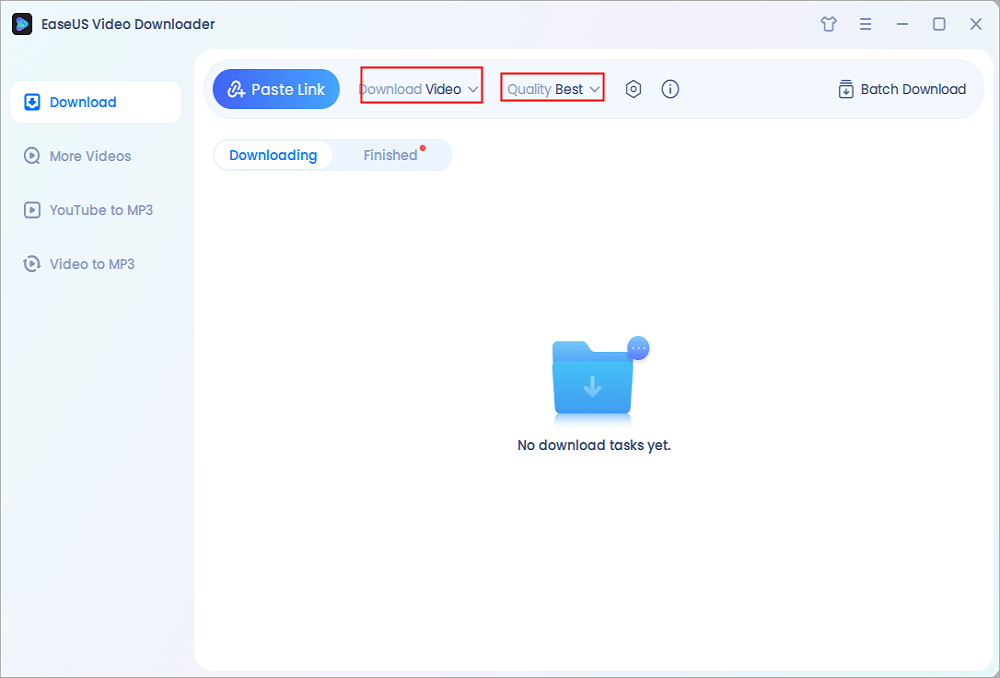
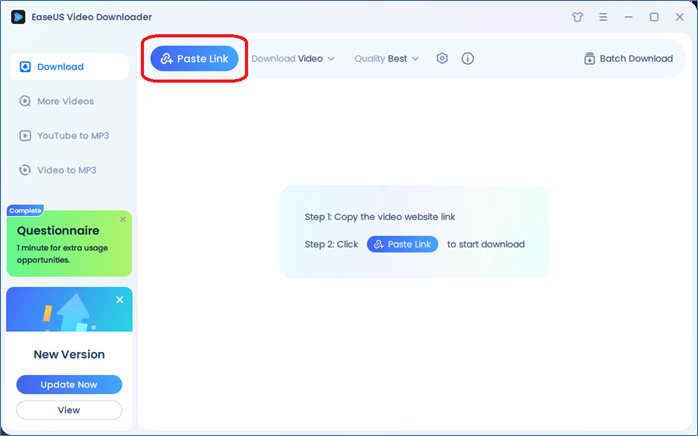
Step 2. Launch EaseUS Video Downloader on your computer, and then select the video format and quality setting.
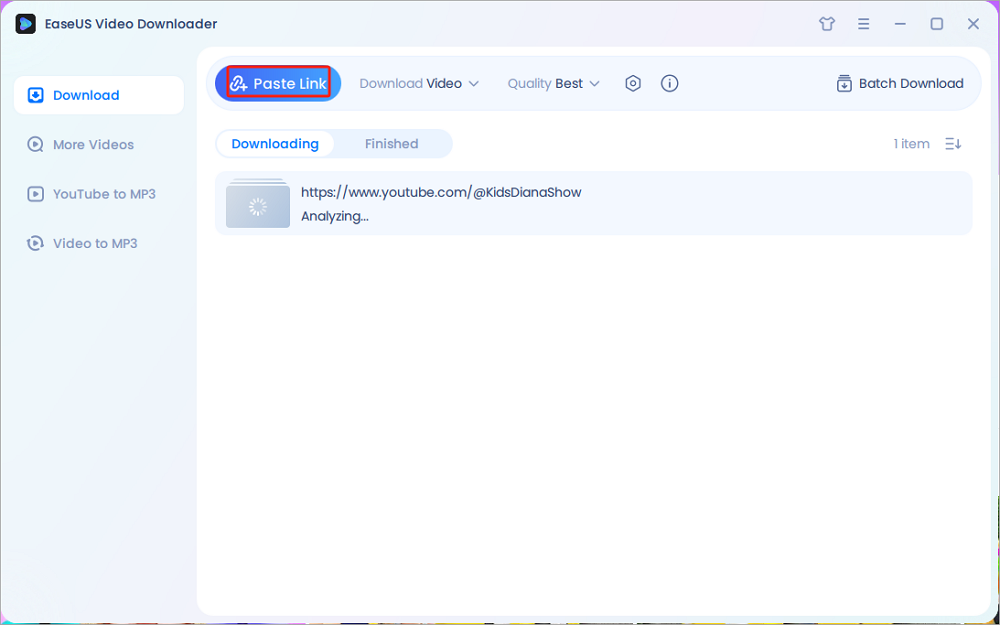
Step 3. Click "Paste Link," and it will detect the copied link automatically, add this download task, and start downloading.
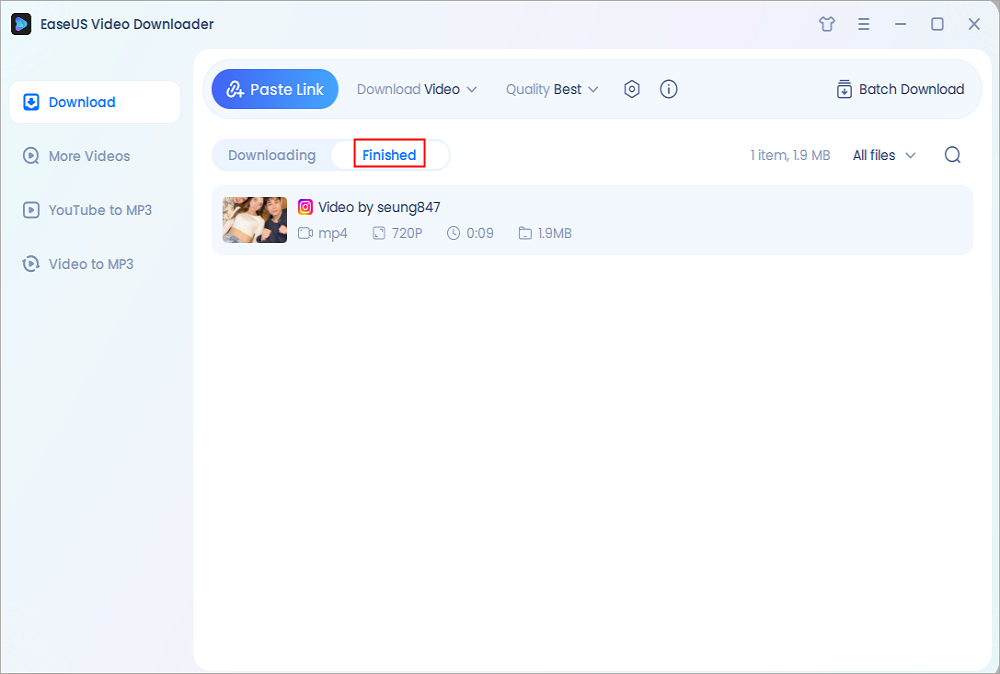
Step 4. Check the downloaded videos below its "Finished" tab.
Disclaimer: This guide is compiled for personal fair use ONLY. EaseUS is in no way collaborated or affiliated with YouTube and never advocates any copyright infringement action. The end-user should be solely responsible for their behavior.
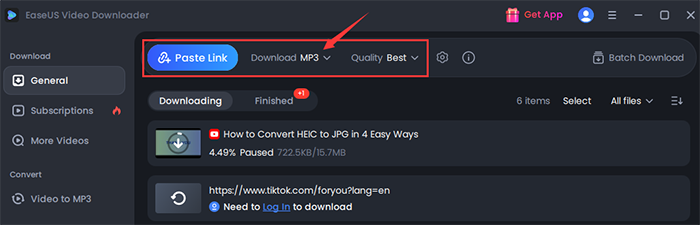
🎯 Tip: If you only want to convert YouTube videos to MP3, choose MP3/WAV as the output format before starting the download.
Secure Download
Secure Download
Yes. EaseUS Video Downloader supports downloading entire YouTube playlists and channels, as long as the content is public and you have the right to download it. You can also paste multiple URLs to download videos in batches.
Yes. A popular open-source option is yt-dlp, a command-line tool that allows advanced downloading of videos, playlists, and audio from YouTube and other platforms. It is free of charge and open source without login. Multiple customization options like network options, geo restriction bypass, video quality choice, output location and filename, video formats, subtitles, and more are on offer for free download. The command line tool not only supports YouTube, but also thousands of streaming platforms.
However, it requires technical knowledge and may occasionally stop working if platforms change their structures. Use it only for authorized or personal-use content.
There are web-based tools like YouTube Multi Downloader (ytmultidownloader.net) that allow you to download entire playlist or multiple videos for free through a browser. ytmultidownloader.net is user-friendly and don't require installation, but it may:
Also, online tools are more susceptible to copyright misuse, and some of them contain annoying ads and redirects, so always ensure your downloads comply with legal use.
The safest and most stable method is to use a trusted desktop downloader like EaseUS Video Downloader, especially if you need high-quality downloads, multiple format options, and batch processing support. Make sure the content you download is either your own or explicitly allowed for reuse.
Secure Download
Secure Download
That depends. Downloading videos from YouTube is only allowed if:
Always respect YouTube's Terms of Service and copyright laws in your region.
For those needing to download multiple videos for offline viewing, educational archiving, or personal backup, EaseUS Video Downloader is one of the best tools available. It supports high-resolution output, audio extraction, and batch processing—all wrapped in a clean, user-friendly interface.
Just remember: only download content you have permission to use. When used responsibly, a YouTube multi downloader can become a valuable productivity tool.
Download Any Video in High Quality, Anytime
Download publicly available videos from YouTube, Facebook, Twitter, Instagram and more for personal use.
Our Team
Joey Albert
Alin
Gorilla
Rel
Dawn Tang
Sasha
Copyright © 2004 - 2023 EaseUS. ALL RIGHTS RESERVED.