-
![]()
Joey Albert
Joey has been involved with tech ever since she joined the EaseUS editor team in March 2011 and now she is a senior website editor. She is good at solving various issues, such as video downloading and recording.…Read full bio -
![]()
Alin
Alin is a sophisticated editor for EaseUS in tech blog writing. She is proficient in writing articles related to screen recording, voice changing, and PDF file editing. She also wrote blogs about data recovery, disk partitioning, data backup, etc.…Read full bio -
Jean has been working as a professional website editor for quite a long time. Her articles focus on topics of computer backup, data security tips, data recovery, and disk partitioning. Also, she writes many guides and tutorials on PC hardware & software troubleshooting. She keeps two lovely parrots and likes making vlogs of pets. With experience in video recording and video editing, she starts writing blogs on multimedia topics now.…Read full bio
-
![]()
Gorilla
Gorilla joined EaseUS in 2022. As a smartphone lover, she stays on top of Android unlocking skills and iOS troubleshooting tips. In addition, she also devotes herself to data recovery and transfer issues.…Read full bio -
![]()
Rel
Rel has always maintained a strong curiosity about the computer field and is committed to the research of the most efficient and practical computer problem solutions.…Read full bio -
![]()
Dawn Tang
Dawn Tang is a seasoned professional with a year-long record of crafting informative Backup & Recovery articles. Currently, she's channeling her expertise into the world of video editing software, embodying adaptability and a passion for mastering new digital domains.…Read full bio -
![]()
Sasha
Sasha is a girl who enjoys researching various electronic products and is dedicated to helping readers solve a wide range of technology-related issues. On EaseUS, she excels at providing readers with concise solutions in audio and video editing.…Read full bio
Page Table of Contents

Myra
Updated on Oct 23, 2026
0 Views |
0 min read
Video DownloadHelper is a browser extension that allows you to download videos from thousands of websites, including live streams. While Video DownloadHelper is a quick solution for downloading videos, it lacks essential features like 4K video downloading, and the Chrome version cannot download YouTube videos. Thus, exploring Video DownloadHelper alternatives becomes necessary for users seeking to save videos without limitations.
PAGE CONTENT:
Video DownloadHelper Alternative — Video Downloader Software
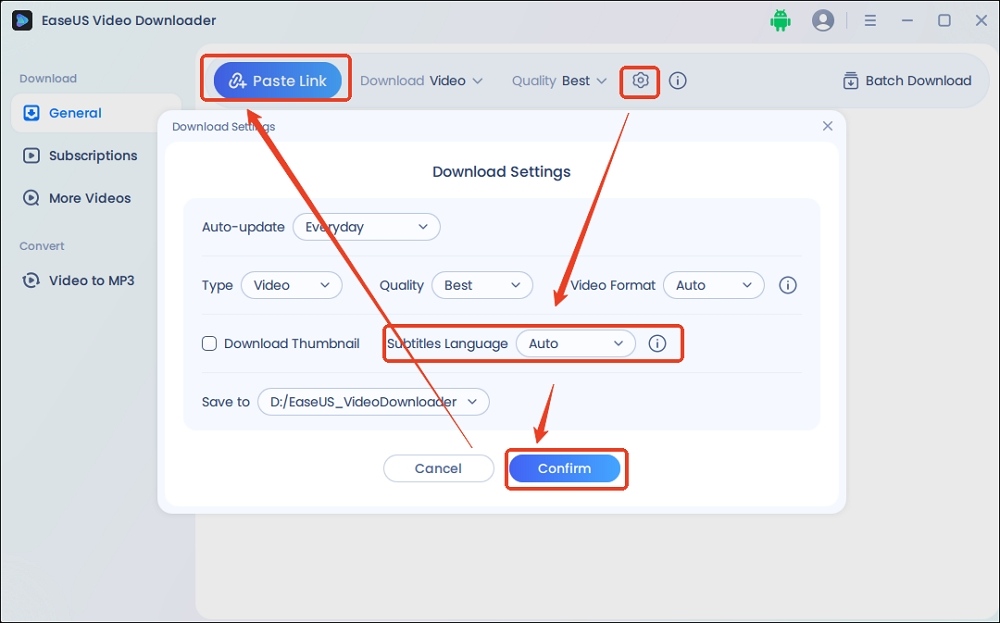
While Video DownloadHelper is a popular option, EaseUS Video Downloader offers a robust alternative for downloading videos on both Windows and Mac. With it, you can download online video clips, movies, TV shows, images, etc., easily and quickly, making it a perfect alternative to Video DownloadHelper.
Main Features:
- Similar to Video DownloadHelper, it supports a wide variety of websites, including YouTube, Vimeo, Facebook, etc.
- You can download videos in HD, 4K, and 8K, which is beyond Video DownloadHelper.
- It offers batch downloading, saving time if you want to download a YouTube playlist or all videos from a channel.
- You can save videos without ads and watermarks.
Cons:
- You can only download videos in 360p or 720p with the free version.
Free Download video downloader for Windows
Secure Download
Free Download video downloader for Mac
Secure Download
Video DownloadHelper Alternative — Browser Extensions
If you want extensions integrated into your browser to download online videos to your devices, there are some free YouTube video downloaders.
Flash Video Downloader
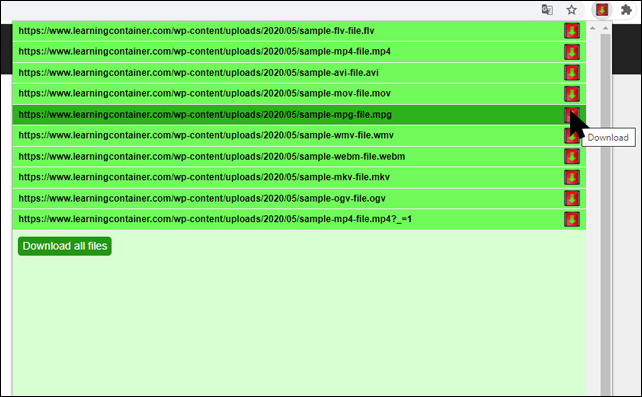
Flash Video Downloader is a user-friendly alternative to Video DownloadHelper. It allows you to download flash videos from various websites directly within their browsers. Thus, you don't need to download and install third-party software on your computer or mobile phone. Just simply add the extension to your Google Chrome or Mozilla Firefox.
Main Features:
- It supports downloading videos in MP4, FLV, HD 720p, and HD 1080p.
- It provides fast and efficient downloads.
- It supports many social media platforms like Twitter, Facebook, and Instagram.
Cons:
- You cannot download YouTube videos and other clips protected by copyright.
- The last updated date is 2023, so it may be outdated.
Ant Video Downloader
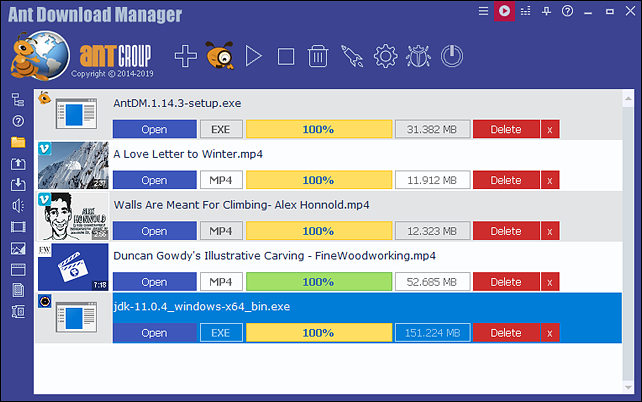
Ant Video Downloader presents another Video DownloadHelper free alternative for saving online videos. It allows users to download videos from streaming websites. Ant Video Downloader integrates with popular browsers, such as Chrome, Firefox, Edge, and their clones. With it, you can download audio and video files without a speed limit.
Main Features:
- It supports most video streaming sites, such as YouTube and Dailymotion.
- It offers downloading options from low-quality to ultra-high definition.
- It includes a built-in converter to change video formats for compatibility with smartphones and tablets.
Cons:
- The user interface looks old and may not appeal to modern users.
- The last update was in May 2025. The development and updates have slowed down, so it may not support newer websites or features.
NetVideoHunter
NetVideoHunter is a browser extension for Chrome and Firefox designed to help users download videos and audio. It supports a wide range of websites, including popular platforms like YouTube, Facebook, Vimeo, and more. It is known for its simplicity and ease of use, making it a popular choice for users who want to save online media for offline viewing.

Main Features:
- You can extract and download audio files from videos.
- You can download videos in different resolutions and formats for free.
- It does not consume significant system resources or slow down the browser.
Cons:
- It is not suitable for users who use Safari or Edge.
- It lacks batch downloading or playlist support.
- It is only available for desktop browsers, and there is no mobile app version.
Video DownloadHelper Alternative — Chrome Online Tools
If you don't want to download any apps, extensions, or software, you can use online video downloaders listed below to save the content for offline viewing.
EaseUS Online Video Downloader
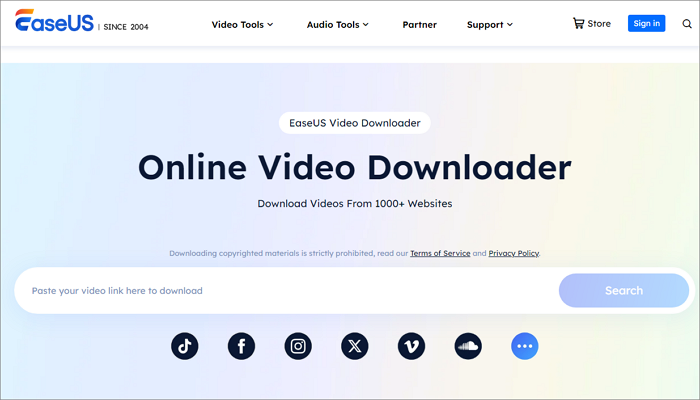
EaseUS Online Video Downloader is a simple, free, and convenient tool for downloading videos from popular platforms like Twitter, Facebook, Instagram, and more. It is a part of the EaseUS software suite, which is known for its user-friendly and reliable tools. Unlike Video DownloadHelper (browser extension), it is a web-based online service that doesn't require installation.
Main Features:
- It is easy to use: paste the video URL, and the tool handles the rest.
- Users can download videos without creating an account or signing up.
- It allows downloading videos in various formats and resolutions, such as HD, 720p, and 360p.
Cons:
- If you want advanced options like batching downloading, you need to install the desktop software.
Video DownloadHelper Not Working: Overview
Video DownloadHelper remains one of the most popular browser extensions for grabbing online videos, but users frequently report issues—especially with sites like YouTube, Twitter, and Facebook—where downloads fail, options disappear, or downloads are limited to low resolutions (like 360p). These problems have surged since recent browser and extension updates in 2025.
Common Causes:
- The browser or extension is outdated, or needs a fresh reinstall.
- YouTube and some sites block downloads due to copyright or technical changes.
- Cache is full or there is not enough storage space.
- The companion app isn't installed, is missing updates, or the required features need a paid license.
- Conflicts with other extensions or malware can also cause failures.
Quick Solutions:
- Update the browser and extension to the latest versions.
- If the problem started after an update, try reverting to an older version.
- Install or update the companion app (vdhcoapp), preferably from the official site or trusted sources.
- Clear your browser cache and ensure adequate disk space.
- Try reinstalling the extension, restarting your browser, or disabling other interfering add-ons.
- For persistent failure on YouTube or specific sites, consider alternative downloaders until new patches roll out.
Conclusion
While Video DownloadHelper remains a popular choice for downloading online videos, several alternatives cater to different needs and preferences. Whether you prefer a user-friendly interface like EaseUS Video Downloader or need a mobile solution like SnapTube, there's an option to suit your requirements. Browser extensions like Flash Video Downloader and Ant Video Downloader offer convenience, while comprehensive tools like YTD Downloader provide format conversion. Ultimately, the best Video DownloadHelper alternative depends on your specific needs and priorities when downloading online videos.
Disclaimer:
Downloading copyrighted material without permission may violate copyright laws. This article is for informational purposes only and does not encourage or endorse any illegal activities. Users are solely responsible for complying with copyright regulations and terms of service when downloading and using online videos. We are not responsible for any misuse of the tools discussed in this article.
FAQs
- 1. Is Video DownloadHelper Safe?
-
Generally, it is considered safe to use (Note: Ensure you download the tool from trusted sources, such as Chrome Web Store and Firefox Add-ons). To unlock the full functionality, Video DownloadHelper prompts you to install a companion application, which is also considered safe and contains FFmpeg to merge separate audio and video streams. For the privacy issue, the developer disclosed, "We only collect information that is necessary to do the job our products are expected to do."
- 2. Is Video DownloadHelper Free?
-
Video DownloadHelper is free to use for basic video and image downloads. However, a license is required if you want to perform one of the following tasks:
- Convert to various formats, MP4, MKV, WebM
- Download videos as audio
- Remove the watermark (QR code) from converted videos
- Unlimited HD video downloads
- HLS stream downloads
- 3. How do I get rid of watermarks on DownloadHelper?
-
To remove watermarks on DownloadHelper, you can purchase a premium license. A license costs $28.50. After upgrading, you can download videos without watermarks, and it provides additional benefits, such as direct MP3 conversion, unlimited downloads, and HD-quality downloads.
- 4. How to download videos using Video DownloadHelper?
-
Install the extension in Firefox or Chrome.
- Go to the webpage with the video you want to download.
- Then, the extension icon will become active. Click it.
- Click the Download button to initiate the process.