-
![]()
Joey Albert
Joey has been involved with tech ever since she joined the EaseUS editor team in March 2011 and now she is a senior website editor. She is good at solving various issues, such as video downloading and recording.…Read full bio -
![]()
Alin
Alin is a sophisticated editor for EaseUS in tech blog writing. She is proficient in writing articles related to screen recording, voice changing, and PDF file editing. She also wrote blogs about data recovery, disk partitioning, data backup, etc.…Read full bio -
Jean has been working as a professional website editor for quite a long time. Her articles focus on topics of computer backup, data security tips, data recovery, and disk partitioning. Also, she writes many guides and tutorials on PC hardware & software troubleshooting. She keeps two lovely parrots and likes making vlogs of pets. With experience in video recording and video editing, she starts writing blogs on multimedia topics now.…Read full bio
-
![]()
Gorilla
Gorilla joined EaseUS in 2022. As a smartphone lover, she stays on top of Android unlocking skills and iOS troubleshooting tips. In addition, she also devotes herself to data recovery and transfer issues.…Read full bio -
![]()
Rel
Rel has always maintained a strong curiosity about the computer field and is committed to the research of the most efficient and practical computer problem solutions.…Read full bio -
![]()
Dawn Tang
Dawn Tang is a seasoned professional with a year-long record of crafting informative Backup & Recovery articles. Currently, she's channeling her expertise into the world of video editing software, embodying adaptability and a passion for mastering new digital domains.…Read full bio -
![]()
Sasha
Sasha is a girl who enjoys researching various electronic products and is dedicated to helping readers solve a wide range of technology-related issues. On EaseUS, she excels at providing readers with concise solutions in audio and video editing.…Read full bio
Page Table of Contents

Jean
Updated on Oct 22, 2026
0 Views |
0 min read
How to Isolate Voices in a Video
Visit the EaseUS website and open the "Vocal Remover" tool, upload your video file or paste a YouTube link for AI analysis, then export and download the separated vocal or instrumental track.
Before learning about these methods in detail, we have done some tests for you to review these methods in terms of effectiveness, difficulty level, and availability. Hope the testing statistics in the table below will help you find the best way.
| Method💡 | Effectiveness✨ | Difficulty Level🚦 | Availability / Notes✅ |
|---|---|---|---|
| EaseUS Vocal Remover | High – AI-powered vocal & instrument separation | Super Easy – no sign-up, direct YouTube link upload | Free, no watermark, no installation needed |
| Notta | Medium-High – good separation, privacy focus | Easy – clean interface, basic free plan limits | Free up to 20-min files, single file at a time |
| Media.io Vocal Remover | Medium – good quality but lossy MP3 export | Easy – sign-up required for free downloads | Free plan limited by file size & number of uses |
| VocalRemover.org | Medium – fast but with output artifacts | Super Easy – no sign-up, limited to short files | Free but limited to 10 minutes per file |
Extract Vocals From Video Online in 4 Methods
This section will demonstrate methods for extracting vocals from videos online using online vocal remover tools. Here is a list of these methods as follows.
- Method 1. EaseUS Vocal Remover
- Method 2. Notta
- Method 3. Media.io Vocal Remover
- Method 4. VocalRemover.org
Now you can check them one by one.
Method 1: EaseUS Vocal Remover
EaseUS Vocal Remover extracts vocals from video online free with no sign-up even when exporting. You can upload local video files or simply paste a YouTube link to start removing vocals instantly. Beyond vocal removal, the tool also separates instruments like piano, drums, and guitar, allowing you to create karaoke tracks or acappella versions with ease.
Whether you're looking to isolate voices in videos, split lead and background vocals, eliminate background noise such as echo and reverb, or adjust a song's pitch and speed, this AI-powered online audio studio provides dedicated tools for each task — all in a clean, intuitive, and beginner-friendly interface.
| ⭕Pros | ❌Cons |
|---|---|
|
|
- 📝User Review
- WOW, this is more than perfect. This app gave me vocal extraction I have been searching for over two years, other apps couldn't do it so perfectly like this musiclab. - By Oliver Idoko, from Google Play
 EaseUS Online Vocal Remover100% music and voice separation
Powered by Advanced AI
How to isolate vocals from a video:
1
Method 2: Notta
The second method we recommend is to use Notta vocal remover to detach an audio file into vocals and background music. Most website visitors can use the best vocal remover online for free. With its assistance, you'll be able to accurately tell apart the vocals from the instrumental parts in your audio files.
You can still submit videos using this voice remover to remove the sound or music. Deleting voices without sacrificing quality is, therefore, an excellent idea. So it is a good option for you to extract vocals from a video online.
| ⭕Pros | ❌Cons |
|---|---|
|
|
- 📝User Review
- I had a quite pleasant experience with Notta. It has a unique set of features. - By Aron K., from G2
How to isolate audio from video:
Step 1. Go to the official website for Notta Vocal Remover.
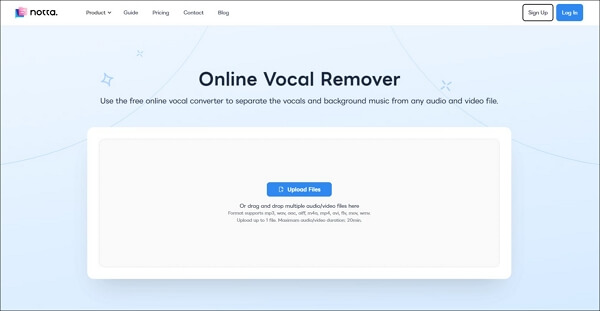
Step 2. Click the blue Upload Files button. The process will take some minutes.
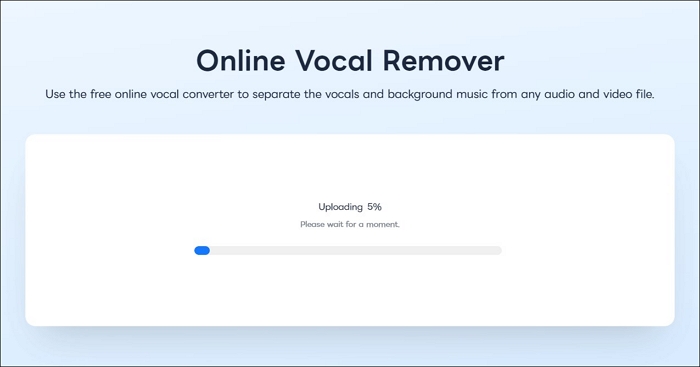
Step 3. After processing, both instrumental and voice audio files will be available for download.

After following the above steps, you can successfully separate music from vocals. If you want to know more about online vocal removers, you can read the following article.
Method 3: Media.io Vocal Remover
The third way we suggest is to use an online vocal remover tool: Media.io Vocal Remover. Any mixed-up and blended vocal and instrumental recordings from music can be extracted with the Media.io Vocal Remover. As a result, almost any shape can be achieved when reassembling the parts.
You can quickly extract, isolate, or eliminate any instrumental, voice, or acapella from any recording using this free online vocal remover from YouTube without affecting sound quality.
| ⭕Pros | ❌Cons |
|---|---|
|
|
- 📝User Review
- Media io really made a difference for me. I was honestly surprised by how easy everything was to use — and how much time it saved me. - By Matjaz, from Trustpilot
Now you can read these steps below to extract vocals from video online.
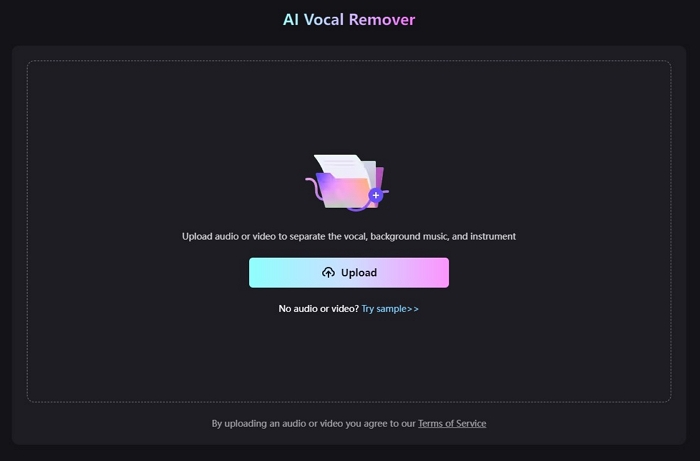
Step 1. Go to the Media.io Vocal Remover website and select Upload from the menu.
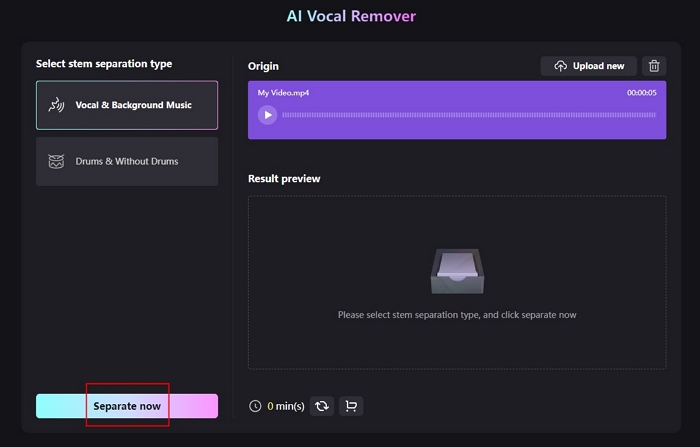
Step 2. Select Separate Now, then wait a few seconds while it uploads and processes.
Step 3. Next, you will see 3 audio files, including the original, vocals, and background music. You can download just one of them or all of them.
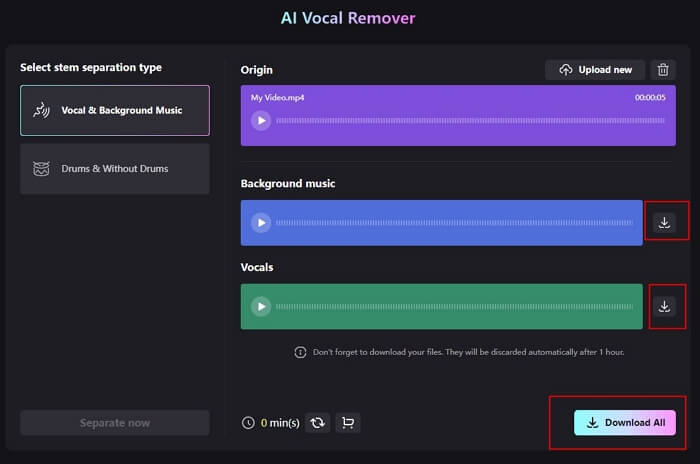
After learning about the above steps, it is believed that this vocal remover from videos can help you achieve the extraction of the vocals from a video file. Therefore, you can freely use the music track to create a karaoke version.
You may be interested in the following article:
Method 4: Vocal Remover
The last way to separate vocals from videos online is to use another online vocal remover tool: Vocalremover.org.
With the help of this music remover from video, you may help remove vocals from a piece of music by creating a karaoke version. The speech audio may be distinguished from the musical track once you've selected a song using artificial intelligence.
| ⭕Pros | ❌Cons |
|---|---|
|
|
- 📝User Review
- I recently used vocalremover.org to remove background music from an audio file, and was very pleased with the results. The service was straightforward and easy to use, and I was able to quickly get the result back with the background music removed. The output quality was excellent. - By Daniel Gonzalez, from Trustpilot
Now you can separate voice from video:
Step 1. Visit the Vocal Remover website.
Step 2. Choose the audio file you want to modify from the menu by selecting Browse my files.
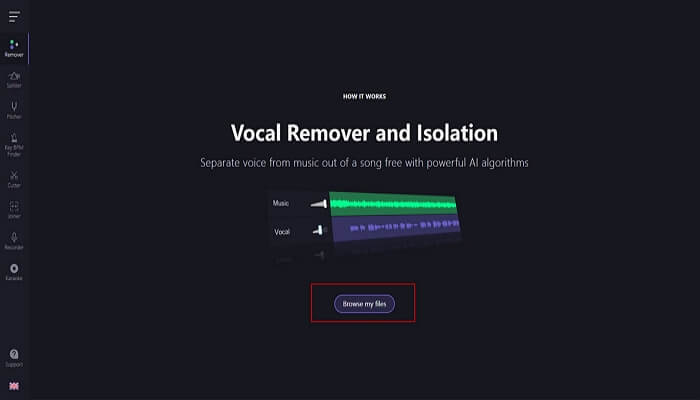
Step 3. After Vocal Remover has processed the file, adjust the vocals' volume by dragging the volume bar.
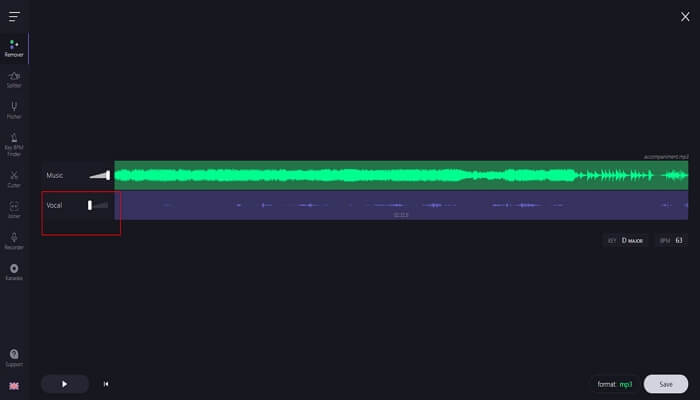
Step 4. After selecting a format like MP3 or WAV, you have the option to save.
After reading the above steps, you may ask the question, "Is Vocal Remover Safe"? Here is an article that may answer your doubt, and you can read this passage.

Is Vocal Remover Safe? You Can Get Answer Here
This passage has answered the question is Vocal Remover safe by providing a full review of this vocal remover and also giving its alternatives for users.
Pro Tip: Remove Vocals From Video Offline
If you're concerned about privacy and want more control, consider EaseUS VideoKit—a powerful desktop vocal remover that safely extracts vocals from video and audio files without quality loss. It works with formats like WAV and even Spotify songs, letting you separate vocals and instrumentals easily.
Additionally, EaseUS offers a free AI-based online vocal remover that requires no installation. It supports many audio formats (MP3, WAV, AAC, FLAC, and more) and lets you download vocals and music separately for karaoke or remixing.
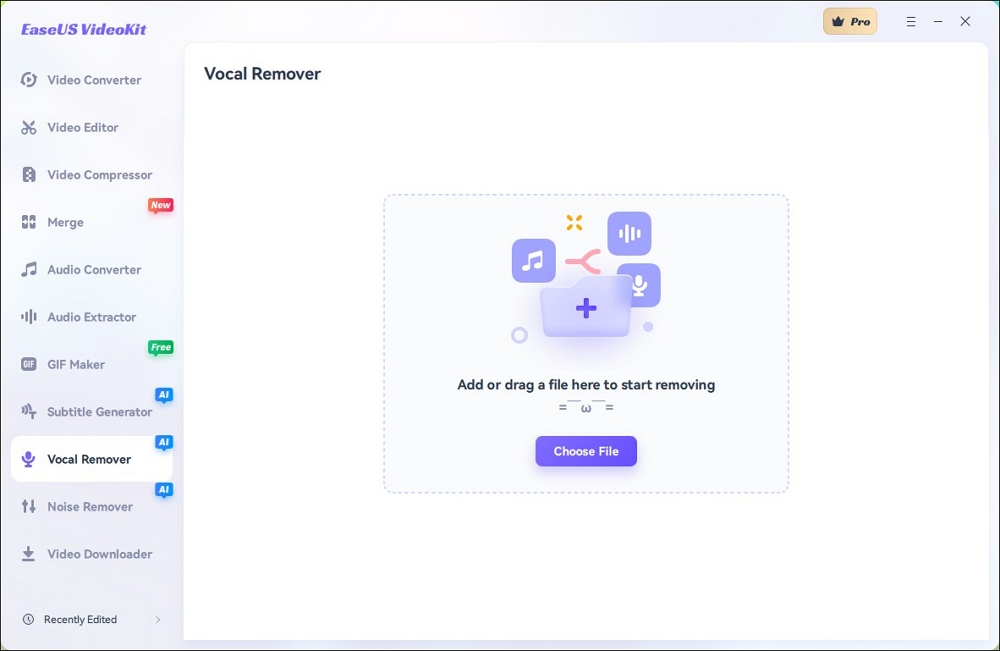
You can download this vocal remover app or use the online vocal remover to have a try!
Share this article on your social media to help more people know how to remove vocals from videos online as well as offline.
Conclusion
All in all, this article has discussed some helpful methods to help users extract vocals from video online by providing some online vocal removers as well as a desktop vocal remover app. It is believed that you can choose any of them to separate vocals from video files.
In terms of effectiveness, difficulty level, and safety, it is recommended that you choose the EaseUS Online Vocal Remover, which can help you remove high-quality vocals from video and audio files without login.
EaseUS Online Vocal Remover100% music and voice separation
Powered by Advanced AI
FAQs About Extract Vocals From Video Online
After learning about the above methods to extract vocals from video online, here are some related questions and answers for you to learn about.
1. Which app is vocal remover for karaoke?
For the best outcomes, Android users can try SonicMelody and EasySplitter. Users of iPhones can try the Moises or PhonicMind apps in the interim.
2. Is there an app to separate vocals from tracks?
With the Moises App, you can isolate or remove the vocals and instruments from any song and perform alongside your favorite musicians in any key and at any speed. Discover the most immersive experience ever made possible by AI.
3. What is the best app to isolate instruments?
EaseUS VideoKit is the best app to isolate instrumentals. You may precisely remove vocals from audio recordings without affecting their original quality by incorporating AI-based methods.