-
![]()
URL to Video AI: Turn Any Web Page into Marketing Videos Automatically
Want to turn url to video with AI generators? This post shows how URL to video AI works and also compares several popular AI URL to video generators.
Jane Zhou. Oct 23, 2026
3 min read
-
![]()
How to Dub a Video in Another Language Easily (AI Video Dubbing)
Learn how to dub a video in another language step by step. Discover the easiest AI video dubbing method to translate and sync voiceovers online.
Jane Zhou. Oct 23, 2026
3 min read
-
![]()
Can Loom Translate Videos with AI?
Can Loom translate videos to other languages? This guide explains its transcription and captioning features, creator limitations, and end-to-end workflows for localizing your videos for international audiences.
Jane Zhou. Oct 23, 2026
3 min read
-
![]()
VeVeo 3.1 vs Sora 2: AI Video Generator Comparison (Real Tests, Results & Use Cases)
Veo 3.1 vs Sora 2 compared in real-world tests. See output quality, speed, pricing, use cases, and which AI video generator is better and more suitable for you.
Jane Zhou. Oct 23, 2026
3 min read
Page Table of Contents


Oct 23, 2026 0 mins read
Creating high-quality videos has never been easier thanks to AI-powered tools. Seedance 2.0 is the latest video generation platform that lets anyone turn ideas into engaging videos in just a few clicks. Perfect for social media creators, marketers, or hobbyists, it simplifies the process without complex software or technical skills.
In this guide, we'll cover the core features of Seedance 2.0, show you step-by-step how to generate videos, share advanced tips for better results, and introduce some alternative tools. By the end, you'll be ready to create professional-looking videos quickly and efficiently.
What Is Seedance 2.0
Seedance 2.0 is a next‑generation multimodal AI video creator developed by ByteDance that goes far beyond simple text‑to‑video generation. Instead of only handling text prompts, it can process text, images, videos, and audio together, giving creators real control over every visual and audio element in a clip. For example, you can swap faces on iPhone with a new face while maintaining the original actions and camera movements.
Older AI tools often felt random, as you typed a prompt and hoped for the best. Seedance 2.0 introduces a reference-driven workflow: you can upload images and video clips as references and assign them specific roles, for example, a character, camera movement, or visual style, using natural language and syntax like @image1 or @video1. This means you're guiding not just what happens, but how it looks, moves, and sounds, giving the AI a clear "creative direction."
Compared with the older versions, the major Seedance 2.0 upgrades include:
1. Multimodal Reference System
Instead of relying on text alone, you can combine up to 9 images, 3 video clips, and 3 audio files with text prompts. This allows you to define characters, motions, styles, camera moves, and even background sound. In practice, this means you could upload a character image, a short camera reference clip, and a soundtrack, and Seedance will weave them together into a cohesive scene, no trial-and-error guesswork.
2. Consistent Multi‑Shot Storytelling
Earlier AI video tools often produced shots that looked disconnected, with characters or lighting changing unpredictably. Seedance 2.0 keeps characters, props, lighting, and style consistent across multiple shots. This makes it possible to create narrative sequences, such as a short story or an ad, rather than just isolated clips. As a user, you immediately notice the difference: your scenes feel like part of the same story, not random AI outputs.
3. Native Audio & Lip‑Sync
Seedance 2.0 automatically generates audio, background music, and lip-synced dialogue in sync with the visuals. This removes the tedious step of manually editing sound separately. Users have reported that even small gestures, such as a character's mouth movements, align more naturally with speech, making the videos feel professional without requiring external audio editing.
4. Precise Motion & Camera Replication
Upload a reference video, and Seedance 2.0 can replicate camera movements, pans, tracking shots, dollies, and complex choreography in your new video. This is huge for creators who want cinematic shots without using real cameras or motion tracking software. You can now translate the feel of a reference clip into your AI-generated scene with surprising accuracy.
5. Extended Editing & Continuity
Beyond generating a video, you can edit existing clips: replace characters, add new scenes, or extend footage, all while keeping continuity intact. For users, this means you're not stuck with a single generated output; you can refine and iterate to produce polished videos that match your vision.
6. Up to 2K Output & Multiple Ratios
Seedance 2.0 supports high-definition output up to 2K and multiple aspect ratios, making it easy to publish videos for social media, YouTube, or cinematic projects. For creators, this flexibility means your AI-generated video can go straight from generation to publishing without additional formatting.
How to Use Seedance 2.0
Seedance 2.0 is accessed inside Dreamina, ByteDance's web-based AI creation workspace. Once you open Dreamina and choose the Seedance 2.0 model, creating a video only takes a few guided steps.
Step 1. Upload multimodal references (optional but powerful)
Start by adding reference materials to guide the AI:
- Up to 9 images for characters or visual style
- Video clips for motion or camera behavior
- Up to 3 audio files for rhythm and atmosphere
These references help Seedance 2.0 maintain visual consistency, style, and storytelling continuity across the generated clip.
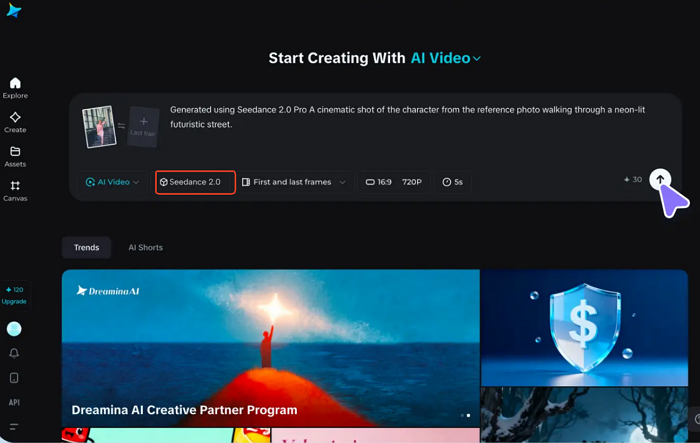
Step 2. Describe the scene and set key parameters
In the prompt box, define the scene, action, and mood, then set the aspect ratio, resolution, and clip duration. Clear, visual descriptions usually lead to more coherent motion and lighting in the final output.
For example: A cinematic shot of the referenced character walking down a neon-lit, futuristic street, with soft fog and dramatic lighting.
Step 3. Generate, refine, and export
Click Generate to preview your video, then refine details, use Upscale if needed, and export the final clip for social media or storytelling. In most cases, a polished AI video can be completed in just a few minutes inside Dreamina.
How to Get Cinematic Results in Seedance 2.0
While creating your first video in Seedance 2.0 is easy, getting professional, cinematic results requires a few extra techniques. Here's how to level up your videos.
1. Use Clear, Visual Prompts
The more descriptive and visual your prompt, the more stable and cinematic the output. Include:
- Characters & appearance: "A young woman with a red coat, holding a lantern"
- Environment & lighting: "Walking through a foggy neon street at night"
- Action & motion: "Camera follows her from behind with a slow pan"
Tip: Think in shots, not just keywords. Describe what the camera sees, not just what happens.
2. Leverage Multimodal References
Adding references dramatically improves consistency:
- Images: lock character appearance
- Video clips: replicate camera moves or choreography
- Audio: control rhythm, background music, or effects
Use the syntax like @image1 as the main character, @video1 for camera motion, and @audio1 for the mood. Even 1–2 references can make your video feel intentionally directed rather than AI-generated randomness.
3. Fine-Tune Motion and Camera Effects
Upload a reference video to replicate pans, tracking, or dolly movements, and adjust timing or action in prompts to match your scene rhythm.
Even subtle tweaks like changing camera speed or angle can turn a simple clip into a cinematic sequence.
4. Experiment With Resolution and Aspect Ratios
Use a higher resolution (up to 2K) for more detail. For instance, match aspect ratios to your target platform: vertical for TikTok/Reels, horizontal for YouTube. These adjustments make videos ready for social media or professional presentations without extra editing.
5. Iterate Quickly
The real power comes from refining after the first render:
- Adjust prompt wording or reference placement
- Replace a character while keeping motion and background
- Extend the scene with new shots, keeping continuity
Most cinematic-quality videos are created in 2–3 iterative cycles, not on the first try.
Seedance 2.0 Alternatives & Recommendations
Besides Seedance 2.0, several AI video tools can help creators achieve different goals. For example:
- ✅EaseUS AI Ecommerce Video Maker: fast video creation for product or marketing content
- ✅EaseUS AI Talking Photo: animate photos with voice and expressions
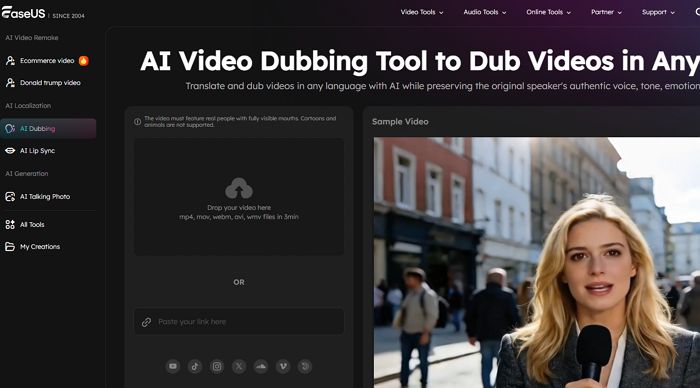
Depending on your needs, you can combine these tools with Seedance 2.0 to enhance workflow, create multilingual content, or produce engaging short videos for social media.
Final Thoughts
Seedance 2.0 is a powerful AI video creator that lets you produce cinematic, multi-shot videos with full control over characters, motion, style, and audio. Its multimodal references and narrative continuity set it apart from traditional text-to-video tools. While beginners may need a few tries to perfect prompts, the results are often high-quality, shareable videos ready for social media or professional projects.
For creators looking for alternatives or additional features, consider combining Seedance 2.0 with EaseUS AI video tools for dubbing, lip-sync, or e-commerce video production.
Seedance 2.0 FAQs
1. Is Seedance 2 free?
Seedance 2.0 usually offers limited free access or trial credits, allowing users to generate short AI video clips. However, advanced features such as higher resolution, longer duration, or faster rendering typically require a paid plan or additional credits.
2. Which is the best free AI video generator?
There isn't a single "best" tool for everyone. The best choice depends on whether you prioritize video quality, speed, or ease of use. Seedance 2.0 stands out for cinematic quality and multimodal control. Other free AI video generators may focus on quick social media clips, talking avatars, or simple animations.
3. Is Seedance 2.0 available now?
Yes. Seedance 2.0 is currently accessible through the Dreamina creative platform, where users can generate AI videos using text prompts, images, videos, and audio references directly in the browser.
4. What videos can Seedance 2.0 generate?
Seedance 2.0 can create short cinematic AI videos for storytelling, social media, marketing, and creative projects. By combining text, visual references, motion cues, and audio, it can produce clips with consistent characters, controlled camera movement, and synchronized sound, making the results feel more like edited footage than random AI output.