Page Table of Contents


Feb 06, 2026 0 mins read
Loom, a popular screen recording and video messaging platform now integrated with Atlassian, has evolved significantly by 2026, incorporating AI to streamline content creation. It excels in transcribing videos in over 50 languages. However, when it comes to true video translation, such as converting spoken content, transcripts, or captions into another language, Loom falls short.
In this comprehensive guide, we'll dive deep into Loom's AI capabilities, exploring what it can (and can't) do for video translation. Whether you're a content creator, marketer, or team leader aiming to boost global reach, this article will help you decide if Loom fits your needs.
Can Loom Translate a Video? Short Answer: No
Loom cannot translate videos in the way creators expect, which means no dubbed audio tracks, voice cloning, or lip-synced output in another language. Loom focuses on transcription and enhancement in the original language rather than cross-language conversion.
Loom supports multi-Language transcription.
Loom's multilingual support centers on transcription and AI enhancements in over 50 languages, including French, Greek, Hindi, Korean, Turkish, etc. When you record a video, Loom's AI detects the spoken language and generates a transcript accordingly. For example, if you're speaking in German, the transcript will be in German, complete with auto-generated titles, summaries, chapters, and filler word removal. All in that native language.
Captions can be translated.
Loom provides AI-powered viewer-side translation for closed captions, enabling viewers to select and auto-generate subtitles in their preferred language directly in the player. Captions are auto-generated from the transcript in the original language, but viewers can translate them on-the-fly. To do so, they toggle closed captions (CC) on in the player and choose their language from the menu.
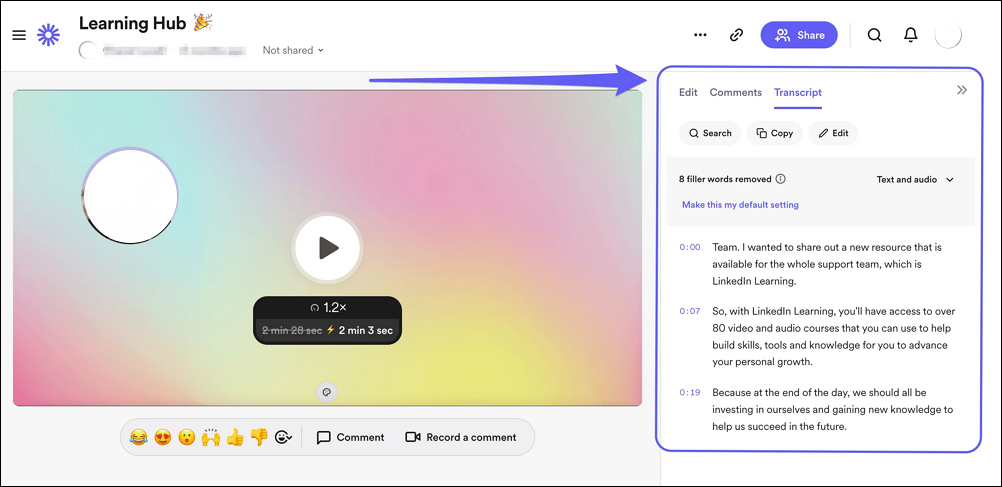
Note that the underlying transcript isn't translated and remains in the video's original language, as confirmed by Loom's support resources—no built-in transcript translation is supported.
| Feature | Viewer Captions | Creator Transcript |
| Who Controls | Viewers | Creator |
| What You Get | Translated subtitles over the original audio | Original spoken language text only |
| Exportable? | No | Yes (text), untranslated |
Why Creators Still Need More? Common Pain Points Listed
Despite 50+ language transcription and viewer captions, Loom falls short for professional localization workflows:
1. No Built-in Transcript Translation
Transcripts are generated only in the original spoken language. No automatic or manual translation within Loom. This forces creators to export transcripts and use external tools like Google Translate, adding extra steps and potential inaccuracies.
2. Lack of Audio Dubbing or Voice Cloning
Viewer-side captions help with subtitles, but the audio remains unchanged. For professional videos, such as marketing campaigns or training materials, this means no dubbed voiceovers or AI-generated voices in target languages, limiting immersion and accessibility for non-caption users.
3. English-Centric AI Workflows
Features like auto-generated summaries, chapters, and document conversions are primarily in English, with limited expansions to other languages. This hinders creators working in non-English environments, as outputs may not fully support multilingual teams.
Translate a Video into Different Languages with Lip Sync
If Loom's features are not enough for your multilingual video needs, several AI-powered alternatives offer translation capabilities, including audio dubbing, voice cloning, lip-syncing, and automated localization. EaseUS AI Lip Sync can help by transforming your videos into natural, language-adapted content with realistic mouth movements. No reshooting required.
It intelligently adapts lip shapes, timing, and articulation to match new scripts in target languages, ensuring videos look and sound native rather than awkwardly dubbed. This makes it ideal for global marketing, e-learning, or social media content, where immersion is key.
Step-by-Step Usage:
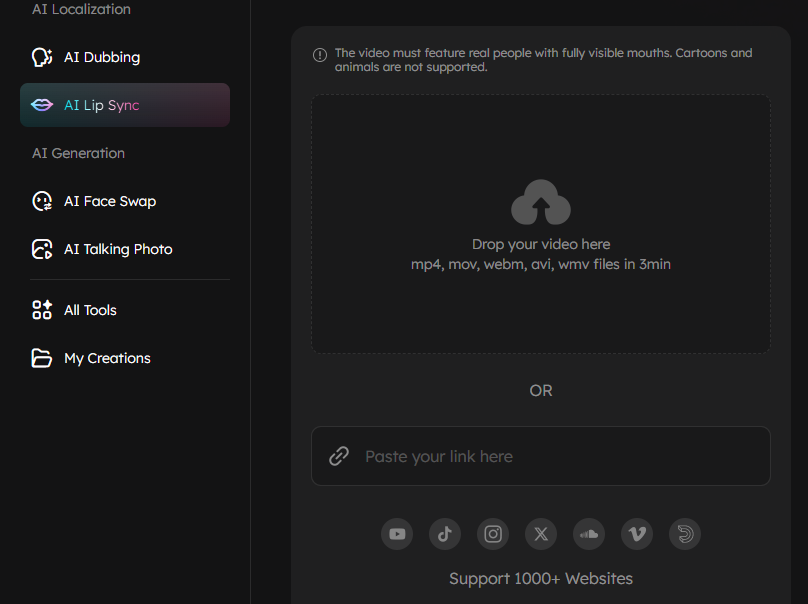
Step 1. Upload your video or paste a link from a mainstream video-sharing platform, such as YouTube or Facebook.
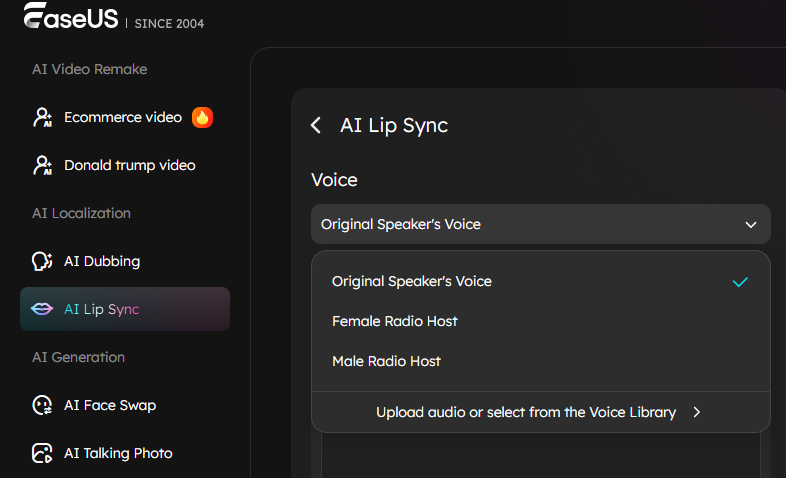
Step 2. Select the voice. Choose to maintain the original voice or select one from our voice library.
Step 3. Write your own script, and choose the target language for translation.
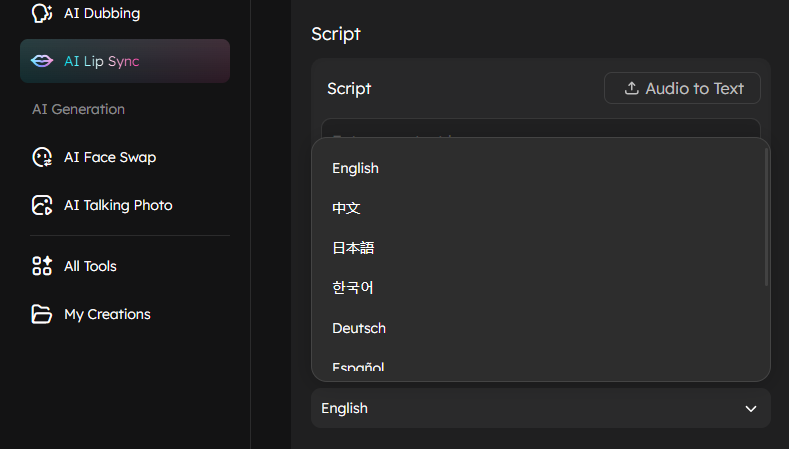
Step 4. Click Generate to create the lip-synced, dubbed version.
Conclusion
Loom handles fast transcription and in-player captions effectively, but it lacks professional video translation capabilities such as dubbing, voice cloning, and lip-synced exports for creators. Content creators targeting global marketing, training materials, or social media should export their Loom videos and follow a complete six-step localization workflow. This process includes capturing the video, transcribing the content, culturally adapting it, producing appropriate voices, implementing lip synchronization, and conducting quality checks.
Key Takeaway: Pair Loom's recording strengths with dedicated localization tools to unlock worldwide reach without reshooting. Test short clips first, prioritize clear facial shots for optimal results, and adapt content for cultural nuances. This approach transforms English-language demos into native-language assets that engage international audiences effectively.
FAQs
1. Can Loom translate a video into English?
No, Loom cannot translate videos to English if recorded in another language. It transcribes only in the original spoken language detected. A Spanish Loom video generates a Spanish transcript, not an English translation.
2. Why can't I download translated captions from Loom?
Translated captions are viewer-side only and stay within the player. Creators download only the original language transcript text.
3. Is Loom transcription accurate for non-English languages?
Accuracy exceeds 90% for clear audio across 50+ languages, with best results in French, German, Spanish, Mandarin, and Hindi. Accents or background noise may reduce precision.
4. How long does Loom transcription take?
Transcription processes instantly upon video upload for all plans, regardless of length (up to storage limits). Viewer caption translation loads in real-time in the player.
5. Can Loom translate the video's audio track?
No, Loom cannot translate or replace the video's audio track. Audio remains in the original language with no dubbing, voice cloning, or new audio generation capabilities. Viewer captions overlay translated text on the unchanged original audio.