-
![]()
Joey Albert
Joey has been involved with tech ever since she joined the EaseUS editor team in March 2011 and now she is a senior website editor. She is good at solving various issues, such as video downloading and recording.…Read full bio -
![]()
Alin
Alin is a sophisticated editor for EaseUS in tech blog writing. She is proficient in writing articles related to screen recording, voice changing, and PDF file editing. She also wrote blogs about data recovery, disk partitioning, data backup, etc.…Read full bio -
Jean has been working as a professional website editor for quite a long time. Her articles focus on topics of computer backup, data security tips, data recovery, and disk partitioning. Also, she writes many guides and tutorials on PC hardware & software troubleshooting. She keeps two lovely parrots and likes making vlogs of pets. With experience in video recording and video editing, she starts writing blogs on multimedia topics now.…Read full bio
-
![]()
Gorilla
Gorilla joined EaseUS in 2022. As a smartphone lover, she stays on top of Android unlocking skills and iOS troubleshooting tips. In addition, she also devotes herself to data recovery and transfer issues.…Read full bio -
![]()
Rel
Rel has always maintained a strong curiosity about the computer field and is committed to the research of the most efficient and practical computer problem solutions.…Read full bio -
![]()
Dawn Tang
Dawn Tang is a seasoned professional with a year-long record of crafting informative Backup & Recovery articles. Currently, she's channeling her expertise into the world of video editing software, embodying adaptability and a passion for mastering new digital domains.…Read full bio -
![]()
Sasha
Sasha is a girl who enjoys researching various electronic products and is dedicated to helping readers solve a wide range of technology-related issues. On EaseUS, she excels at providing readers with concise solutions in audio and video editing.…Read full bio
Page Table of Contents

Sasha
Updated on Dec 02, 2025
0 Views |
0 min read
When you look for a real-time voice changer for PC, Voicemod is often one of the most widely discussed options. It has gained a positive reputation for its fun effects and creative features. However, it also receives mixed reviews due to stability issues, resource consumption, and the limitations of its free version. This article takes a closer look at the reasons behind Voicemod's lower user ratings and introduces several reliable alternatives you can consider.
Overview of Voicemod
Voicemod is a real-time voice changer and soundboard application available for both Windows and macOS. It allows you to transform your natural voice into a wide range of characters—such as Mickey Mouse or the Minecraft Villager—and easily trigger sound effects during calls, streams, or gameplay.
With over a decade of development, Voicemod performs well in real-time voice processing and integrates smoothly with major communication and streaming platforms, including Discord, Twitch, OBS, and popular online games like Call of Duty, Battlefield 6, and Valorant. Its active community and vast library of user-generated voices and soundboard clips also make it a standout option.
Common Issues Reported by Voicemod Users
However, despite its popularity, you may also notice frequent user complaints. So what exactly causes these issues? Let's break down the key reasons.
Based on aggregated user feedback, several recurring issues have been reported regarding Voicemod's performance, stability, and overall user experience:
- Tip
- The following issues are summarized from real user feedback on Trustpilot.
1. Frequent Technical Problems
Many users note that Voicemod often fails to function reliably. Common reports include audio devices not being recognized, the voice changer not activating, or the software requiring repeated reinstallations. These technical issues can significantly reduce usability, especially for users who only need the tool occasionally.
2. Incomplete Uninstallation and System Interference
Some users report that even after uninstalling Voicemod, its virtual audio drivers may persist and continue to affect their systems. This can lead to microphone settings being overwritten or audio routing issues persisting long after the software has been removed.
3. Mandatory and Frequent Updates
Users frequently mention that Voicemod pushes large, mandatory updates that cannot be skipped. This can be inconvenient for those who need to use the software immediately, as the application must update before launching.
4. High Resource Usage
Several users report unusually high RAM usage by Voicemod processes—sometimes exceeding several gigabytes. This level of resource usage can impact overall system performance, especially when running games or livestreaming software concurrently.
5. Software Bugs and Stability Issues
Users describe various bugs, including crashes, recurring errors on system reboot, and issues introduced by recent updates. Some feel that newer versions are less stable than older ones and that long-standing bugs remain unresolved.
6. Login and Subscription Errors
There are reports of users being unexpectedly logged out, encountering difficulty signing back in, or losing access to paid features, including lifetime subscriptions. Such issues can be disruptive, especially for paying customers.
7. Slow or Ineffective Customer Support
Although customer support is often described as polite, users report slow response times and repetitive troubleshooting steps. Some feel the support process does not effectively resolve technical issues, particularly those affecting daily use or streaming workflows.
8. Account or Community Management Concerns
A small number of users report unexpected actions related to account or community moderation, such as being removed from Voicemod’s community channels or experiencing limited communication options after raising issues.
Who Needs a Voicemod alternative?
Since Voicemod may not work reliably for everyone, many users are seeking voice changers that offer improved stability and performance. If you are in these situations, try considering a Voicemod alternative.
You're a content creator seeking a more extensive library of meme sounds and sound effects.
You're looking for a free or more affordable solution that doesn't compromise on quality.
You're looking for a tool with faster performance and smoother real-time response, especially during gaming, streaming, or live recording.
You're hoping for more reliable customer support, including quicker responses, clear troubleshooting guidance, and consistent post-purchase service.
You're seeking a voice tool that offers more stable updates and long-term technical maintenance, so your workflow isn't disrupted by crashes or compatibility issues.
Best Voicemod Alternative - EaseUS VoiceWave
💻Works on: Windows
💲Price: Starts from $14.95/mon
So the best alternatives to Voicemod should not have its shortcomings, and it would be better to show more features. EaseUS VoiceWave has become the answer. It offers more exclusive AI voice effects, including common ones like bad mic and zombie, movie character voices like Minions and Deadpool, and game-related voice effects like Collei, 1x1x1x1, and more. Since its voice library updates regularly, you might need to update the app regularly. But don't worry, you could skip it with one click. Paid users can also use it to clone their own voices with AI.
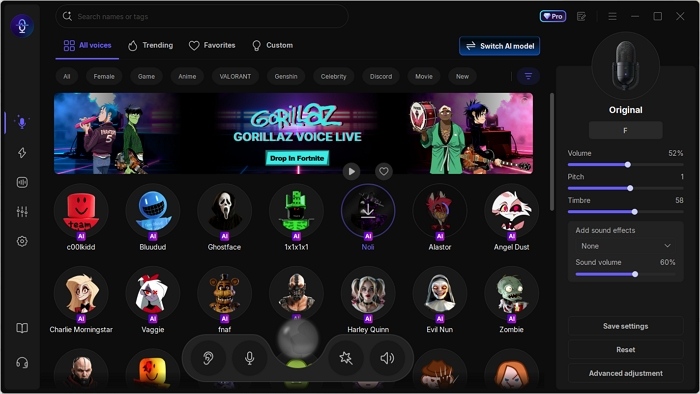
Preview its AI voice effect:
Original
Modified
Pros Compared with Voicemod:
- User-friendly guided onboarding
- Extensive high-quality voice library (300+ built-in voices + 200+ AI voices)
- Multiple advanced voice models (self-developed VST + DVC)
- Daily free access to premium AI voice effects
- Ultra-low latency (≤500 ms real-time processing)
- Low CPU consumption (around 4% in games)
- Fast, stable system performance
- Excellent long-term value with a $39.95 lifetime license (vs. Voicemod's $109.99)
- 24/7 customer support
Cons:
- Limited AI audio clips and soundboard in its community
- ✍️What the Editor Says
- EaseUS VoiceWave offers more stable performance, lower latency, lower CPU usage, and higher-quality AI voice effects, all within an intuitive guided setup. It's especially ideal for gamers, streamers, and Discord users who need fast, reliable real-time voice changing
How to Use EaseUS VoiceWave
Like Voicemod, EaseUS VoceWave integrates seamlessly with over 2,000+ online video games, streaming tools and platforms, and instant messaging apps. To use it with these apps:
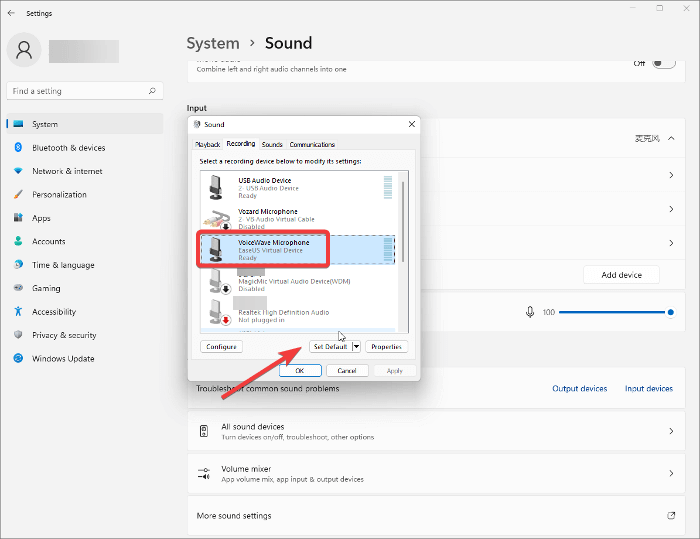
Has a voice chat feature: Go to the audio configuration menu in the app, and select VoiceWave microphone as your preferred input device.
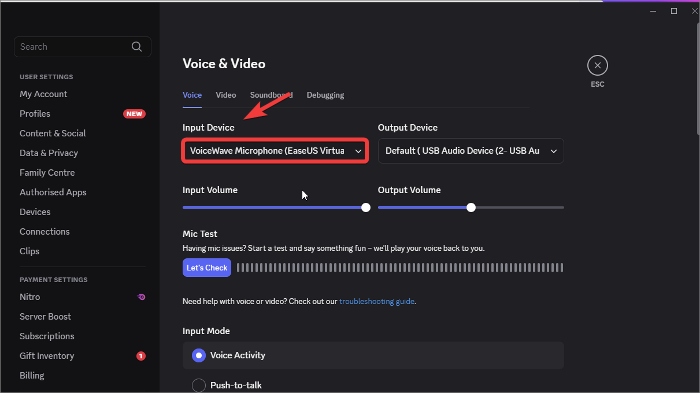
No built-in audio setting: In Windows, set the VoiceWave microphone as the default device by going to Control Panel > Sound > Recording Tab.
Free Voicemod Alternative - Clownfish Voice Changer
💻Works on: Windows
💲Price: Free
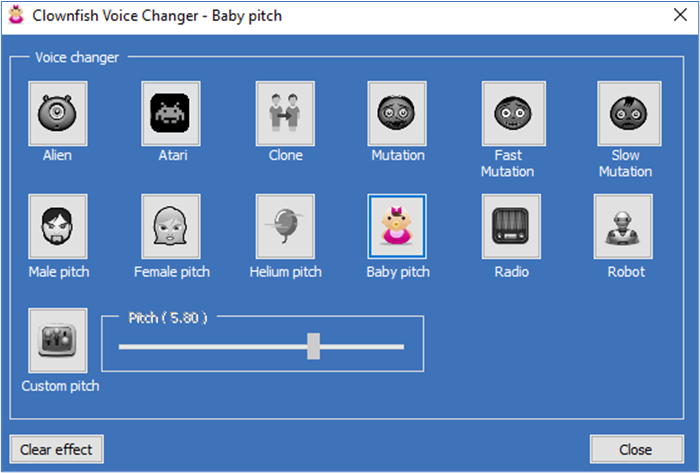
It's hard to find a voice changer that is totally free, since most you can find on Google only offer a free version; to get more features, you need to pay, more or less. Luckily, Clownfish is a totally free voice changer that supports real-time voice conversion. Considering it is a free tool, there are only 14 preset voice filters, such as alien, female pitch, baby pitch, and alien.
Pros:
- VST support
- Time-specific voice
- Music player
Cons:
- Basic design
- Limited features
What the Editor Says:
- ✍️What the Editor Says:
- Clownfish provides simple, system-wide voice-changing for free, making it accessible to anyone without subscriptions or complex setup. While basic, it's a dependable choice for casual users who just need quick, lightweight voice effects across apps.
How to Use Clownfish Voice Changer
Go to this page to see how to use Clownfish Voice Changer efficiently.

How to Change Your Voice on Discord (Desktop & Mobile)
This post will walk you through changing your voice on Discord with detailed guides. Now, take a look to find the easiest way to modify your voice in Discord!
To Conclude
This post summarizes complaints from Voicemod users. Based on their response, it offers you two alternatives: EaseUS VoiceWave and Clownfish. Choose based on your needs.
Share it on:

FAQs on Voicemod Alternatives
1. Are voice changers illegal?
No, using a voice changer is generally legal. The key is to use it responsibly and not for fraud, harassment, or other illegal activities.
2. What is the best fully free voice changer?
Clownfish Voice Changer is widely recommended as a fully free option. It provides basic voice modulation across apps like Discord, Skype, and in-game chat.
3. Is Voicemod illegal?
No, Voicemod is legal software. Like any voice changer, it must be used responsibly within the law.
4. Is it safe to use EaseUS VoiceWave in games?
Yes, EaseUS VoiceWave is safe to use in games. It's designed to run in real time with low latency and minimal CPU usage, minimizing the risk of crashes or performance issues.
5. Can voice changers be detected?
Generally, voice changers are not detected by games or chat apps. However, some competitive platforms may flag abnormal audio input if it affects fair play, so always check the platform rules.
6. Can I use alternative voice changers with Discord, games, or streaming software?
Yes, most modern voice changers, including EaseUS VoiceWave and Clownfish, work with Discord, Twitch, Zoom, and popular games.