-
![]()
Joey Albert
Joey has been involved with tech ever since she joined the EaseUS editor team in March 2011 and now she is a senior website editor. She is good at solving various issues, such as video downloading and recording.…Read full bio -
![]()
Alin
Alin is a sophisticated editor for EaseUS in tech blog writing. She is proficient in writing articles related to screen recording, voice changing, and PDF file editing. She also wrote blogs about data recovery, disk partitioning, data backup, etc.…Read full bio -
Jean has been working as a professional website editor for quite a long time. Her articles focus on topics of computer backup, data security tips, data recovery, and disk partitioning. Also, she writes many guides and tutorials on PC hardware & software troubleshooting. She keeps two lovely parrots and likes making vlogs of pets. With experience in video recording and video editing, she starts writing blogs on multimedia topics now.…Read full bio
-
![]()
Gorilla
Gorilla joined EaseUS in 2022. As a smartphone lover, she stays on top of Android unlocking skills and iOS troubleshooting tips. In addition, she also devotes herself to data recovery and transfer issues.…Read full bio -
![]()
Rel
Rel has always maintained a strong curiosity about the computer field and is committed to the research of the most efficient and practical computer problem solutions.…Read full bio -
![]()
Dawn Tang
Dawn Tang is a seasoned professional with a year-long record of crafting informative Backup & Recovery articles. Currently, she's channeling her expertise into the world of video editing software, embodying adaptability and a passion for mastering new digital domains.…Read full bio -
![]()
Sasha
Sasha is a girl who enjoys researching various electronic products and is dedicated to helping readers solve a wide range of technology-related issues. On EaseUS, she excels at providing readers with concise solutions in audio and video editing.…Read full bio
Page Table of Contents

Sasha
Updated on Jan 21, 2026
0 Views |
0 min read
Mafioso's smooth, confident voice is as iconic as his role in Roblox—a fearless mob enforcer who's always in control. In this guide, you'll learn four practical ways to recreate his signature tone for Halloween roleplay, streaming, music covers, or in-game dominance.
| Mafioso AI Voice Generator | Platform | Feature | Custmization | User-friendly |
|---|---|---|---|---|
| EaseUS VoiceWave | Windows | Mafioso voice changer | ✅ | Easiest |
| 101Soundboards | Web | Mafioso soundboard | ❌ | Easy but with ads |
| Voicemod | Windows & Mac | Mafioso Forsaken voice changer | ✅ | Easy |
| Jammable | Web | Mafioso text to speech & AI cover | ✅ | Middle |
Who Is Mafioso

Mafioso is a ruthless debt collector and mob enforcer, famous for being confident, feeling no pain, and often leading a group of goons or a "familia" to collect debts and assets dominance in-game. He typically appears as a yellow-skinned Robloxian dressed in a black hat and tie. The character is voiced by community contributor Georgelolwut, whose smug, self-assured delivery perfectly captures the essence of an unstoppable mafia boss—calm, in control, and seldom showing strong emotion.
1. EaseUS VoiceWave – Real-Time Mafioso Voice Modulation
EaseUS VoiceWave is a PC voice changer that lets you sound like Mafioso instantly during games, calls, or streams on Halloween night. It offers over 400 high-quality voice models—from popular memes to anime and game characters—and works seamlessly with 1,000+ games like Roblox, R.E.P.O., Battlefield, Minecraft, and ARC Raiders, and 1,000+ chat apps. Let's see together what EaseUS VoiceWave could give you:
- Instant voice modulation to sound like Mafioso;
- Noise reduction for clear audio;
- Large library of popular soundboards;
- Wide compatibility with the most popular applications.
How to Use EaseUS VoiceWave with Other Apps:
Step 1. Install and launch EaseUS VoiceWave on your Windows device.
Step 2. Set up your input/output devices in Settings, then select a Mafioso-style effect.
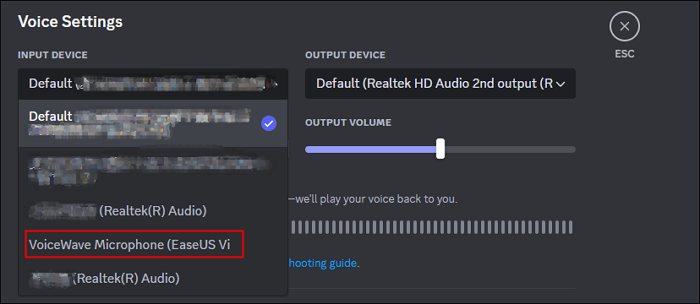
Step 3. Open a third-party app (e.g., Discord) and set EaseUS VoiceWave as the input device.
2. 101Soundboards – Authentic Mafioso Voice Clips
101Soundboards offers millions of sound clips, including a collection of Mafioso voice lines from Roblox's Dream Game Myth. These pre-recorded voicelines can be used in EaseUS VoiceWave, Voicemod, Twitch, and more.
How to Add Mafioso Clips to EaseUS VoiceWave:
Step 1. Download the desired Mafioso clip from 101Soundboards.
Step 2. In EaseUS VoiceWave, go to "Soundboard" > "Upload sounds" at the upper right corner, and add your clip.
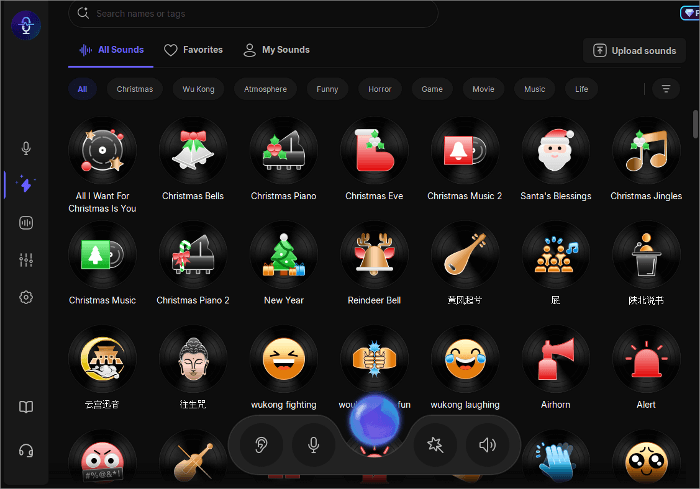
This method is perfect if you want to play authentic lines instead of live voice modulation.
3. Voicemod – Instant Mafioso-Style Transformation
Voicemod is one of the most popular real-time voice changers for horror, spooky voice effects, featuring over 100 customizable voice filters and a large Tuna community library. You can find Roblox/Forsaken-inspired effects—such as Mafioso, Bluudud, c00lkidd, and 007n7—plus thousands of user-shared audio clips for your festive theme.
How to Use Mafioso Audio in Voicemod:
Step 1. Visit the Tuna Mafioso page and click "OPEN IN VOICEMOD."
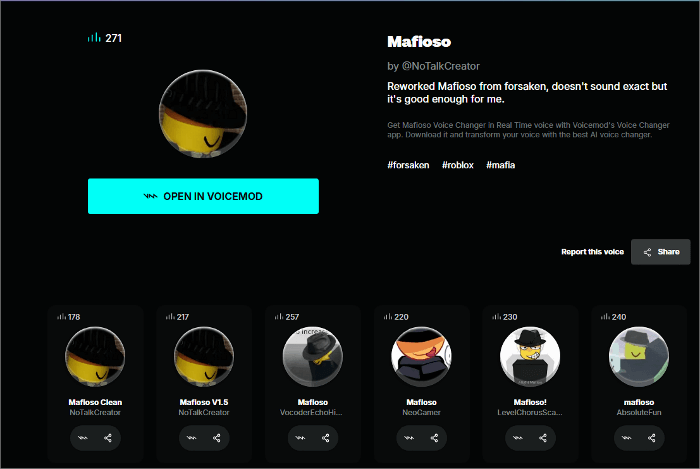
Step 2. Select the added soundboard in Voicemod to use the clips live during games or streams.
4. Jammable – Mafioso AI Singing & Text to Speech
If you are looking for a way to create covers and songs with a Mafioso AI voice, then look no further than Jammable. This platform lets you create custom songs or covers using thousands of voices—including those you train yourself.
How to Create Mafioso-Sung Music:
Step 1. Search for a Mafioso-style voice in Jammable's library.
Step 2. Upload your song or vocal track, then process it to apply the Mafioso voice.
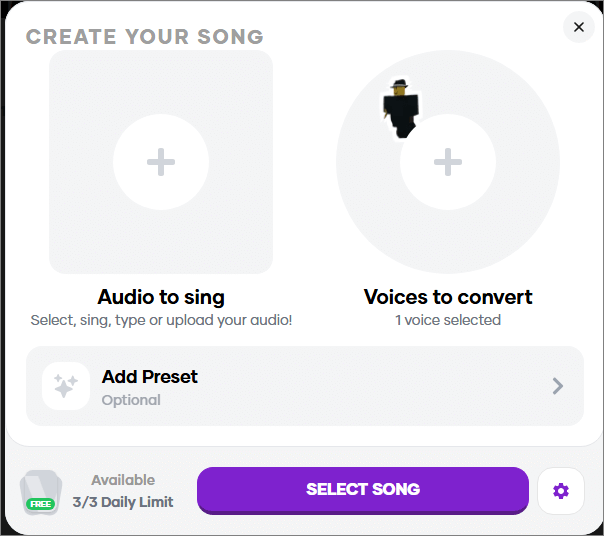
This is ideal for creative projects, such as role-play theme songs or parody covers.
Final Thoughts
Whether you want to roleplay in Roblox horror games, stream with a commanding presence on Halloween, or create a custom song in Mafioso's voice, you now have multiple tools to make it happen:
- EaseUS VoiceWave for smooth real-time roleplay
- 101Soundboards for authentic voicelines
- Voicemod for versatile live effects
- Jammable for music and covers
Choose the one that matches your style—and let your inner mafia boss take the mic. Share it on:

Mafioso Voice Changer FAQ
How to get Mafioso voice changer?
- Download EaseUS VoiceWave and complete the basic setup.
- Search for Mafioso in the voice library.
- Download the AI model in seconds and speak.
Are voice changers illegal?
No, voice changers are not illegal.
They're simply software or hardware tools that modify your voice, and people use them for gaming, streaming, pranks, roleplay, or privacy. However, what matters is how you use them:
- Legal uses: entertainment, Halloween pranks, gaming, streaming, creative content, voiceovers, and protecting identity.
- Illegal uses: impersonating someone for fraud, harassment, scams, or other malicious activities.
Is Mafioso an AI voice?
Yes, Mafioso is an AI voice effect, often found in AI voice changers like VoiceWave or text-to-speech tools.
It's designed to mimic the stereotypical deep, commanding tone associated with mob bosses in movies. People use it for roleplay, gaming, pranks, or creating dramatic voiceovers.
Is there a free voice changer for GTA RP?
Yes, there are free voice changers you can use for GTA RP (Roleplay). Whether for GTA V Online, FiveM, or similar RP setups, here's how:
- Install EaseUS VoiceWave on your Windows PC.
- In Windows Sound settings, set VoiceWave Virtual Microphone as your input device.
- In GTA RP, select the VoiceWave mic in Voice Chat/Microphone settings.
- Choose an effect in VoiceWave (Ghostface, Mafioso, etc.) and use it.
- Follow server rules—some RP servers may not allow voice changers.