-
![]()
Joey Albert
Joey has been involved with tech ever since she joined the EaseUS editor team in March 2011 and now she is a senior website editor. She is good at solving various issues, such as video downloading and recording.…Read full bio -
![]()
Alin
Alin is a sophisticated editor for EaseUS in tech blog writing. She is proficient in writing articles related to screen recording, voice changing, and PDF file editing. She also wrote blogs about data recovery, disk partitioning, data backup, etc.…Read full bio -
Jean has been working as a professional website editor for quite a long time. Her articles focus on topics of computer backup, data security tips, data recovery, and disk partitioning. Also, she writes many guides and tutorials on PC hardware & software troubleshooting. She keeps two lovely parrots and likes making vlogs of pets. With experience in video recording and video editing, she starts writing blogs on multimedia topics now.…Read full bio
-
![]()
Gorilla
Gorilla joined EaseUS in 2022. As a smartphone lover, she stays on top of Android unlocking skills and iOS troubleshooting tips. In addition, she also devotes herself to data recovery and transfer issues.…Read full bio -
![]()
Rel
Rel has always maintained a strong curiosity about the computer field and is committed to the research of the most efficient and practical computer problem solutions.…Read full bio -
![]()
Dawn Tang
Dawn Tang is a seasoned professional with a year-long record of crafting informative Backup & Recovery articles. Currently, she's channeling her expertise into the world of video editing software, embodying adaptability and a passion for mastering new digital domains.…Read full bio -
![]()
Sasha
Sasha is a girl who enjoys researching various electronic products and is dedicated to helping readers solve a wide range of technology-related issues. On EaseUS, she excels at providing readers with concise solutions in audio and video editing.…Read full bio
Page Table of Contents

Jane Zhou
Updated on Jan 21, 2026
0 Views |
0 min read
From the iconic "1x1 Lego Piece" memes to his high-energy roars, CaseOh has become a legend on Twitch and TikTok. Now, his massive influence has many fans searching for a high-quality CaseOh voice changer to mimic that signature southern grit and explosive personality in Discord calls or gaming sessions.
However, simple pitch-shifters often fall short of capturing his unique vocal texture. To truly replicate his booming sound, you need a professional CaseOh AI voice generator. In this guide, we'll explore the best tools and techniques to help you sound exactly like the internet's favorite "heavyweight" streamer.
What Is The CaseOh AI Voice?
First of all, you need to know who CaseOh is. CaseOh isn't just a streamer; he's a digital force of nature. Known for his "Southern charm" mixed with ear-splitting, high-energy reactions, his voice has become the ultimate tool for internet comedy. But what exactly makes the CaseOh AI voice so unique?
The "CaseOh sound" is a perfect storm of a deep, resonant southern drawl that can instantly shift into a high-decibel roar. It's the voice behind iconic viral moments, from being roasted as a "1x1 Lego Piece" to his legendary "YOU'RE BANNED!" rants. Whether you're making AI song covers or trolling friends in Discord, using a CaseOh meme voice adds an instant layer of chaotic humor to any situation.
However, capturing his specific vocal texture, that blend of grit, volume, and "mic-peaking" energy, is surprisingly hard. You can't just yell into your mic and hope for the best. To get that signature "heavyweight" resonance without the distortion of a cheap filter, fans are turning to advanced AI voice cloning to replicate his exact tonal frequency.
Top 4 CaseOh Voice Changers
If you want to sound like the "Internet's Giant," there are two ways to do it: change your voice live while gaming, or generate CaseOh's voice from an existing recording or text. Here are the top tools:
| Tool | Use case | Core Advantages |
| EaseUS VoiceWave | Real-time gaming/Discord | Zero-latency AI; High-fidelity realism |
| Voicemod | Pranking with sound effects | Massive meme library |
| VoiceDub | Text to speech voiceovers | No recording needed |
| Musicfy AI | Creating AI song covers | High musical accuracy for parodies |
1. EaseUS VoiceWave
⭐Best for: Real-time AI voice changing during gaming and Discord streaming
When it comes to sounding like CaseOh live on Discord, Twitch, or in-game, EaseUS VoiceWave is the undisputed heavyweight champion. While other tools struggle with robotic lag, VoiceWave uses a cutting-edge AI engine specifically tuned for high-energy streaming.
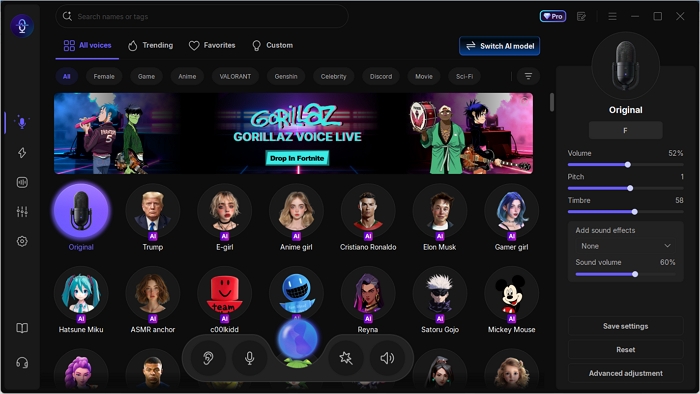
- ✅Zero-Latency Real-Time AI: The biggest hurdle for CaseOh fans is "mic lag." EaseUS VoiceWave solves this with ultra-low latency processing. You can scream, laugh, and "ban" your friends in real-time without the awkward 2-second delay found in web-based generators.
- ✅The "Southern Grit" AI Preset: This isn't just a simple pitch-shifter. VoiceWave's AI model captures the specific resonance of CaseOh's voice, the deep, booming southern drawl, and that signature "mic-peaking" intensity that makes his reactions so legendary.
- ✅Seamless Integration: It acts as a virtual microphone for Discord, Steam, Fortnite, and OBS. Once you toggle the CaseOh preset, every app on your PC hears the "Internet's Giant" instead of you.
- ✅Audio File "Generation": Beyond live use, you can also upload your existing recordings. If you've recorded a funny clip, VoiceWave can "generate" a CaseOh version of that audio in seconds, making it a powerful tool for TikTok and YouTube editors.
How to sound like CaseOh in 3 seconds:
- Select Mic: Set your headset as the input device.
- Pick the AI Model: Search for the "CaseOh" preset in the AI voice library.
- Go Live: Toggle the switch and start your own "1x1 Lego Piece" rant.
2. Voicemod
⭐Best for: Casual gamers who want fun soundboard effects alongside a basic voice changer.
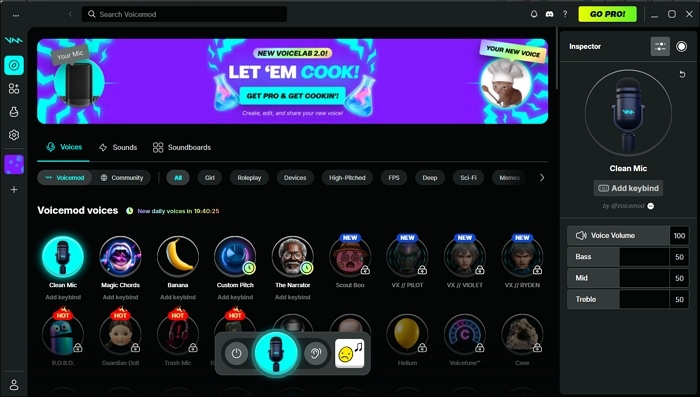
Voicemod is the most well-known name in the industry, acting as a "creative hub" for your microphone. While its AI capabilities have improved this year, its true strength lies in its Soundboard. Instead of just changing your voice, you can set hotkeys to play CaseOh's actual viral clips, like his "YOU'RE BANNED!" scream, at the touch of a button. It's a great choice if you want to mix your own voice-changing with pre-recorded memes to keep your audience engaged.
Pros:
- Huge library of user-uploaded CaseOh memes and sound effects.
- Works seamlessly with almost every communication app and game.
Cons:
- It can consume significant CPU resources during intense gaming.
- The CaseOh AI filter can sometimes sound "robotic" compared to dedicated AI engines.
Share this post if you find it helpful!

3. VoiceDub
⭐Best for: Fast Text-to-Speech (TTS) generation for "faceless" content creators.
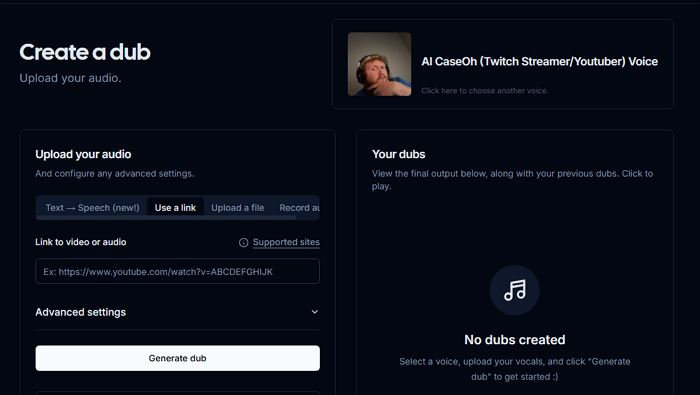
VoiceDub is a dedicated AI Voice Generator that focuses on Text-to-Speech. It's perfect for creators who have a script ready but don't want to (or can't) record their own voice. You simply type in your dialogue, select the CaseOh AI model, and download the audio. It's highly efficient for making YouTube Shorts or TikToks where you need a CaseOh-style narrator to deliver a joke or an explanation without the need for a microphone.
Pros:
- Generates clean CaseOh-style narration in seconds.
- Great for people who aren't comfortable recording their own voice.
Cons:
- Often lacks the "spontaneous screaming" and raw energy of a real-time tool.
- Most AI generations are limited by a credit system or subscription.
4. Musicfy AI
⭐Best for: Creating viral AI song covers and music parodies.
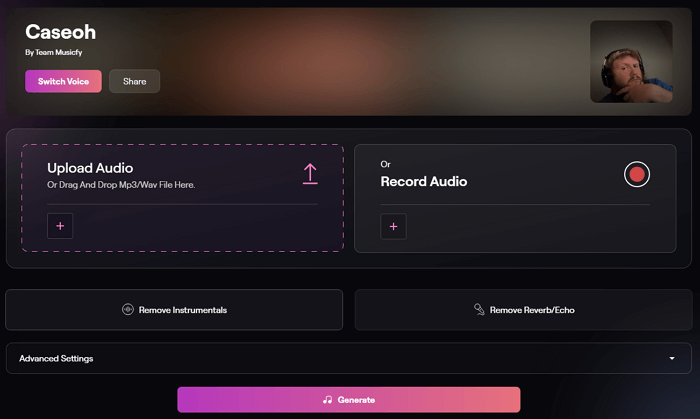
If you don't want to talk like CaseOh, but rather want him to sing your favorite pop hits, Musicfy AI is the specialist tool. This cloud-based platform is designed for "Voice-to-Music" conversion. You simply upload a vocal track (or a song link), and the AI replaces the original singer with CaseOh's unique tone. It's the tool responsible for those viral TikToks where CaseOh "sings" everything from romantic ballads to heavy metal.
Pros:
- Handles high notes and complex melodies better than speech-focused tools
- No software installation required; works on any device
Cons:
- You cannot use this in a live Discord call or during gameplay
- Processing a full song can take several minutes
Pro Tips: How to Fine-Tune Your Realistic CaseOh AI Voice
Whether you are using a real-time voice changer or an online generator, simply clicking the "CaseOh" preset will usually only get you about 70% of the way there. The remaining 30% depends on how you tweak the underlying audio parameters to match your specific vocal cords.
Here is a universal tuning guide compatible with most mainstream voice software (such as EaseUS VoiceWave, Voicemod):
1. Pitch
CaseOh has a heavy, ground-shaking baritone. If your natural voice is on the lighter or higher side, the AI might make you sound like a "pitched-up" version of him rather than the man himself.
- How to Adjust: Locate the Pitch slider in your software and shift it to the left (usually between -3 and -6).
2. Timbre/Formant
This is the core setting that determines the "texture" of your voice. CaseOh's voice isn't smooth; it's gravelly, resonant, and full of Southern personality.
- How to Adjust: Tweak the Timbre (or Formant Shift) slider. Move it in small increments until you hear that specific "grainy" or "chesty" quality in the output.
3. Volume & Gain
The soul of a CaseOh meme is his microphone constantly being on the verge of a mental breakdown.
- How to Adjust: Slightly increase your Input Gain or Volume.
Final Words
Sounding like CaseOh is all about capturing his iconic "heavyweight" energy. While Musicfy and VoiceDub excel at covers and scripts, EaseUS VoiceWave is the ultimate choice for real-time, zero-latency Discord rants.
Don't just use a preset, fine-tune your Pitch and Timbre to master that signature grit. Download EaseUS VoiceWave now and start "banning" your friends in style!
FAQs
1. Is it legal to use CaseOh's AI voice for streaming?
Using an AI voice for parody, gaming, or content creation is generally considered "Fair Use" as long as it is transformative and not used for malicious purposes (like scams or spreading misinformation). However, you cannot use his voice to falsely endorse a product. For streamers on Twitch or YouTube, it's mostly seen as harmless entertainment.
2. How to make CaseOh sing a song?
To make CaseOh sing, you need a "Voice-to-Music" tool rather than a real-time changer. Musicfy AI is the best choice here. You simply upload a vocal track or a YouTube link, and the AI replaces the singer's voice with CaseOh's unique tone. If you want more control, you can record yourself singing and then use the File Voice Changer in EaseUS VoiceWave to convert that recording into CaseOh's voice.
3. Can I convert my voice into AI voice?
Absolutely. Modern AI voice changers work by analyzing your vocal input and mapping it onto a pre-trained AI model (like CaseOh's). With software like EaseUS VoiceWave, this happens in real-time; you speak into your mic, and the AI converts it instantly. You can also upload pre-recorded audio files to "clone" your voice into a different character for video editing.
4. Can AI clone voices for free?
Yes, but with limitations. Many platforms offer free trials or "basic" AI models. However, high-quality, low-latency AI cloning (like the realistic CaseOh sound) requires significant processing power. While you can find free web tools, professional software like EaseUS VoiceWave offers a much more stable and realistic experience, with the most advanced AI models typically being part of a premium or "Pro" package.