Download videos right now
With EaseUS Video Downloader, save any video in seconds - download copyright-free video from public websites.
Affiliate
Earn commissions when you drive sales through your affiliate links.
Resellers
Sell EaseUS products as a distributor.

Creators & Influencers
Partner with us on YouTube, TikTok, Twitch to earn commissions.
OEM & Outsourcing Service
Put your brand on EaseUS software, or get custom solutions.

Refer & Earn
Earn rewards when you refer others to EaseUS solutions.

Education
Verified students and teachers get exclusive discounts.
Page Table of Contents

Jun 25, 2026 0 mins read
⚠️Legal & Copyright Notice:
The following methods are intended only for users who already have legitimate access to age-restricted content on YouTube (logged into a verified 18+ account). These tips are for personal, offline viewing of copyright-free or self-owned content. We do not encourage bypassing YouTube's Terms of Service or downloading copyrighted videos without permission.
Before attempting to download, make sure your account meets YouTube's age requirements:
Once your account is verified, you can legally access age-restricted videos, which is a prerequisite for all download methods below. You can also follow the video guide below to verify your age on YouTube.
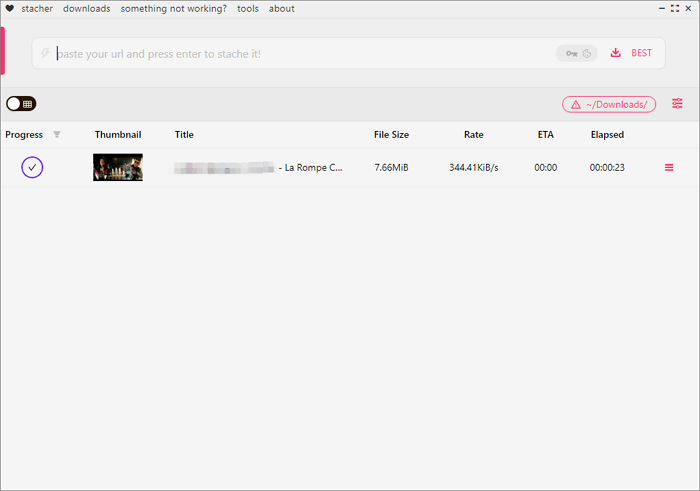
YT-DLP is a free and open-source command-line tool available on Windows, macOS, and Linux operating systems that is mainly used to download videos from Internet. Downloading and installing it is relatively simple, but learning how to use it properly may take some time for a beginner, so here we will give you a simpler frontend application for the popular YT-DLP - Stacher.
To use Stacher to download YouTube videos that are marked as age-restricted:
YouTube restricts certain videos to viewers signed into a verified 18+ account due to mature content, language, or sensitive topics. If you already have access to such content and are looking to save it for offline, personal viewing, you can consider using a tool like EaseUS Video Downloader for PC.
EaseUS Video Downloader allows you to download a wide variety of YouTube content, including playlists, music, Shorts, and even unlisted videos in various qualities and formats like MP3. It supports multiple resolutions, from 720p and 1080p up to 4K.
Download videos right now
With EaseUS Video Downloader, save any video in seconds - download copyright-free video from public websites.
Its latest "Subscription" feature also lets you auto-download newly published videos from your subscribed channels. You can customize how often the tool checks for new uploads and whether it should also download subtitles or thumbnails.
If you have the video URL and rightful access to the content, EaseUS Video Downloader can help you save it for offline viewing - conveniently and efficiently. See the steps to download blocked YouTube age-restricted videos
If the above tools do not work, a screen recorder lets you legally capture videos you can already watch, for personal offline use:
YouTube restricts certain videos to users who are signed in and verified as 18 or older. This includes content that may feature:
These restrictions are in place to protect underage viewers and ensure content complies with local laws and advertiser guidelines. Users under 18 years of age can't watch age-restricted videos on YouTube.
See YouTube Help Document: Turn Restricted Mode on or off on YouTube if you're over 18 and need to turn off the restricted mode.
So, in this article, we share ways to help you download age-restricted YouTube videos in MP4 or MP3 format, whether on a PC or mobile phone. Since some YouTube age-restricted video downloaders have limited format and quality options, we recommend you choose EaseUS Video Downloader for stable and quick downloads.
If you like this article, please share it with your friends!
YouTube applies age restrictions to protect younger viewers from content that may not be appropriate for them. This includes videos containing nudity, sexual themes, strong language, violence, disturbing imagery, or other mature content. Restrictions also help YouTube comply with local laws and advertiser guidelines.
If you entered a date of birth that makes you younger than the required minimum age (usually 13, depending on your country), Google may suspend or delete your account. This is to comply with child protection regulations like COPPA. If it was a mistake, you may need to provide proof of age to recover your account.
No. Google requires a date of birth to confirm your eligibility for a Google account. It helps determine whether you can use certain services (like YouTube) and ensures compliance with age-related regulations. Without providing a birthday, you cannot fully use Google services.
To verify your age, Google may ask you to:
Once verified, your Google account will be marked as 18+ so you can access restricted content.
If you believe your video was mistakenly age-restricted, you can submit an appeal:
YouTube's review team will recheck the content and notify you of the decision.

Copyright Disclaimer
This article is for educational and technical reference only. Do not use the described methods to download or share copyrighted content without permission.
Users are fully responsible for any legal consequences. Please:

Respect content creators' rights

Use official or authorized platforms

Avoid unauthorized downloads

Use official or authorized platforms
Columnist
Sasha is a girl who enjoys researching various electronic products and is dedicated to helping readers solve a wide range of technology-related issues. On EaseUS, she excels at providing readers with concise solutions in audio and video editing.
Read Full Bio More Related Articles
How to Download 1080P YouTube Videos in 3 Ways [Full Guide]
Do you want to save your favorite YouTube videos or movies in 1080P for offline viewing? Here, you will learn powerful software and online tools to save YouTube videos in 1080p.
Sasha. Jun 25, 2026
3 min read
5 Methods to Download Telegram Videos on PC
Want to download videos from Telegram, which is rather tricky? Then, follow our guide to learn about multiple methods to download and watch the videos offline. We have also discussed a powerful video downloader that can simplify things.
Sasha. Jun 25, 2026
3 min read
Convert YouTube to USB Free in 8 Ways
To download and save popular or valuable videos from YouTube for sharing or other purposes, you may want to save them to your USB flash drive. This blog will walk you through 8 ways to convert YouTube to USB drive for free. Do not miss the information.
Sasha. Jun 25, 2026
3 min read
How to Download Saved TikTok Videos | With Bonus
How to download saved, bookmarked or liked TikTok videos? You can download each one using the developer tools or copy the video link to an online downloader, but they are not smart and takes manual effort.
Sasha. Jun 25, 2026
3 min read