Download Any Video in High Quality, Anytime
Download publicly available videos from YouTube, Facebook, Twitter, Instagram and more for personal use.
Affiliate
Earn commissions when you drive sales through your affiliate links.
Resellers
Sell EaseUS products as a distributor.

Creators & Influencers
Partner with us on YouTube, TikTok, Twitch to earn commissions.
OEM & Outsourcing Service
Put your brand on EaseUS software, or get custom solutions.

Refer & Earn
Earn rewards when you refer others to EaseUS solutions.

Education
Verified students and teachers get exclusive discounts.
Page Table of Contents


Oct 23, 2026 0 mins read
This guide is for informational purposes only. Converting YouTube videos to MP3 should be limited to personal and legal uses, such as saving your own uploads, downloading royalty-free music, or accessing Creative Commons–licensed content. We do not encourage downloading copyrighted material without permission, and all methods shared here are intended to help users stay safe and compliant.
Now that we've clarified the legal uses of YouTube to MP3 converters, let's explore some of the most effective ways to convert multiple YouTube videos to MP3. Depending on your needs, you can choose from:
✅ An open-source tool (yt-dlp) for tech-savvy users using CMD or CLI command line.
✅ A desktop software (EaseUS Video Downloader) with a user-friendly interface for Windows & Mac users.
✅ An online converter (ConvertBear) for quick and lightweight tasks without downloading software.
Each method has its own pros and cons. Preview the following main features so that you can select one of them that you prefer.
| YouTube to MP3 | Audio Format | Audio Quality | Bulk Download |
|---|---|---|---|
| yt-dlp | MP3, M4A, WAV, etc. | Original (up to 320kbps MP3) | ☑️ |
| EaseUS Downloader | MP3 & WAV | Original (up to 320kbps MP3) | ☑️ |
| ConvertBear | MP3 only | Standard (usually 128–192kbps) | ☑️ |
yt-dlp is a free, open-source command-line tool that works on Windows, macOS, and Linux, letting users download videos or extract audio from YouTube and other platforms. It supports formats like MP3, AAC, and Opus, though converting to MP3 can reduce audio quality. It's powerful and flexible, especially for batch downloads, but can be slower for multiple files and less user-friendly due to its command-line nature.
To download multiple YouTube videos as MP3 files using yt-dlp, follow these steps:
Step 1. Download and install yt-dlp from its official website.
Step 2. To enable audio extraction and conversion, install FFmpeg.
Step 3. Open a text editor and list each YouTube video URL on a separate line. Save this file as video_urls.txt.
Step 4. Launch the Command Prompt on Windows or Terminal on macOS/Linux.
Step 5. Navigate to the directory containing video_urls.txt: Use the cd command to change to the directory where your video_urls.txt file is located.
Step 6. Run yt-dlp with the batch file: Enter the following command to download and convert the videos to MP3:
yt-dlp --ignore-errors --format bestaudio --extract-audio --audio-format mp3 --audio-quality 160K --output "%(title)s.%(ext)s" -a video_urls.txt
This command indicates the following:
After running this command, yt-dlp will process each URL in the video_urls.txt file, downloading and converting them to MP3 files in the specified directory.
To download a YouTube video playlist to MP3:
yt-dlp -x --audio-format mp3 "YouTube URL"
Ensure that both yt-dlp and FFmpeg are properly installed and accessible from your system's PATH to execute the commands successfully.
The video download for PC & Mac - EaseUS Video Downloader is capable of downloading at most 50 YouTube videos to MP3 at a time. With it, you don't need to click "Download" 50 times like you use some online converter. Instead, after you set the target format as MP3, click "Download" and all of the videos will be saved in MP3 format automatically. You can also set the audio quality you like, including 128kbps, 256kbps, and 320kbps (highest quality).
Download Any Video in High Quality, Anytime
Download publicly available videos from YouTube, Facebook, Twitter, Instagram and more for personal use.
Other than YouTube, this video downloader also supports video/audio downloads from over 1000+ video or social networking sites. Even if you want to extract audio from a local video, the video to MP3 converter in EaseUS Video Downloader will meet your needs.
Here's how to use EaseUS Video Downloader to download multiple videos from YouTube to MP3 or WAV:
Step 1: Launch the YouTube video downloader on your computer and select the MP3/WAV as the output format.
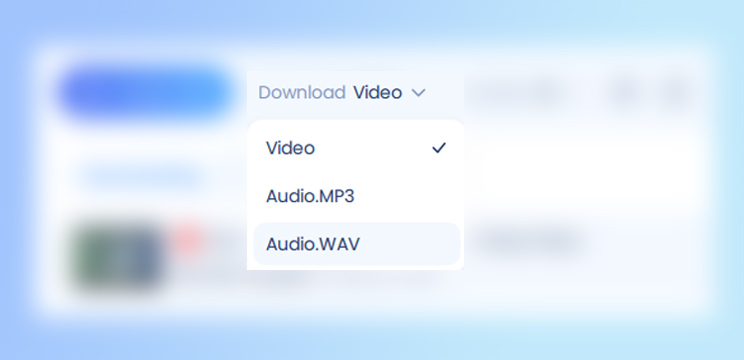
Step 2: Click the Quality droplist to select the proper resolution.

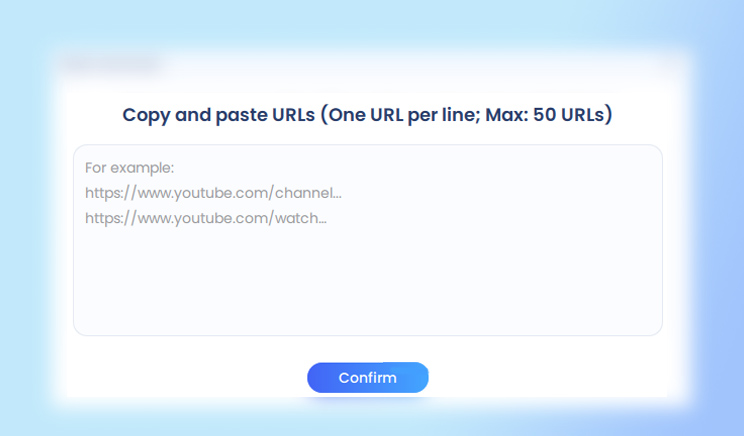
Step 3: Click Batch Download to enter the URL(s) of the videos that you'll convert to MP3 and start downloading.
Disclaimer: EaseUS Video Downloader is intended for personal and legal use only. You can use it to save your own videos, download copyright-free content, or convert videos for offline learning. Please do not use it to download copyrighted music or videos without permission.
Although a desktop program is the optimal choice for you, given its reliability and speed, it's not the most convenient solution to download YouTube videos to MP3 in bulk. Speaking of convenience, online video/audio downloaders outperform their competitors indeed. If you don't want to download and install a program on your computer to finish the video download, switch to an online YouTube to MP3 converter for help instead.
To convert multiple YouTube videos to MP3 online:
Step 1. Prepare the URLs you want to download.
Step 2. Go to the online YouTube to MP3 converter and paste the URLs in the address box as required.
Step 3. Click "Multi Convert."
Step 4. Click "Go to Download" under the video and follow the new page to download the audio file to your computer.
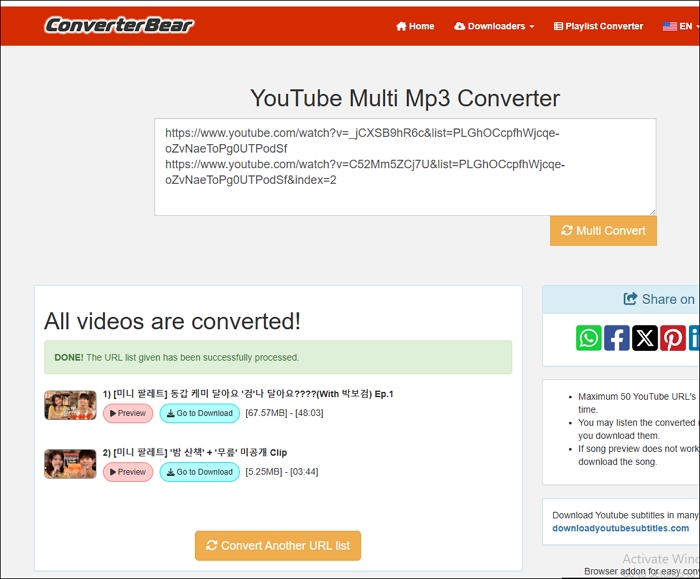
Here is our conclusion: As you may have noticed, there is no button for you to download audio files all at once. Instead, you need to save MP3 files one by one using this online YouTube to MP3 converter. Thus, although an online service spares you from downloading and installing a program, it will spend much more time saving audio files to your computer compared with EaseUS Video Downloader.
Sharing is caring!
With either of the tools above, you will be able to download YouTube Videos to MP3 in bulk. You can choose between converting first and then downloading, and downloading at the same time. Friendly reminder: You shouldn't download private videos that are under copyright protection, and can only use the audio files for non-commercial use.
Disclaimer: Downloading multiple YouTube videos as MP3 files should be done responsibly. Many videos are copyrighted, and saving or distributing them without permission can infringe on the rights of the creators. Always respect content ownership and use downloaded material only when it's legally and ethically appropriate.
To download multiple YouTube videos at once using EaseUS Video Downloader:
Once done, the videos will be saved in your chosen location.
Note: If you encounter issues with downloading audio-only files, such as being prompted to install FFmpeg, you may need to adjust the settings:

Copyright Disclaimer
This article is for educational and technical reference only. Do not use the described methods to download or share copyrighted content without permission.
Users are fully responsible for any legal consequences. Please:

Respect content creators' rights

Use official or authorized platforms

Avoid unauthorized downloads

Use official or authorized platforms
Columnist
Dawn Tang is a seasoned professional with a year-long record of crafting informative Backup & Recovery articles. Currently, she's channeling her expertise into the world of video editing software, embodying adaptability and a passion for mastering new digital domains.
Read Full Bio More Related Articles
Top 5 Firefox Extensions to Download YouTube Videos
Here is a collection of YouTube video downloader add-ons for Firefox that allow you to download YouTube videos directly via Firefox. With them, you will be able to choose the video format and video quality you like before the downloading process starts.
Dawn Tang. Oct 23, 2026
3 min read
How to Insert a YouTube Video into PowerPoint | Step-by-Step Guide
Easily enhance presentations by inserting a YouTube video into your PowerPoint slides. Follow our clear steps for smooth results.
Dawn Tang. Oct 23, 2026
3 min read
How to Download GIFs from Tenor on PC/Mobile
If you want to keep Tenor GIFs, read this article and learn how to easily download GIFs from Tenor. Enhance your digital content with engaging GIFs.
Dawn Tang. Oct 23, 2026
3 min read
Facebook Downloader for PC Windows 10/11/7/8 [2026 Update]
The Facebook video downloader for PC - EaseUS Video Downloader will help you download a Facebook video to your computer or mobile device at no cost. Get this Facebook video downloader for Windows and apply it to download Facebook videos with ease.
Dawn Tang. Oct 23, 2026
3 min read