-
![]()
Joey Albert
Joey has been involved with tech ever since she joined the EaseUS editor team in March 2011 and now she is a senior website editor. She is good at solving various issues, such as video downloading and recording.…Read full bio -
![]()
Alin
Alin is a sophisticated editor for EaseUS in tech blog writing. She is proficient in writing articles related to screen recording, voice changing, and PDF file editing. She also wrote blogs about data recovery, disk partitioning, data backup, etc.…Read full bio -
Jean has been working as a professional website editor for quite a long time. Her articles focus on topics of computer backup, data security tips, data recovery, and disk partitioning. Also, she writes many guides and tutorials on PC hardware & software troubleshooting. She keeps two lovely parrots and likes making vlogs of pets. With experience in video recording and video editing, she starts writing blogs on multimedia topics now.…Read full bio
-
![]()
Gorilla
Gorilla joined EaseUS in 2022. As a smartphone lover, she stays on top of Android unlocking skills and iOS troubleshooting tips. In addition, she also devotes herself to data recovery and transfer issues.…Read full bio -
![]()
Rel
Rel has always maintained a strong curiosity about the computer field and is committed to the research of the most efficient and practical computer problem solutions.…Read full bio -
![]()
Dawn Tang
Dawn Tang is a seasoned professional with a year-long record of crafting informative Backup & Recovery articles. Currently, she's channeling her expertise into the world of video editing software, embodying adaptability and a passion for mastering new digital domains.…Read full bio -
![]()
Sasha
Sasha is a girl who enjoys researching various electronic products and is dedicated to helping readers solve a wide range of technology-related issues. On EaseUS, she excels at providing readers with concise solutions in audio and video editing.…Read full bio
Page Table of Contents

Jane Zhou
Updated on Jan 21, 2026
0 Views |
0 min read
In the world of Gorilla Tag, your voice is just as important as your parkour skills. Whether you're roleplaying as a massive Silverback or trolling lobbies with the infamous K9 sounds, a reliable Gorilla Tag voice changer and soundboard can transform your VR experience.
Standing out in the Forest requires more than just high-speed branch running. You need an immersive edge. However, finding a tool that works seamlessly with Quest 2, Quest 3, and SteamVR without causing lag is no easy feat. This guide explores the top-rated apps to help you find the perfect "monke" voice and high-quality sound effects to dominate every lobby while keeping your performance smooth and lag-free.
Why You Need a Voice Changer & Soundboard for Gorilla Tag?
Your voice is just as important as your parkour skills. Here's how these Gorilla Tag voice changers elevate your "monke" life:
- Become the ultimate roleplayer: To truly "reject humanity", you need more than just skins. AI voice modulation lets you sound like a deep-grunting Silverback or a hyper chimp, making social interactions in the Forest 100% more immersive.
- Go viral with content creation: For YouTubers and TikTokers, a soundboard is a must-have. Triggering a perfectly timed meme sound (like a "Vine Boom") during an intense chase is the secret to getting hilarious reactions and viral clips.
- Master the ghost culture: Want to be the next PBBV or K9? A dedicated Windows soundboard lets you instantly play those eerie background tracks and ghost noises that haunt public lobbies, making you a legend in the GTag urban legend scene.
- Enhanced Privacy: Masking your natural voice adds an extra layer of privacy in public lobbies, letting you stay social and engaged without revealing your age or identity.
Best Gorilla Tag Voice Changer Recommendation
Choosing the right tool is the difference between a laggy, robotic mess and a hilarious, high-quality "monke" session. Based on our tests for latency, voice realism, and ease of use, here are the top picks:
1. EaseUS VoiceWave
For Gorilla Tag players who need performance and humor in one package, EaseUS VoiceWave is the undisputed No.1 choice. This AI-powered voice changer is designed with gamers in mind, offering a perfect balance between professional-grade modulation and user-friendly "one-click" setups.
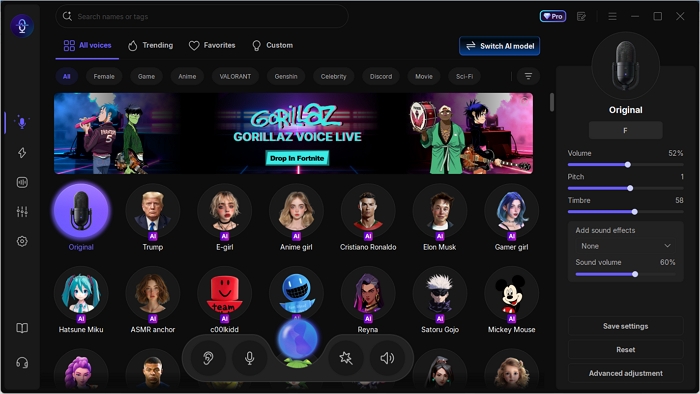
⭐Why It Wins for Gorilla Tag:
✅Ultra-Low Latency:
Nothing ruins a tag match faster than audio lag. VoiceWave ensures your monkey grunts and meme sounds trigger instantly, keeping you perfectly synced with your movements.
✅300+ Soundboard Presets:
It comes pre-loaded with an massive soundboard library. Whether you need the K9 background music, high-pitched primate screams, or the latest viral memes, it's all available at your fingertips.
✅AI "Monke" Voices:
Go beyond simple pitch shifting. VoiceWave's AI engine creates realistic, deep gorilla roars and energetic chimp voices that sound natural, not mechanical.
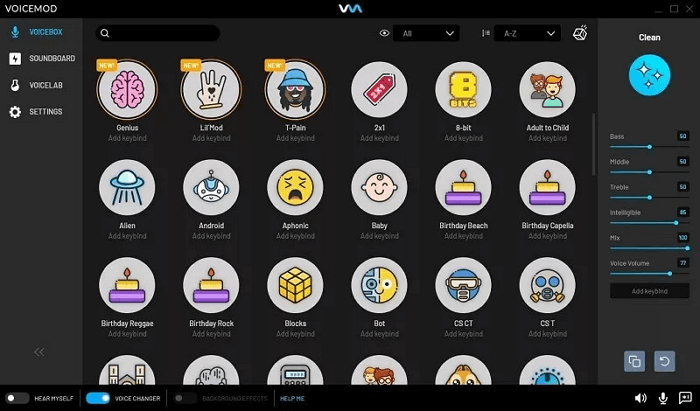
2. Voicemod
As one of the most recognized names in voice modulation, Voicemod remains a powerhouse for Gorilla Tag players who crave variety. Its massive ecosystem allows you to access millions of community-uploaded sounds through its "Tuna" library, meaning you can find almost any niche meme or ghost sound mentioned in GTag urban legends.
While it offers unparalleled customization, its sophisticated engine requires more system resources, which can be a hurdle for players on mid-range PCVR setups looking to maintain maximum frame rates.
Pros:
- Access to an endless supply of community-created "monke" memes and ghost noises.
- The "Voicelab" allows you to build a 100% unique sonic identity from scratch.
- Works flawlessly with Discord and streaming software for content creators.
Cons:
- High Resource Usage: Can cause FPS drops or audio crackling on lower-end PCs during intense VR movement.
- The free tier only offers a few rotating voices daily, which is frustrating for consistent roleplay.
Step Guide: How to Use EaseUS VoiceWave in Gorrila Tag
Setting up a voice changer for VR can be tricky because of the multiple audio layers. Follow these steps to ensure your "monke" voice and soundboard work perfectly without any lag.
Step 1. Launch EaseUS Voice Changer on your PC and select your preferred gorilla voice or set up your soundboard hotkeys.
Step 2. In VoiceWave, set the Microphone to your VR Headset Microphone, and choose your PC's headphones or VR headset speakers as the Headphone.
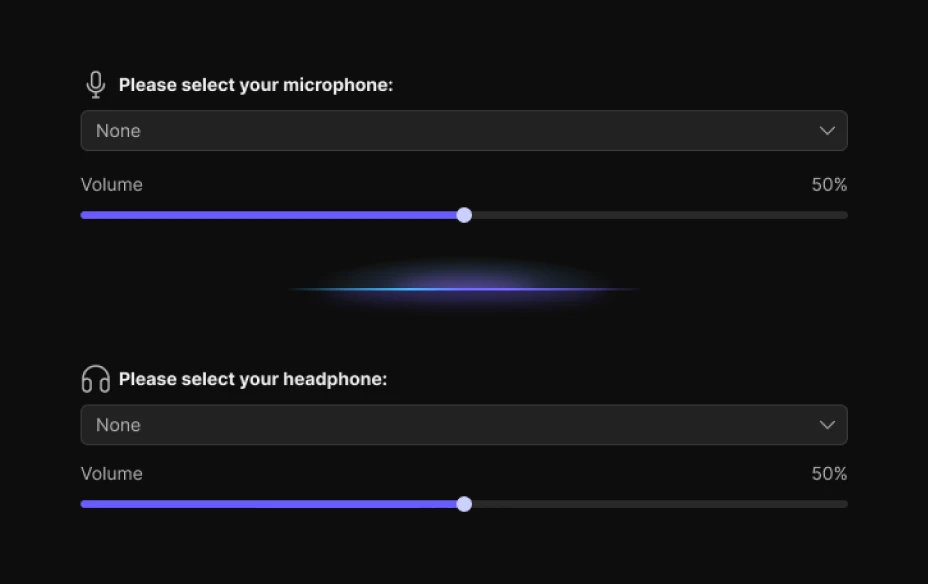
Step 3. Then, put on your headset, open the SteamVR menu. Click Settings > Audio, and choose the VoiceWave microphone as the Input Device.
Top Soundboard Effects Every Gorilla Tag Players Wants
A great voice is only half the battle. To truly dominate a lobby, you need a high-quality soundboard. Here are the must-have sound effects that every Gorilla Tag player is searching for:
1. K9 & Ghost Sounds
The "K9" sound is arguably the most iconic and searched-for audio clip in the community. Whether you're roleplaying as a mysterious entity or just trying to spook new players in a private lobby, having a dedicated ghost or scary sounds pack is essential.
- Important
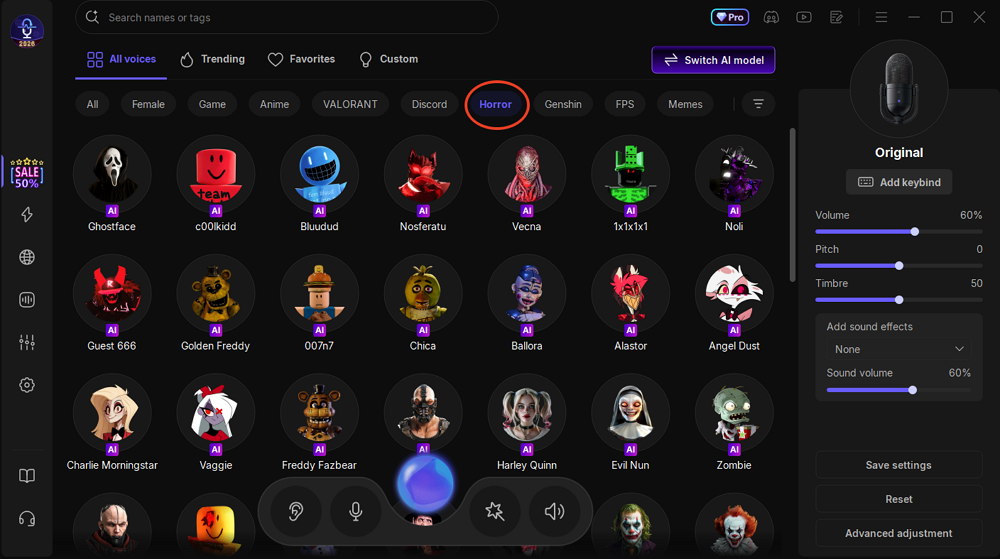
- EaseUS VoiceWave features a specialized "Horror" Soundboard Category. You can instantly trigger haunting drones, jump-scare screeches, and ghost-like echoes that are perfect for mimicking the game's famous urban legends.
2. Viral Meme Sounds for Trolling
Nothing beats the comedic timing of a "Vine Boom," "Emotional Damage," or the classic "Bruh" sound after a particularly impressive juke. These meme sounds are the bread and butter of GTag content creators on TikTok and YouTube. They turn every tag into a potential viral clip.
3. Primal Animal Noises
To achieve 100% immersion, you need more than just human speech. Authentic primate screams, deep gorilla roars, and chimp chatters help you fully "reject humanity."
Final Words
Whether you're aiming to become the next legendary ghost in the Forest or simply want to keep your friends laughing with perfectly timed meme sounds, having the right tools is essential. In 2026, the Gorilla Tag community is more creative than ever, and a high-performance Gorilla Tag voice changer is your ticket to standing out.
While there are many options available, EaseUS VoiceWave offers the perfect mix of low-latency performance, spooky horror soundboards, and an easy setup that won't lag your VR experience. Don't just play the game, become the character that everyone remembers in the lobby.
Gorilla Tag Voice Changer & Soundboard FAQs
1. Will I get banned for using a voice changer in Gorilla Tag?
Generally, no. Using a voice changer for roleplay or fun is not against Another Axels' Terms of Service. However, if you use it to bypass a mute, harass other players, or play extremely loud/toxic sounds through your soundboard, you may be reported and face a "Mic Ban" or a temporary game ban. Always use EaseUS VoiceWave responsibly to keep the community fun!
2. Why is my voice changer not working in Gorilla Tag?
Most issues are caused by incorrect audio routing. Follow this checklist:
Check Input Device: Ensure SteamVR or Oculus settings are set to "VoiceWave Microphone" and not your raw headset mic.
App Permissions: On Quest, go to App Settings > Gorilla Tag > Permissions and ensure Microphone Access is toggled ON.
Update Check: Sometimes a game update resets audio drivers. Restart both your PC and your VR headset after installing EaseUS VoiceWave.
3. Does Gorilla Tag have a voice changer?
No. Gorilla Tag doesn't provide a built-in voice changer, and the game uses your system's default microphone input for voice chat.